
Local service guide
Home Office Setup in Atlanta: Plan the Right Scope
For Home Office Setup in Atlanta, hire around a written task list: furniture assembly, monitor positioning, device connections and cable organization. Identify new outlets or installed network wiring before accepting a quote. Georgia defines electrical and low-voltage license categories, including local-area-network distribution wiring, so ask who will handle those parts and what credentials they hold. [1]
Define the work before comparing quotes
List each item you want assembled, connected or mounted. Include desk and chair models, monitor sizes, the computer and dock, printer connections and any equipment you plan to reuse. For a standing desk, ask the installer to check the full movement range with the equipment and cables in place.
Describe the finished result: a usable desk, working displays, a tested connection and cables that stay clear of your feet. Ask whether the price includes mounting hardware, taking items out of boxes, packaging removal and a return visit for missing parts. Request separate amounts for equipment, assembly, mounting, device configuration and wiring so you can compare offers.
Choose the desk position before drilling
Try the proposed desk position with your chair and screen before approving wall mounts. Check window reflections, the camera background, door clearance and access to storage. Leave room to reach plugs and adjust the monitor without moving the desk. Mark the agreed position for the installer.
For a monitor arm, share the monitor model and the desk’s edge and underside details. Ask the installer to confirm compatibility against the manufacturers’ instructions. For a wall mount, request a proposed fixing method after the installer inspects the wall. Agree on visible cable routes and responsibility for patching holes before work starts.
Separate device setup from installed wiring
Ask the provider to distinguish connecting your existing devices from installing wiring. Georgia’s licensing rules define several low-voltage contractor classes and include local-area-network distribution wiring among general low-voltage systems. If you want Ethernet runs through walls or new network outlets, ask which license category covers the proposed work and who will perform it. [1]
For new electrical outlets or circuit changes, request an electrical contractor’s license details and a separate description of the work. Georgia distinguishes restricted Class I and unrestricted Class II electrical contractor licenses. Ask the contractor to identify applicable permit and inspection requirements before scheduling and spell out who will arrange them. [1]
Test connectivity at the proposed workstation
The Georgia Broadband Program describes a location-level map that combines home and business locations with provider service availability. Use that statewide resource to investigate your address, then ask the provider to confirm the service, installation appointment and equipment you can order. [3]
Before buying extra networking equipment, test your usual work tasks at the desk location. Try a video call, file upload and any employer-required connection. If you want help diagnosing a problem, ask the technician to compare a wired connection at the router with the connection at the desk. Agree on what they will test before leaving.
Budget for setup and ongoing use
Request a written setup quote based on your equipment and room. Ask about minimum visit charges, extra trips, wall repairs and changes you approve during the appointment. Set a spending limit for unplanned work and require approval before the provider exceeds it.
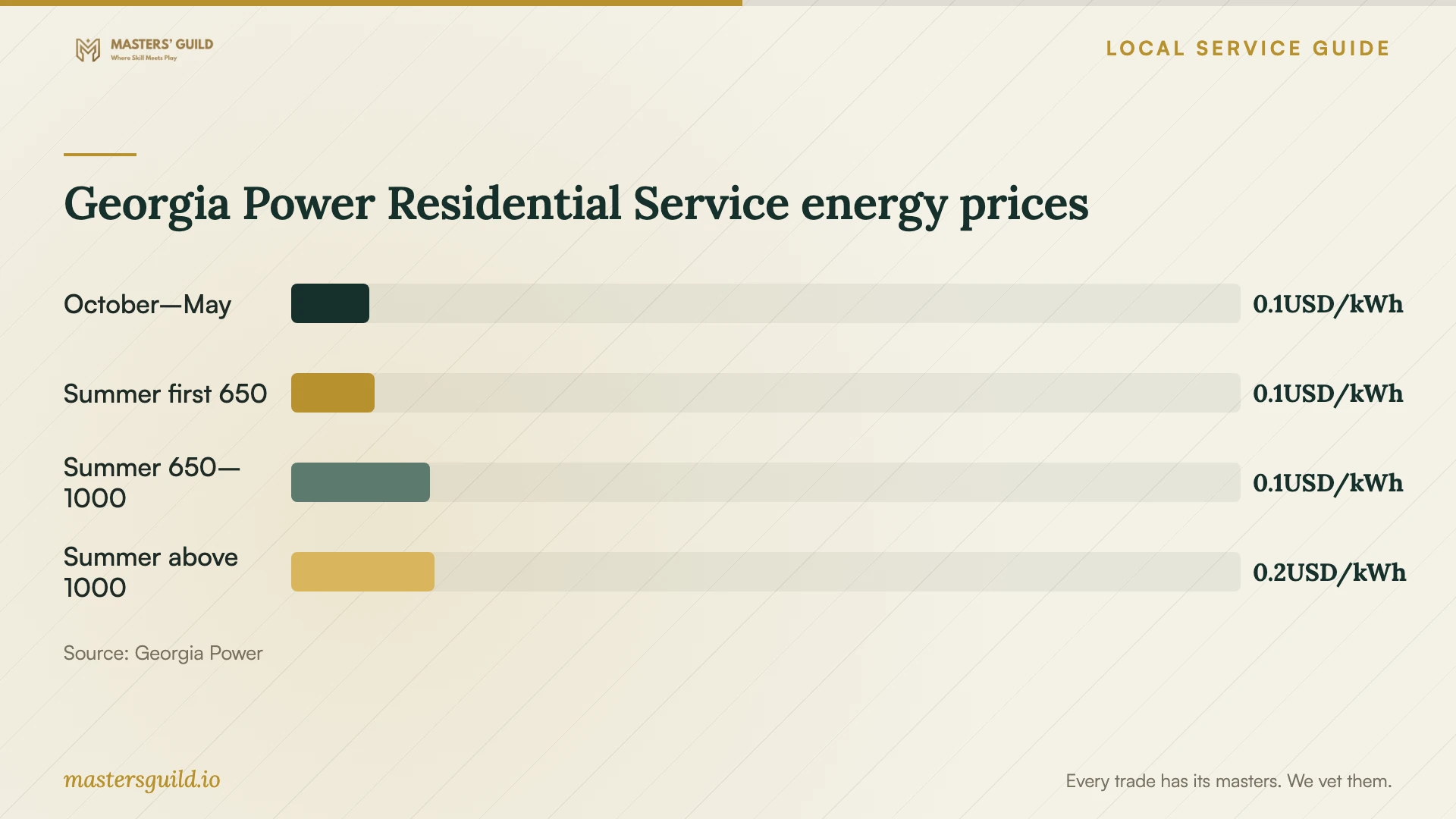
If Georgia Power supplies your home, identify your rate plan before using the chart to estimate energy charges. Residential Service uses seasonal pricing and summer consumption tiers. Smart Usage adds a charge based on the month’s highest usage hour; Georgia Power says it cannot predict whether an individual customer will save on that plan. [2] [4]
Before the installer leaves, ask them to demonstrate the desk controls, displays, dock and network connection with your own equipment. Keep the furniture instructions and record any settings you may need to restore. If you use an employer-managed computer, arrange access through your employer’s support process.
Georgia Power Residential Service energy prices
Local details that affect your job
Georgia’s low-voltage categories affect cabling hires
For an Atlanta home office with installed Ethernet wiring, ask about low-voltage credentials before booking a furniture installer. Georgia names local-area-network distribution wiring in its general low-voltage systems definition and distinguishes restricted license classes from an unrestricted class. Have the contractor explain how their credentials match your proposed installation. [1]
Georgia Power customers should check household usage
On the optional Smart Usage plan, Georgia Power applies a demand charge to the highest usage hour each month. Its summer on-peak window runs from 2 p.m. to 7 p.m. on weekdays during June through September, excluding holidays. Review office use alongside cooling and major appliances before choosing this plan; the utility warns that a customer can face a higher bill. [2]
Match the provider to the work
| Your planned work | Provider to consider | Question before booking |
|---|---|---|
| Desk and chair assembly | Furniture assembly provider | Does the quote cover these exact models, adjustments and cleanup? |
| Displays, dock and printer connections | Device setup technician | Will you test my equipment and explain the finished connections? |
| Installed Ethernet distribution wiring | Contractor with credentials matching Georgia’s low-voltage categories | Which license class covers this installation, and who performs the work? |
| New outlets or circuit changes | Electrical contractor with an appropriate Georgia license | What electrical work, permit arrangements and inspections does your quote include? |
Your hiring checklist
- Photograph the room, desk location, outlets and proposed cable route.
- Gather furniture, monitor, dock and computer model numbers.
- Separate assembly and device setup from requested wiring work.
- Confirm mounting compatibility and the proposed fixing method.
- Test your work connection at the proposed desk location.
- Agree on materials, cleanup, extra-trip charges and change approval.
- Arrange building access and any permission needed for drilling.
- Test the completed setup with your own equipment before the installer leaves.
Frequently Asked Questions
How much should I budget for the setup?
Get an itemized quote for your furniture, equipment and installation needs. Compare the same tasks across offers, including hardware, cleanup, extra trips and any wiring. Keep equipment purchases separate from labor so you can adjust the plan and track the total.
Can the same person assemble my desk and install Ethernet?
Ask about both capabilities before booking. Georgia includes local-area-network distribution wiring in its low-voltage rules. Request the credentials that match installed cabling work and identify the person responsible for it, even if one business coordinates the whole appointment. [1]
Does the state broadband map confirm my desk will have a good connection?
The Georgia map concerns service availability at home and business locations. Use it to investigate address-level options. Confirm service with the provider and test the connection at your intended workstation before deciding whether to add equipment or installed cabling. [3]
Should I switch electricity plans because I work from home?
Review your household usage first. Georgia Power’s Residential Service plan uses seasonal energy pricing, while Smart Usage includes a demand charge and summer peak pricing. The utility says it cannot predict individual savings on Smart Usage. Compare plans using your own usage history. [2] [4]
Sources and scope
This guide combines the sources below with practical planning guidance. Figures apply to the stated geography and period; request a written quote for your property.