
Local service guide
Computer Virus Removal in Atlanta, GA
Arrange Computer Virus Removal in Atlanta by choosing a technician through contact details you verify and requesting a written quote, completion estimate and data-preservation plan. For encrypted business files or suspected spread across devices, disconnect affected equipment from the network and contact your IT provider or an incident-response specialist before approving a reset. CISA recommends isolating affected systems and preserving evidence during ransomware response. [3]
Define the job before booking
Describe the symptoms without choosing a diagnosis. Record the alert wording, affected applications, first occurrence and any remote access you allowed. Tell the technician whether the computer holds payroll, customer records or shared business files. Ask how they will assess whether the problem involves one device, accounts or the wider network.
For suspected ransomware, disconnect affected equipment from Ethernet and Wi-Fi. CISA recommends powering down devices only when you cannot disconnect them from the network, because shutdown loses potential evidence in memory. Use a separate phone to contact your IT provider, following CISA's advice to use communications outside the affected systems. [3]
Ask the provider to separate assessment, cleanup, investigation, file recovery and operating-system rebuilding in the proposal. Require your approval before they expand the work. Identify the business functions you need restored first, such as appointment records or invoicing, and discuss those priorities before the appointment.
Choose how the technician will access the computer
Discuss remote service with a provider you contacted through verified business details. Ask which access tool they will use, whether you can observe the session and how they will end access afterward. Georgia's Attorney General warns that unsolicited tech-support callers may charge for fake repairs or install malware after obtaining computer access. [2]
For drop-off service, request a receipt identifying the device and accessories. Agree on who may access files, whether the provider will copy data, where they will keep copies and when they will delete them. Bring the charger and a list of essential applications. Keep account passwords out of the booking description.
For an on-site appointment, provide building access instructions and identify the devices you want assessed. Ask about travel charges and diagnostic fees before booking. For a suspected network incident, confirm whether the provider handles business incident response and who will coordinate with your existing IT contact.
Get a quote with approval limits
Request a device-specific written quote and completion estimate after assessment. Ask the technician to distinguish the diagnostic appointment from file recovery, rebuilding and application setup. Confirm whether you owe a diagnostic fee if you decline further work and whether the estimate includes follow-up support.
Compare proposals with the same preservation requirements. Specify the files and applications you need retained, require approval before a reset or drive replacement, and set a spending limit. Ask the technician to contact you if they recommend additional investigation or cannot complete the agreed scope.
Georgia's Department of Revenue says itemized repair labor is exempt from sales tax. It also says service providers selling tangible personal property must collect applicable sales tax. Request separate lines for labor, hardware and other purchases, with an explanation of any tax before you approve the bill. [1]
Agree on the handover and return to work
Request a written summary of what the technician found, what they removed or rebuilt, which files they restored and which issues remain unresolved. Ask them to demonstrate your essential applications. Confirm whether they left remote-access software installed and agree on its removal or continued use.
For ransomware recovery, CISA recommends restoring data from offline, encrypted backups while avoiding reinfection of clean systems. It also recommends addressing vulnerabilities and resetting affected passwords after cleaning and rebuilding the environment. Ask your incident responder to explain the checks required before reconnecting equipment. [3]
CISA recommends software updates, multifactor authentication and tested backups for organizations. Agree with your IT provider on who will maintain these protections after the repair. Record that responsibility and arrange a follow-up appointment if the cleanup leaves unresolved work. [3]
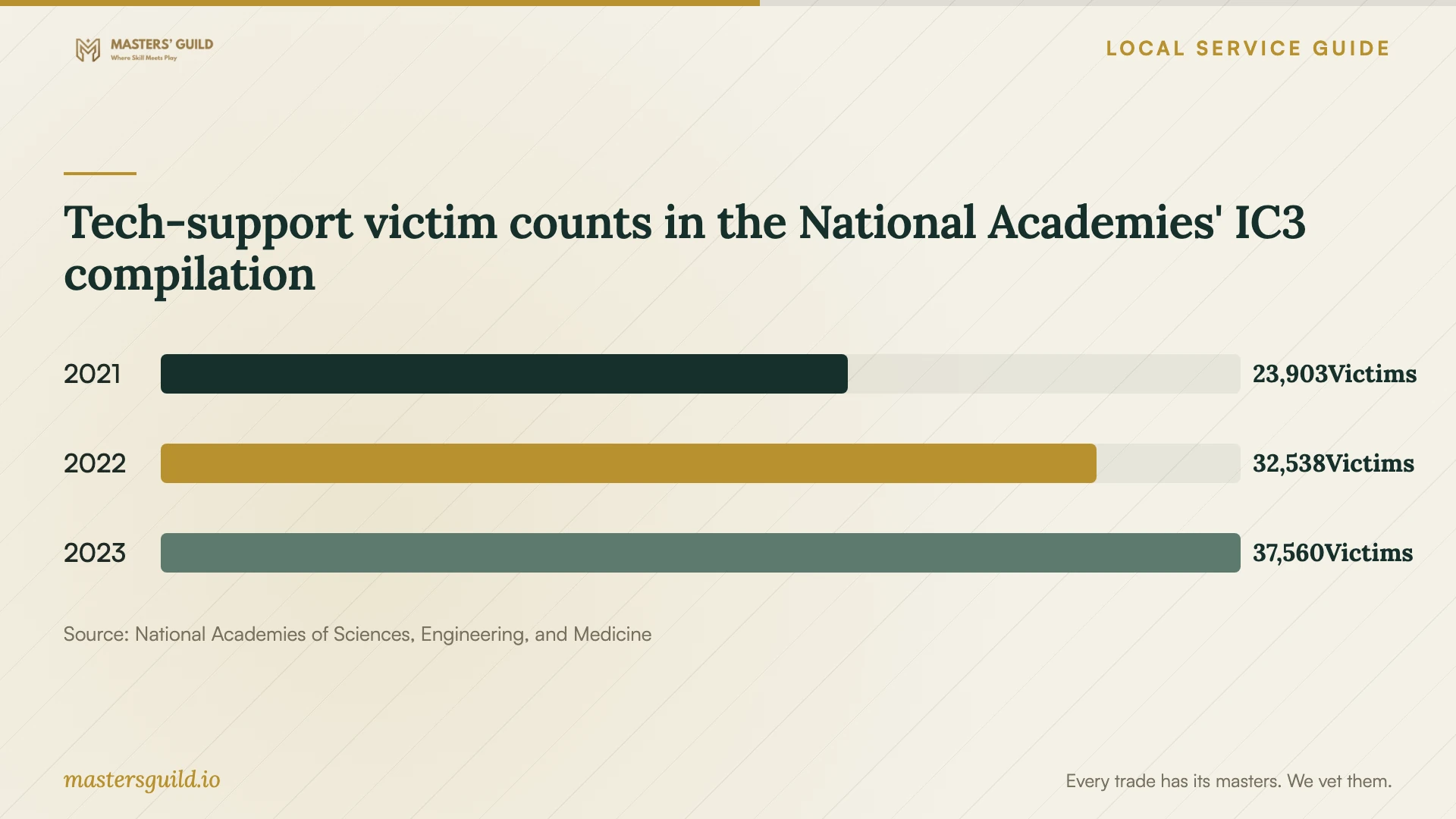
Tech-support victim counts in the National Academies' IC3 compilation
Local details that affect your job
Georgia invoice treatment changes how to request the quote
For an Atlanta repair, ask the provider to identify repair labor apart from hardware and other purchases on the estimate and invoice. Georgia's Department of Revenue exempts itemized repair labor from sales tax and requires applicable tax on sales of tangible personal property. Check the invoice structure before authorizing a combined cleanup and hardware purchase. [1]
Georgia complaint contacts for suspicious repair charges
If an unsolicited caller or virus pop-up prompted the booking, pause before granting access. Georgia's Consumer Protection Division advises against granting control to unsolicited callers or calling pop-up numbers. For a complaint about a suspicious repair offer or charge, its published consumer complaint contacts are (404) 651-8600 and (800) 869-1123, toll-free in Georgia. Keep the invoice, messages and a record of the access you granted. [2]
Choose the next step for your situation
| Situation | Next step | Ask before approving work |
|---|---|---|
| An unsolicited caller or pop-up offers a repair | Decline access and contact a provider you choose | Verify the business through contact details outside the alert |
| One computer has symptoms and essential files | Arrange assessment with a written preservation scope | Identify files and applications to retain before any reset |
| Files are encrypted or several devices appear affected | Isolate affected equipment and involve incident-response help | Discuss evidence preservation, affected systems and recovery priorities |
| The quote includes repair labor and hardware | Request separate charges and an explanation of tax | Confirm that the invoice itemizes repair labor |
| The provider proposes restoring a business backup | Agree on clean restoration and reconnection checks | Ask how the responder will avoid reinfecting restored systems |
Your hiring checklist
- Record symptoms, alert wording and when you first noticed the problem.
- Identify essential business files, applications and devices for assessment.
- Choose a provider using contact details you verify.
- Agree on file access, copy retention and approval before destructive changes.
- Request an itemized scope, diagnostic fee and spending limit.
- Confirm appointment access, travel charges and a completion estimate.
- Request a repair summary and test essential applications at handover.
Frequently Asked Questions
How much should I budget for cleanup?
Request a written quote after assessment that separates diagnostics, cleanup, data preservation, reinstallation and follow-up. Set an approval limit so the technician contacts you before adding work. Ask for a completion estimate that accounts for restoring your essential applications.
Should I approve a computer reset?
Agree on the files and applications you need retained before approving a reset. For suspected ransomware, involve an incident responder before destructive changes. CISA includes evidence collection and preservation in its response guidance. [3]
Does Georgia charge sales tax on repair labor?
Georgia's Department of Revenue says itemized repair labor is exempt from sales tax. Request separate invoice lines and an explanation of tax on hardware or other purchases accompanying the repair. [1]
Can I trust a caller who says Microsoft found a virus?
Georgia's Consumer Protection Division says Microsoft does not make unsolicited consumer calls about viruses, security issues or software fixes. Decline the request for access and contact support through business details you verify. [2]
Sources and scope
This guide combines the sources below with practical planning guidance. Figures apply to the stated geography and period; request a written quote for your property.