
Local service guide
software installation in Arlington, TX: Hiring Guide
For software installation in Arlington, TX, ask a technician to quote the named applications, your computer’s operating system, activation, and a working demonstration before you book. Agree on backup and account access before the appointment. If your application already works and you need help using Word or Excel, consider Arlington Public Library’s introductory classes, which require registration. [1]
Describe the installation you want
Send the technician the application name and version, computer model, operating system, and any error message. Explain whether you want a first installation, a reinstall, or a move from another computer. Request a compatibility check before you purchase software or approve changes.
Separate installation from related work in your request. Specify whether you need existing files transferred, email accounts connected, printer functions tested, or an old application removed. Ask the technician to identify anything outside the quote and get your approval before adding work.
For a useful acceptance test, describe your next real task. You might ask to open an existing spreadsheet, save a new document, or send a test email. Include a restart and another application launch in the handover so you can confirm that the setup still works after the appointment.
Choose remote help, a visit, or a drop-off
Ask about remote service if the computer starts, you can connect to the internet, and you can stay present to approve access. Before booking, ask which remote access tool the technician plans to use, how you will end the session, and whether the technician will remove ongoing access afterward.
Consider a home visit when you want the technician to test the software with your printer or other equipment. For a drop-off, request an intake record listing the device and accessories, the agreed work, the spending limit, and the collection arrangements. Agree on a contact method for approving extra work.
Discuss a fallback before the work begins. Ask what the technician will do if activation fails, your account cannot sign in, or the installation requires further troubleshooting. Get the diagnostic charge and cancellation terms in writing, including what you owe if the requested installation cannot proceed.
Protect files and keep control of accounts
Make a backup of the files you want to keep and check that you can open a sample from that backup. Tell the technician which folders matter. Require your approval before erasing a drive, resetting the computer, deleting an account, or removing an application that contains files you still need.
Keep software purchases and subscriptions under an account you control. Enter your own passwords and verification codes during the appointment where possible. Ask the technician to explain any administrator access they need and agree on how they will handle it. Keep recovery information out of the job description.
At handover, ask for a record of the installed applications, activation status, renewal charges, and changes to startup or security settings. Review any remote access software with the technician. Request a clear follow-up policy covering installation errors, including its duration and any charge for another visit.
Compare the full quote and check tax
Request a total that separates labor, software, recurring subscriptions, travel, and optional file transfer or backup work. For an hourly quote, ask for a spending cap and the point at which the technician must contact you. Compare offers using the same device list and completion test.
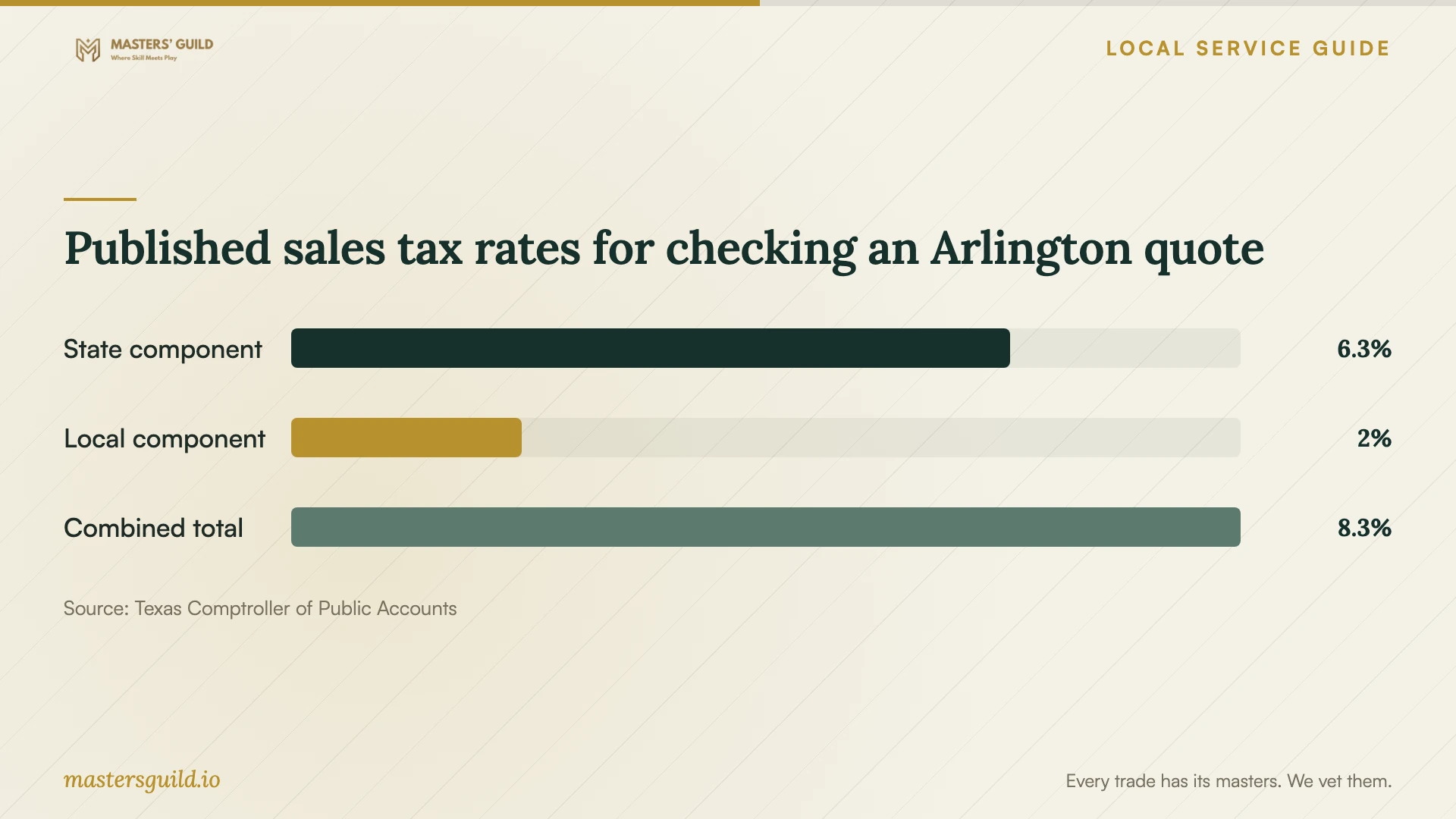
The Texas Comptroller lists Arlington’s local sales and use tax rate as 2% and its total rate as 8.25%. Texas’s state rate is 6.25% for most goods and taxable services. These rates do not establish whether a particular installation charge is taxable. Ask the seller to identify the taxable items and the rate used on your invoice. [3] [4]
Ask for extra clarity if the quote bundles installation with cloud storage or ongoing software access. The Comptroller includes data storage and software-as-a-service providers in its data-processing guidance and states that 20% of data-processing charges are exempt from tax. Do not apply that exemption to the whole installation bill without confirming how the seller classified each charge. [5]
Published sales tax rates for checking an Arlington quote
Local details that affect your job
Use library training when the application already works
Arlington Public Library offers introductory Word and Excel classes for beginners and requires registration. Its Learning Express software tutorials require a library card and a free account. If your main problem is creating documents or using spreadsheets, check these options before paying for an installation appointment. For setup work, arrange a technician: the library’s technology FAQ says staff cannot help configure your computer. [1] [2]
Plan temporary computer access around library limits
If you need access while a technician works on your computer, Arlington Public Library offers free public computer use with a valid library card. Sessions last 45 minutes at Woodland West and one hour at other locations; computers operate on a first-come, first-served basis. Plan short tasks around those limits. The library also offers Chromebook loans to adult patrons with library cards in good standing, subject to availability. Confirm your card’s standing, laptop availability, and whether a Chromebook suits your task before relying on a loan. [2]
Choose help that matches your task
| Your situation | Next step | Confirm before booking |
|---|---|---|
| The application opens, but you need Word or Excel instruction | Check Arlington Public Library’s introductory classes | Registration and the class topic |
| The computer starts and you want to supervise from home | Ask a technician about remote installation | Access tool, session removal, and completion test |
| You need software tested with your home equipment | Request a home visit with equipment testing in scope | Travel charge and which devices the quote covers |
| The job includes a reset or file transfer | Request a backup and data-handling plan | Files to preserve and approval before deletion |
| You need temporary computer access | Check library public computer access or Chromebook availability | A valid library card for free public computer use; adult patron status and a library card in good standing for Chromebook loans, subject to availability; session limits and task suitability |
Your hiring checklist
- List the computer, operating system, applications, and exact tasks you want completed.
- Confirm who will purchase the software and who will control the subscription account.
- Back up important files and open sample files from the backup.
- Agree on remote access or device intake arrangements and a spending cap.
- Request separate labor, purchases, subscriptions, optional work, and tax line items.
- Require approval before resets, deletion, or additional troubleshooting.
- Test activation and your normal task after a restart, then review follow-up terms.
Frequently Asked Questions
How much should I budget for installation?
Request a written quote for your device and application list. Compare labor, software purchases, recurring charges, optional backup work, and tax as separate items. Set an approval limit for troubleshooting so you can decide whether to continue if the technician encounters a problem.
Can library staff install software on my laptop?
Arlington Public Library states that staff cannot provide computer configuration assistance. Use its Word and Excel classes or software tutorials for learning, and arrange a technician for installation work. Classes require registration; Learning Express tutorials require a library card and free account. [1] [2]
Should I give the technician my account password?
Arrange to enter passwords and verification codes yourself where possible. Ask what access the technician needs before booking. If you must leave the device, agree on an access method and review account and remote access settings when you collect it.
Does Arlington’s 8.25% rate apply to the whole bill?
The Comptroller lists 8.25% as Arlington’s total sales and use tax rate, but the rate table does not classify your installation work. Ask the seller which invoice items are taxable and which rate applies. Data-processing services have separate guidance, including a 20% exemption from the charge. [3] [5]
Sources and scope
This guide combines the sources below with practical planning guidance. Figures apply to the stated geography and period; request a written quote for your property.