
Local service guide
Network Setup and Support in Arlington, TX
For Network Setup and Support in Arlington, TX, ask the installer to diagnose your connection before quoting replacement equipment. Describe the rooms and devices you need connected, then request separate prices for configuration, hardware and cable installation. If the work includes wall openings or added electrical power, ask who will confirm local requirements before you approve it.
Describe the problem before choosing equipment
Prepare a short description of what fails, where it fails and which devices you use. For example, tell the technician that your laptop disconnects in the upstairs office while the television downstairs stays connected. Note whether the problem affects one device or several, and record any error messages. Ask the technician to compare those observations before recommending equipment.
Photograph the labels on your modem, router and any existing network equipment. Sketch the rooms where you want service, including a home office, detached workspace or outdoor area if those matter to you. Ask the provider to explain which parts of the proposed job address your symptoms and which parts add coverage or capacity you have requested.
Separate configuration, cabling and electrical work
Ask for a written scope that separates router configuration, equipment installation and cable routes. For each proposed cable, identify the starting point, destination, wall plate location and access route. Agree on who will patch and finish any openings. If you rent, obtain the owner's permission before authorizing drilling or changes to the property.
TDLR lists communications circuits and optical-fiber cables among work exempt from state electrician licensing. It also warns that municipal or regional regulations may override exemptions. Use that distinction when interviewing a cabling provider: ask them to identify the rules that apply to the proposed installation instead of treating the state exemption as permission for the entire project. [1]
For a proposal that includes electrical work, Arlington's permit portal lists electrical-work applications and Planning and Development Services at 101 W. Abram St., second floor, with telephone number 817-459-6502. Contact the department with the proposed scope and ask what approvals apply. The portal does not establish a blanket permit rule for Ethernet installation. [3]
Compare quotes by what you will receive
Request itemized labor, equipment, cable work and any follow-up charges. Ask whether you will own the equipment and administrator accounts, and whether the provider includes setup documentation. Have each bidder quote the same rooms and devices so you can compare the work without guessing what a package includes.
Set acceptance checks before the visit. Ask the technician to demonstrate your chosen tasks in the rooms that matter: join a work call, connect a printer or use a device at the far end of the house. For cable installation, request labeled endpoints and a test record. Agree on how the provider will handle a failed check and whether a return visit carries a charge.
Arrange temporary internet access
Arlington Public Library offers free Wi-Fi at all library locations under the network name LIB_ONLINE, without a password. The library says connection speed varies by location and the number of users. Treat it as an option for temporary access during a service visit; check the location's opening hours before arranging your day around it. [2]
The library also identifies an East Arlington public Wi-Fi service area between East Abram Street, Sherry Street, East Park Row Drive and New York Avenue. If you plan to use that service, confirm that your intended location falls within those boundaries and test access before your home appointment. [2]
Library staff cannot configure your computer, and the library does not provide privacy protection through its Wi-Fi. Arrange technical support with your hired provider. For temporary access, choose tasks you are comfortable completing on a public network and follow your employer's security requirements if you use a work device. [2]
Keep control of the finished setup
Ask the installer to let you enter passwords yourself and keep account recovery details under your control. Request a handover record with equipment models, cable labels, administrator access instructions and the agreed support contact. Store credentials in your own password manager rather than in the general job description.
Before the technician leaves, complete the agreed checks and ask them to explain any remaining limitations. Record unresolved items and the next action in writing. If the provider proposes ongoing support, ask about its scope, recurring charges, remote access permissions and cancellation terms before signing.
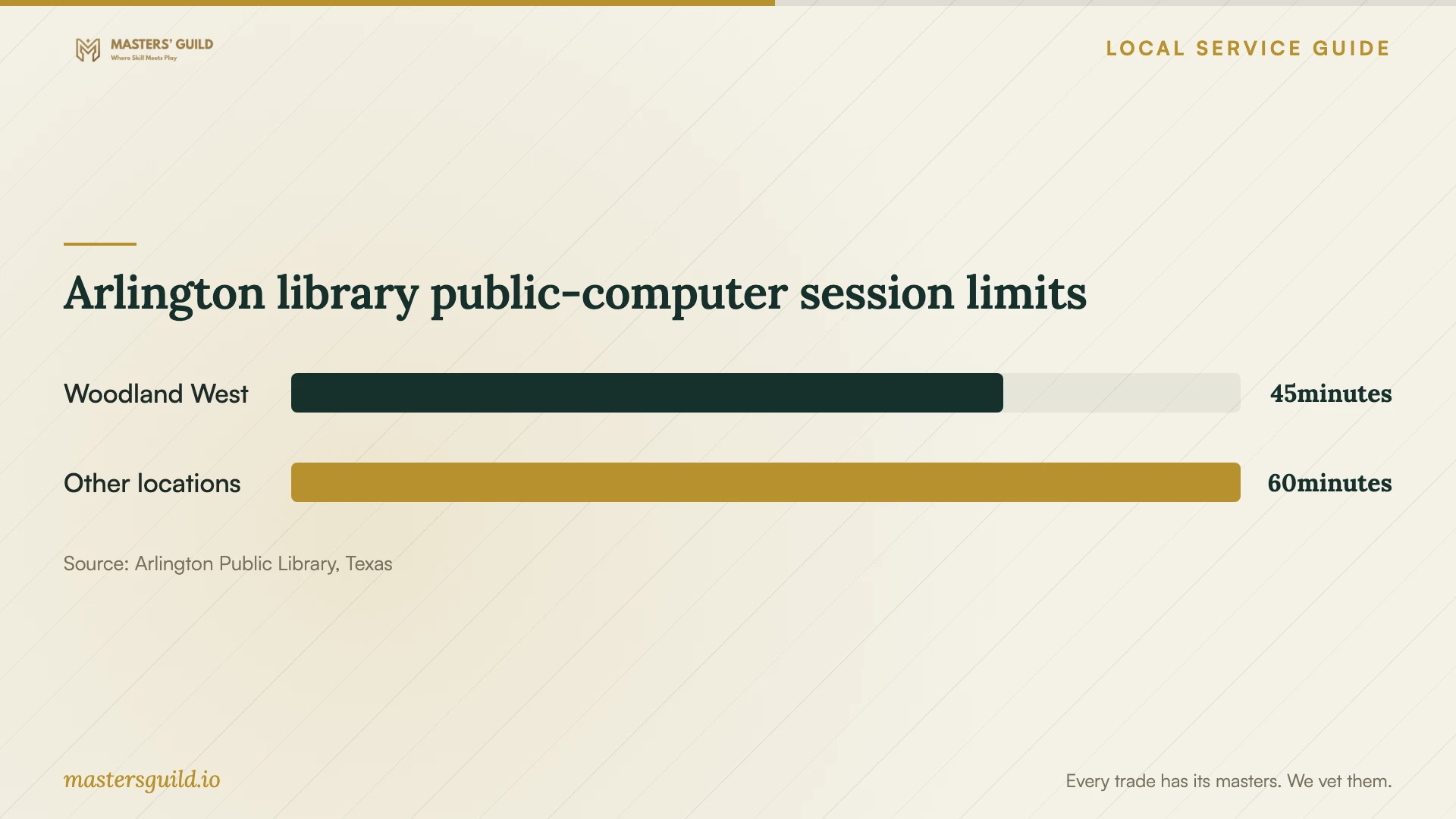
Arlington library public-computer session limits
Local details that affect your job
Confirm the electrical portion with Arlington
Arlington's Planning and Development Services handles online electrical-work permit applications. Call 817-459-6502 with the proposed electrical scope before approving a quote that adds power infrastructure. Ask the installer to name the person responsible for applications and inspections if the city requires them. [3]
Check the East Arlington Wi-Fi boundaries
The city's neighborhood Wi-Fi program serves the area bounded by East Abram Street to the north, Sherry Street to the east, East Park Row Drive to the south and New York Avenue to the west. Check those boundaries before relying on the program during home-network downtime. [2]
Use the library for access, arrange setup help elsewhere
Arlington Public Library provides free Wi-Fi at its locations, but staff cannot configure customers' computers. Choose it for temporary internet access and arrange troubleshooting with your network provider. [2]
Choose the next step for your network job
| Your situation | What to request | Before approving |
|---|---|---|
| Connection problems with existing equipment | A diagnostic visit and written findings | Ask which observations support any replacement recommendation. |
| Coverage needed in specific rooms | A room-by-room proposal and acceptance checks | Name the devices and tasks you want demonstrated. |
| New in-wall cable routes | A route plan, endpoint labels and test records | Confirm local requirements; Texas's state licensing exemption has a municipal or regional caveat. |
| Installation includes electrical work | A separate electrical scope | Use Arlington's electrical-work permitting route to confirm approvals and responsibility. |
| Temporary access needed during the visit | A plan using a library location or the defined East Arlington Wi-Fi area | Library staff cannot configure your computer; arrange technical help with your provider. |
Your hiring checklist
- Write down affected devices, rooms, symptoms and error messages.
- Photograph equipment labels and sketch desired connection points.
- Request separate prices for configuration, equipment and cabling.
- Agree on cable routes, wall repairs and any owner permissions.
- Ask who will check local requirements for the proposed scope.
- Arrange temporary internet access before the appointment.
- Define room-by-room acceptance checks and request cable test records.
- Collect account access, documentation and support terms at handover.
Frequently Asked Questions
Should I buy a mesh system before booking support?
Ask for a diagnosis first. Give the technician your equipment details and the rooms where you need coverage. Request an explanation of the proposed equipment and agree on acceptance checks before purchasing.
Does Ethernet cabling require a Texas electrician license?
TDLR exempts communications circuits and optical-fiber cables from state electrician licensing, while warning that municipal or regional regulations may override exemptions. Ask the installer to confirm the requirements for your exact scope, including any electrical work. [1]
Can the Arlington library help set up my computer?
The library says staff cannot configure your computer or provide technical assistance. It offers free Wi-Fi for temporary access, so arrange setup help with your hired technician. [2]
What should I receive after the installation?
Request equipment details, administrator access instructions, labeled cable endpoints, test records and support terms. Complete your agreed room-by-room checks with the technician and document any unfinished work before closing the job.
Sources and scope
This guide combines the sources below with practical planning guidance. Figures apply to the stated geography and period; request a written quote for your property.