
Local service guide
Computer Virus Removal in Arlington, TX
For Computer Virus Removal in Arlington, choose a technician and approve a written scope covering diagnosis, cleanup, file preservation and permission before any reset or reinstall. Request the total including tax and a completion estimate. If a pop-up or unsolicited caller prompted the repair, refuse their remote access and verify a repair business through separate contact details. The Texas Attorney General warns that scammers use these approaches to access personal information and install malware. [1]
Describe the warning before approving repair
Describe what you saw without assuming a virus caused it. Record the warning text, the application you were using and whether the computer still starts. Tell the technician about recent downloads and any repair steps you have attempted. Request diagnosis before approving a cleanup package.
The Texas Attorney General describes scams that begin with a call or screen warning claiming to come from Microsoft or an antivirus company. Scammers may ask you to download software or enter a code that grants access. Avoid the warning's phone number. Verify the repair business's name, address and phone number through a separate source before contacting it. [1]
If you allowed access, tell your chosen technician what the caller asked you to do and which software you installed. Request a review of that access in the repair scope. If you shared financial information or sent money, contact your financial institution through a number you trust. Keep messages and payment records.
Choose remote help, drop-off or a home visit
Ask providers which service arrangements they offer and whether they can diagnose your symptoms that way. For remote work, agree on the tool, session time, access permissions and how the technician will end access. Choose the provider yourself before authorizing a connection.
For drop-off service, confirm the intake appointment and ask whether to bring the charger. Request a receipt identifying the device and accessories. For a home visit, provide your address and ask about travel charges, minimum charges and the arrival window. State your deadline and request a diagnostic update before agreeing on a return date.
Set limits for files, credentials and investigation
List essential folders, such as family photos, tax documents and schoolwork. Tell the technician whether you have a backup and when you last checked it. Ask how they will preserve files, where they will store copies and when they will delete those copies after handover.
Require approval for operating system reinstallation, file deletion, replacement parts and paid security software. Ask the technician to explain how each proposed step affects your applications and files. Keep passwords out of the job description; agree on a way to provide only the access needed for repair.
If you want an investigation of suspected theft or fraud, explain that before authorizing cleanup. Ask whether the provider performs that work or recommends a specialist, and how they would preserve records before changing the computer. Texas includes certain computer forensic services and support that reviews data to investigate potential criminal or civil matters within taxable security services. [2]
Compare itemized quotes and tax
Compare written quotes for the same scope. Ask providers to separate diagnosis, cleanup, operating system repair, file recovery or backup, travel, replacement parts and subscriptions. Confirm what you owe if you decline repair after diagnosis. Set a spending limit and require approval for additional work.
Texas lists personal property repair and data processing among taxable service categories. The Comptroller includes offsite electronic file backup as data processing and exempts 20 percent of data processing charges from tax. Ask the provider how they classify each charge and calculate tax on the package. [2]
Request a price and turnaround estimate after describing your device, symptoms and file needs. Ask whether the provider quotes a fixed charge or bills by time, and what happens if diagnosis reveals work outside the original scope. Compare the total payable amount alongside the promised work.
Review the result or arrange replacement
Before accepting the computer, ask the technician to explain their findings and changes. Have them demonstrate startup, open the files you agreed to preserve and review remaining problems with you. Request written follow-up terms and instructions for ending any remote access they used.
Ask the technician to review operating system, browser and security software updates with you. The Texas Attorney General recommends keeping software and antivirus protection updated and downloading software from trusted sites. [1]
If you choose replacement, request a separate plan for file recovery and data erasure. Texas requires manufacturers to offer free, convenient recycling for eligible equipment from their own brands purchased primarily for personal or home-business use. Confirm eligibility and the collection method before arranging transport. [6]
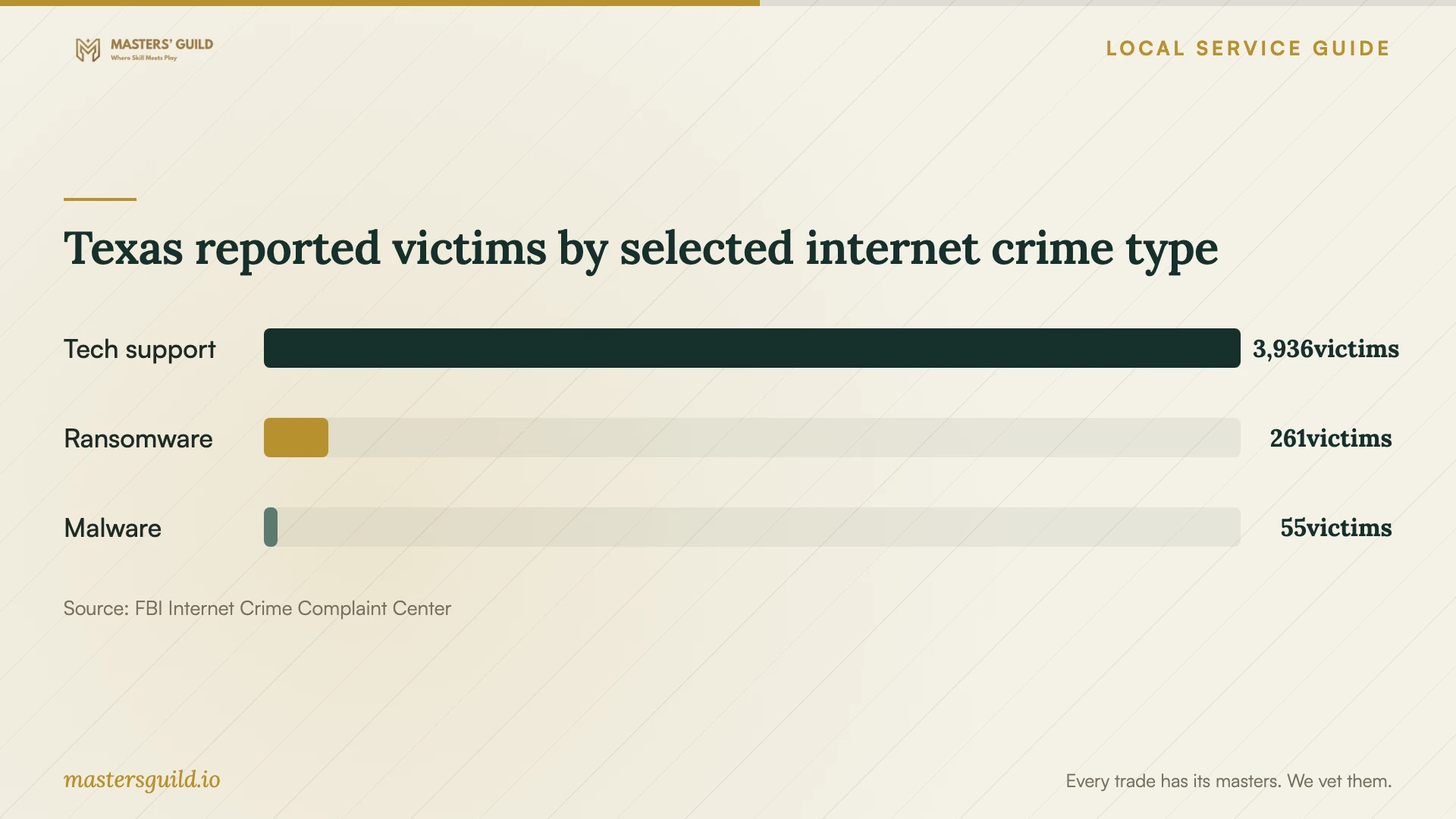
Texas reported victims by selected internet crime type
Local details that affect your job
Check the address and taxable portion of your quote
The Comptroller lists Arlington in Tarrant County with a 2 percent local rate and an 8.25 percent total rate. Its collection guide explains that seller location and customer use location can affect local tax, and that ZIP codes do not define taxing boundaries. For remote help or a home visit, ask which address the provider uses and request an itemized tax amount before approving work. [3] [4]
Check Texas recycling eligibility before paying for disposal
For an eligible household computer, check the manufacturer's Texas recycling option before paying for disposal. Manufacturers must collect their own brands but may accept others. TCEQ makes consumers responsible for information left on equipment. Include data erasure in the technician's scope and confirm that the collection program accepts your equipment before drop-off. [6]
Choose the repair request for your situation
| Situation | Request | Approval point |
|---|---|---|
| Pop-up or unsolicited caller claims a virus | Contact a provider through verified details | Refuse access from the caller or pop-up |
| Computer starts and you need a diagnosis | Ask whether remote diagnosis suits the symptoms | Agree on access permissions and session end |
| Computer will not start or essential files need preservation | Discuss drop-off or a visit and a file preservation plan | Approve file handling before reset or reinstall |
| You want an investigation of suspected theft or fraud | Discuss specialist work and record preservation | Agree on the investigation scope before cleanup |
| You choose to replace a household computer | Request file recovery and data erasure | Check manufacturer recycling eligibility |
Your hiring checklist
- Record symptoms and warning text without clicking the warning's links.
- Write down related downloads, payments, shared credentials and remote sessions.
- List essential files and describe your existing backup.
- Verify provider contact details through a source separate from the warning.
- Request the diagnostic fee, itemized scope, tax amount and spending limit.
- Require approval before erasure, reinstallation, paid software or additional work.
- Confirm handover arrangements, a diagnostic update time and follow-up terms.
- Review startup, preserved files and completed work before accepting the device.
Frequently Asked Questions
Does a virus warning mean I need professional removal?
Record the warning and check its origin before approving repair. The Texas Attorney General warns that scammers use screen pop-ups claiming to detect viruses. Avoid the warning's phone number and access instructions. If you remain unsure, ask a provider you select for diagnosis. [1]
Can I require the technician to preserve my files?
Make file preservation part of the written scope. Name the files you need and ask what the technician can attempt before you approve erasure or reinstallation. Request an explanation of any limits and decide whether you want a separate recovery quote.
Should the quote include 8.25 percent tax?
The Comptroller lists Arlington's combined rate as 8.25 percent. Ask the provider to identify the taxable charges and applicable transaction location, then explain the calculation. For data processing charges, Texas exempts 20 percent of the charge from tax. [2] [3] [4]
Can I recycle the computer after replacing it?
Check your manufacturer's program. Texas requires free, convenient recycling of eligible personal and home-business equipment from the manufacturer's own brands. Arrange data removal first because TCEQ makes consumers responsible for information left on the equipment. [6]
Sources and scope
This guide combines the sources below with practical planning guidance. Figures apply to the stated geography and period; request a written quote for your property.