
Local service guide
Plan software installation in Anchorage
Arrange software installation in Anchorage by giving the technician your computer model, operating system, application names, and the task you need to complete. Ask for a written scope covering installation, activation, updates, and a working demonstration. For a Windows 11 upgrade, request a compatibility check before authorizing installation. Microsoft lists hardware, internet, and account requirements to check against your device. Choose the provider through contact details you obtain yourself, and agree on how you will supervise any remote session. [2] [3]
Define the result before requesting quotes
Describe what you want to do after the appointment: open an existing document, send email from your account, use a purchased application, or finish setting up a new computer. List each device and program. Include the exact error message if an installation has failed, but remove personal information from screenshots.
Ask whether the quote includes downloading the installer, activating your license, applying updates, and testing the program with you. Request separate approval for file migration, account recovery, malware investigation, or hardware changes. If the technician discovers another problem, agree that they will explain the proposed work and its price before proceeding.
For a useful handover, choose a test that matches your purpose. Ask the technician to open a document you select, send a test email, or launch the application after restarting the computer. Request a short record of the software version, activation status, and any unfinished work.
Check eligibility before an operating-system upgrade
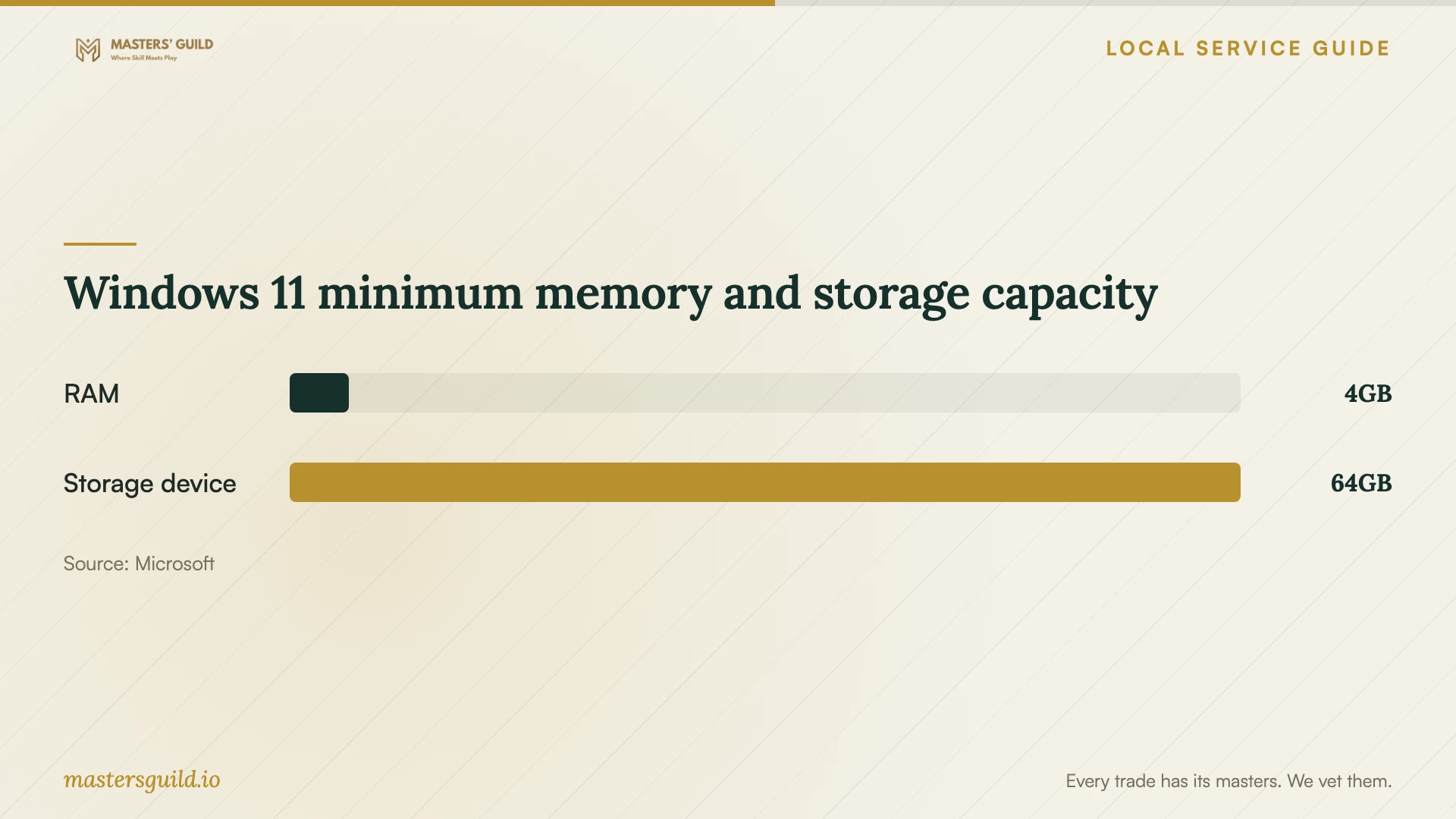
Microsoft lists Windows 11 minimums of 4 GB RAM and a storage device of at least 64 GB. It also requires a compatible processor, UEFI firmware with Secure Boot capability, TPM 2.0, and compatible graphics and display hardware. Meeting the memory and storage thresholds alone does not establish eligibility. Microsoft notes that particular applications and features can require more than these minimums. [3]
Ask the technician to check the whole device before quoting an upgrade. Microsoft offers PC Health Check for eligibility assessment on Windows 10 consumer PCs. For an administrator-managed computer, Microsoft directs users to their IT administrator. If your household computer also belongs to an employer, obtain the employer's approval before arranging changes. [3]
Microsoft requires internet connectivity and a Microsoft account during initial setup of Windows 11 Home and Windows 11 Pro for personal use. Plan to be present for sign-in and account verification. Ask whether the technician needs your existing recovery information, and enter sensitive credentials yourself. [3]
Choose remote help or an appointment with the device
Ask the provider whether they can complete your specific scope remotely. Explain whether the computer starts, connects to the internet, and lets you sign in. If you cannot reach the desktop or expect hardware work, ask about an in-person appointment or device drop-off. Confirm the meeting location and any travel or collection charge before accepting the quote.
For remote work, agree on the session start time, what the technician may access, and how you will end the connection. Ask them to explain the remote-access program before you install it. Stay present, close private documents, and decline unattended access unless you have agreed to a specific reason and removal plan.
FBI Anchorage's November 2020 advisory describes scammers impersonating technology-company staff and requesting remote-access software. Its advice is to initiate contact with a known, trusted company using publicly available contact information. Apply that advice when arranging an installation. The advisory's reported increase in scams describes 2020. [2]
Prepare files, accounts, and a clear handover
Before the appointment, make a backup of files you want to keep and check that you can open a few of them from the backup. Gather purchase receipts, license details, and the names of accounts associated with the software. Keep passwords out of your job description and messages to prospective technicians.
Ask the technician to explain any proposed reset or clean installation before you approve it. Specify which files and settings you expect to retain. For account problems, ask them to guide you through the vendor's recovery process while you control the account and verification steps.
At the end, test the agreed task yourself. Ask the technician to remove temporary remote access, return any storage devices, and explain future update steps. Keep your receipt and written scope so you can identify whether a later problem concerns the completed installation or additional work.
Windows 11 minimum memory and storage capacity
Local details that affect your job
Use library access when your computer is unavailable
Anchorage Public Library provides internet-connected computers at all its locations on a first come, first served basis. Loussac requires an APL/ALC member card for computer use; guests without an APL card can request a guest pass at branch locations. Choose your location with that access rule in mind if you need to contact software support or retrieve purchase information before a repair appointment. The library also lists password-free Wi-Fi at all locations. Contact the library to ask whether staff can help install software on your own computer. Sign out of your accounts when you finish. [1]
Use Alaska-specific support-fraud guidance when booking
FBI Anchorage advises Alaska residents to make the initial contact with a trusted support company using public contact details. Its November 2020 advisory identifies unsolicited calls, pop-up warnings, remote-access requests, and pressure to pay through gift cards or prepaid cards as scam tactics. If a warning tells you to call someone, pause and find your chosen provider's contact details yourself. For suspected fraud, the advisory lists the Anchorage Field Office at 907-276-4441 and the FBI's Internet Crime Complaint Center as reporting options. Use these regional prevention and reporting options without assuming the advisory describes today's scam frequency. [2]
Choose the next step for your installation
| Your situation | Next step | Question to ask |
|---|---|---|
| You need an application installed | Request installation, activation, and a task-based test. | Does your quote include updates and testing with my files? |
| You want Windows 11 | Request a full eligibility check against Microsoft's requirements. | Have you checked the processor, TPM, firmware, memory, and storage? |
| Your computer is unavailable | Consider library computer access; check Loussac card or branch guest-pass requirements. | Can I complete the preparation through vendor support before my appointment? |
| A pop-up or unsolicited caller offers support | Follow FBI Anchorage's advice to initiate contact through public provider details. | Did I choose this provider and initiate the contact? |
| The device belongs to your employer | Consult its IT administrator before arranging a Windows upgrade. | Who can authorize and perform changes on this computer? |
Your hiring checklist
- Record the computer model, operating-system version, application names, and exact error messages.
- Describe the task you want to demonstrate before the technician leaves.
- Back up important files and open sample files from the backup.
- Gather purchase and license information without sending passwords.
- Request an itemized quote and an approval step for additional work.
- Agree on appointment location or supervised remote access.
- Test the application yourself and request a written handover.
Frequently Asked Questions
What should a software-installation quote include?
Ask for the named applications and devices, installation labor, activation, updates, and an agreed demonstration. Request separate lines for software purchases, backups, file transfer, and troubleshooting. Agree on how the technician will obtain approval for additional work.
Can I approve Windows 11 installation based on RAM alone?
Check the complete requirements. Microsoft lists 4 GB RAM and a storage device of at least 64 GB, plus processor, firmware, TPM, graphics, and display requirements. Ask for a device eligibility assessment before authorizing the upgrade. [3]
Can the library install software on my home computer?
The library lists public computers, Wi-Fi, and printing. Contact the library to ask whether staff can help install software on your own computer. You can also use its computer-access options to contact vendor support or prepare for your appointment. [1]
How should I respond to an unexpected support call?
FBI Anchorage advises caution with unsolicited calls and recommends making the initial contact with a trusted company through public contact information. End the call and contact your chosen provider yourself. Avoid granting device access or making payments under pressure. [2]
Sources and scope
This guide combines the sources below with practical planning guidance. Figures apply to the stated geography and period; request a written quote for your property.