
Local service guide
Network Setup and Support in Anchorage, AK
Arrange Network Setup in Anchorage by checking your internet provider's support and equipment options before hiring a technician. Ask an independent provider for a defined scope covering the rooms, devices and connections you need, with hardware and labor priced separately. GCI can diagnose AK-Fi coverage concerns and provide complimentary pods when it determines they are needed. For a new Alaska Communications fixed wireless connection, coordinate property approvals and the provider's exterior installation before arranging indoor network work. [2] [3]
Separate provider support from indoor network work
Start with a comparison between your incoming connection and Wi-Fi performance in the affected room. GCI recommends testing with a capable computer connected through a CAT 6 or better Ethernet cable to the modem's highest-rated port. Its AK-Fi app measures performance at the AK-Fi equipment rather than at an individual wireless device. Follow the provider's instructions and record the test method with each result. [1]
Give those results to your provider before authorizing replacement equipment. Ask an independent technician to investigate room coverage, device setup or indoor cabling after you establish what the provider will address. Describe the symptom in concrete terms: a dropped video call at the upstairs desk, a printer that will not connect, or an Ethernet socket that needs testing.
Choose equipment after a coverage assessment
GCI says its technicians use AK-Fi diagnostic tools to assess coverage concerns. When the technician cannot resolve the issue and GCI determines a pod is needed, GCI provides it at no cost. Ask for that assessment before paying another installer to supply a separate mesh system. [2]
GCI advises placing pods where they retain a good connection to the modem, adjacent to the weak-coverage area. Its guidance identifies appliances, mirrors, energy-efficient windows and foil-backed underfloor insulation as possible signal obstacles. Ask the technician to test proposed locations and the room you need to serve before accepting the layout. [2]
For an independent installation, specify which desk, television or other device should use Ethernet and which rooms need Wi-Fi. Request a comparison between repositioning existing equipment, adding access points and running cable. Require your approval before the technician buys hardware or opens a wall.
Check the address and upload requirements
Alaska Communications offers fiber in select Anchorage neighborhoods and requires an address check. Its published Fiber 250/25 plan has different download and upload limits, while its Fiber 500, 1000 and 2500 plans list matching download and upload speeds. Confirm the service offered at your property before commissioning equipment for a particular plan. [4]
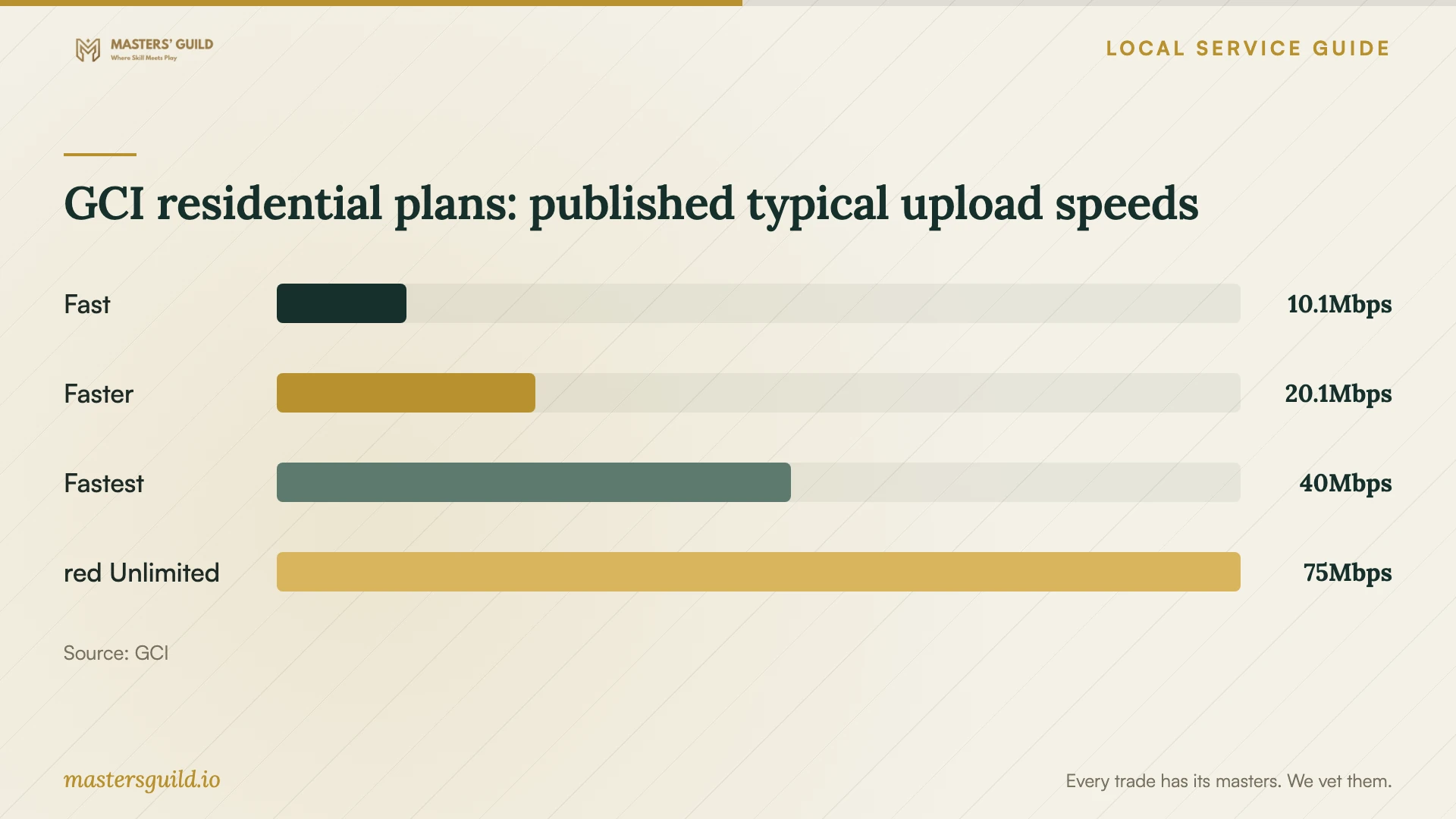
The chart compares GCI's published typical upload speeds for four residential plans. Use it to frame a discussion about video calls and file uploads. GCI measures these figures between its AK-Fi equipment and its test servers during weekday peak hours, 5 p.m. to 11 p.m. local time. A result from a laptop in a distant room measures a different path and may reflect device or Wi-Fi limitations. [1]
Ask your installer to confirm the capability of the router, switch ports and computer used for testing. GCI calls for equipment capable of supporting the subscribed speed. Alaska Communications identifies a 10G Ethernet port on its fiber gateway for its maximum wired 2.5 Gbps service. [1] [4]
Coordinate installation and property access
Alaska Communications describes fixed wireless installation as an exterior or roof antenna installation followed by indoor cable routing, router connection, surge protection and testing. It asks customers to confirm required property-owner or HOA approval beforehand and warns renters that work may include wall penetration. The provider gives about two hours as its installation duration; confirm the appointment details for your property. [3]
Arrange the provider's connection work before booking a separate technician to configure your indoor network. Have each party identify the equipment it will install and support. For additional Ethernet runs, agree on outlet locations, visible cable sections, access to concealed spaces and responsibility for repairing finishes.
Compare quotes and agree on completion
Ask for separate labor and equipment amounts, the billing basis, any minimum visit charge and the procedure for approving extra work. Describe the number of rooms and intended connections in your request. Do not treat monthly internet subscription charges as a network-installation quote.
Define completion before the visit: connect the agreed devices, test the intended rooms, label new Ethernet outlets and provide a record of the equipment settings. Ask who owns the administrator account and how you will receive credentials. Keep account passwords out of public job descriptions and arrange private access during the appointment.
Request written follow-up terms covering the contact method, response window and charges for a return visit. Before the technician leaves, use your own devices to check the tasks that prompted the booking, such as joining a call from your desk or printing from your laptop.
GCI residential plans: published typical upload speeds
Local details that affect your job
GCI coverage support can change the purchase
GCI offers complimentary AK-Fi pods when its diagnosis establishes a need. Contact its support team about coverage before including a new mesh kit in an independent installer's quote. Ask what GCI will supply and which remaining tasks you should commission. [2]
Fixed wireless needs advance property coordination
Alaska Communications asks fixed wireless customers to confirm required property-owner or HOA approval before installation. Its crew installs an exterior or roof antenna and routes cable indoors, potentially through a wall. Renters should settle approval and cable-route questions before scheduling indoor setup. [3]
Building-managed internet changes router needs
Alaska Communications lists Anchorage among its InternetNow locations and distinguishes FiberNow wall-jack buildings from InternetNow Wi-Fi buildings. It recommends a router for the wall-jack connection and says Wi-Fi buildings need no additional equipment. Confirm your building's type before purchasing a router or booking a modem installation. [5]
Choose the first contact for your setup
| Situation | First contact | Next step |
|---|---|---|
| AK-Fi coverage concern | GCI support | Request diagnosis and ask whether complimentary pods apply. |
| New fixed wireless service | Alaska Communications | Confirm property approvals and exterior installation scope. |
| FiberNow wall jack | Building manager or Alaska Communications | Confirm connection type, then arrange router setup if needed. |
| InternetNow Wi-Fi building | Alaska Communications support | Check account and device registration before buying equipment. |
| Additional indoor Ethernet outlets | Independent network installer | Request a cable-route proposal, itemized quote and testing plan. |
Your hiring checklist
- Record your provider, plan and equipment model numbers.
- Describe the affected rooms, devices and tasks.
- Ask your provider which diagnostic and equipment support it will supply.
- Confirm property permission and agree on any drilling or cable routes.
- Request separate labor, hardware and finish-repair amounts.
- Agree on room testing, outlet labeling and credential handover.
- Get follow-up support terms in writing.
Frequently Asked Questions
Should I buy mesh Wi-Fi before hiring someone?
Request a coverage assessment first. GCI may provide complimentary AK-Fi pods when it determines they are needed. For other setups, ask the installer to propose equipment after reviewing your rooms and existing network. [2]
Can I arrange fixed wireless installation as a renter?
Confirm required property-owner approval before the appointment. Alaska Communications says installation can involve wall penetration and an exterior or roof antenna. Ask the provider to confirm the proposed work with you and your property manager. [3]
Do I need a router in an apartment with InternetNow?
Confirm the building's connection type. Alaska Communications recommends a router for a FiberNow wall jack to provide Wi-Fi. It says an InternetNow Wi-Fi-enabled building needs no additional equipment. [5]
How should I budget for independent setup?
Request a quote for your specific rooms, devices and cable routes. Ask the technician to separate labor, equipment and repairs, explain extra-work approval, and include testing and follow-up terms.
Sources and scope
This guide combines the sources below with practical planning guidance. Figures apply to the stated geography and period; request a written quote for your property.