
Local service guide
Home office setup in Anchorage, AK: Plan and Hire
For home office setup in Anchorage, hire for a written list of tasks: furniture assembly, monitor installation, device connections and cable organization. Arrange electrical alterations as a separate scope before final furniture placement. Anchorage requires permits for regulated electrical work unless a specific exemption applies; its code exempts qualifying portable plug-in appliances. Send providers your equipment models, room measurements and outlet photos so they can explain what they will complete and what needs another appointment. [1]
Define the job before comparing offers
Write down what you want to use at the end of the visit. For example: an assembled standing desk, two connected monitors, a working webcam and cables secured through the desk's full movement. Include furniture model numbers, monitor weights, mounting hardware and the devices you own. Ask the provider to identify any missing brackets, adapters or cables before you agree to the appointment.
Request separate prices for assembly, mounting and computer or network configuration. Ask whether the provider will unpack furniture, move existing items, remove packaging and return for missing parts. For hourly offers, request the minimum charge and how the provider will seek approval for extra time. Compare offers against the same task list rather than an undefined full-setup package.
Choose a provider whose stated work matches your project. Ask for relevant assembly or mounting examples and proof of insurance. If you need help with employer-managed equipment, agree on the permitted work with your employer's IT team before granting access or changing settings.
Choose the room and test the connection
Start your internet check with the FCC's address search. The national map lists providers that report serving that location, their connection technologies and maximum advertised download and upload speeds. Confirm service availability and installation arrangements with the provider before ordering equipment or planning a cable route. [4]
Test your current connection at the proposed desk location using the activities you need: a video call, a file upload and access to your work applications. Ask the setup provider to quote a wired connection or network troubleshooting if you want those tasks included. Record your test results so you have a clear starting point for the appointment.
Do not choose a cellular backup based on the map alone. The FCC explains that its mobile coverage maps describe outdoor or moving-vehicle coverage and do not show indoor coverage. Test the connection inside the intended office before relying on it for work. [4]
Measure chair clearance and the delivery route before buying furniture. Try the proposed screen position with the room's lighting and window coverings. For a standing desk, ask the installer to check cable reach at both ends of its travel and keep connections accessible for future changes.
Separate electrical work from equipment setup
Tell the provider whether you intend to use existing receptacles or add electrical infrastructure. Anchorage exempts qualifying portable appliances connected by an attachment plug to an approved receptacle, but requires permits for regulated electrical installations and alterations unless the code grants an exemption. Do not assume an equipment-setup offer includes new outlets. [1]
Ask an electrical contractor to identify the permit category, who will obtain the permit and which inspections the work requires. The municipal code allows a retrofit permit for one new 20-amp circuit with no more than six general-purpose receptacles or light fixtures. It also lists a retrofit category for no more than six such devices added to existing 20-amp circuits. Have the contractor confirm whether your proposed work fits. [1]
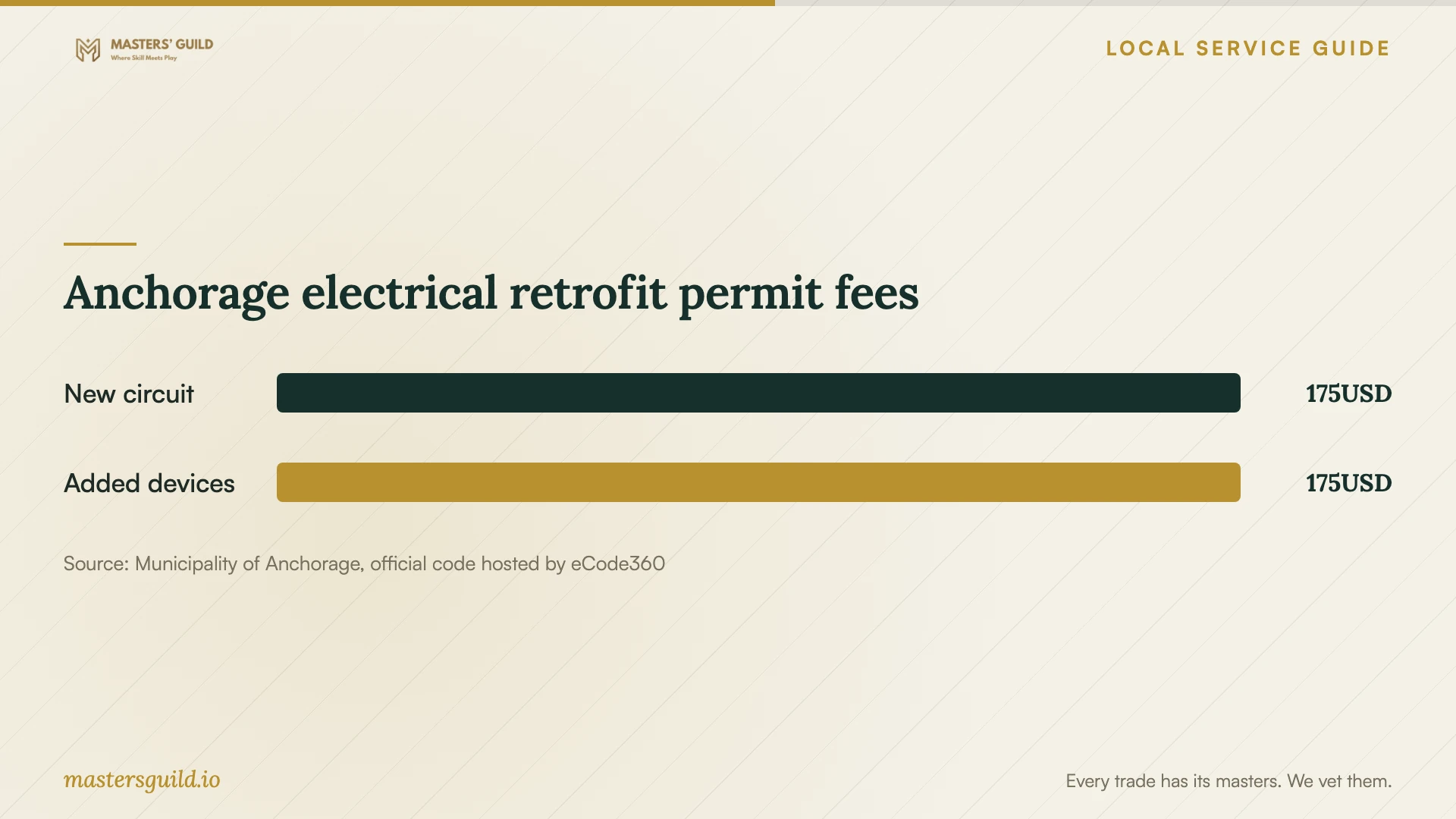
For either of those limited retrofit scopes, the published municipal fee is $175 with two inspections included. Treat that amount as one budget line alongside contractor labor, materials and any other applicable charges. The fee does not establish a local price for desk assembly or a complete office installation. [2]
Arrange inspections and a usable handover
Coordinate electrical inspection access before committing to final desk placement. Anchorage asks for the permit number, contact phone number, inspection type, job-site address and preferred date and timeframe. The municipality may provide a same-day inspection if it receives the request before 6 a.m. on the same business day and workload permits. Confirm the appointment rather than assuming that cutoff guarantees service. [3]
Arrange for someone to answer the inspector and provide entry. Anchorage warns that an inspector who cannot reach a contact or obtain access may record a no-show, which may result in fees. Ask your contractor which areas must remain accessible before you install furniture or conceal cables. [3]
Before the setup provider leaves, sit at the desk and test the agreed tasks together. Check the monitor positions, camera, microphone, network connection and desk controls. Ask the provider to label cables, explain anything unfinished and record any agreed return visit. Keep employer credentials under your control during testing.
Anchorage electrical retrofit permit fees
Local details that affect your job
Budget for the specific outlet-addition permit
For a desk location that needs added outlets, ask whether the work fits Anchorage's retrofit category for no more than six general-purpose receptacles or light fixtures added to existing 20-amp circuits. The municipality lists $175 with two inspections for that scope. Obtain an itemized electrical offer before buying furniture that blocks the proposed work area. [1] [2]
Condominium work can need association approval
If your office project includes permitted work in common areas or a structural change, Anchorage requires an approval letter from the condominium association. Its code also requires a letter for construction affecting the building's appearance or structural integrity. Describe proposed penetrations or structural changes to the association and contractor before booking installation. [1]
Keep inspection access in the appointment plan
Use Anchorage's inspection request process with the permit number and site details ready. The municipality offers a phone request line at 343-8300 and lists 343-8211 for questions before scheduling. Arrange an available contact and entry to the work area to avoid a no-show. [3]
Choose the scope to request
| Your planned work | Who to ask | What to confirm |
|---|---|---|
| Assemble furniture and connect equipment | Assembly or equipment-setup provider | Models, included connections, cable organization and handover tests |
| Install a monitor mount | Provider offering mounting work | Mount compatibility, attachment method and permission for wall work |
| Add outlets or a circuit | Electrical contractor | Applicable permit; qualifying limited retrofit scopes carry a $175 fee with two inspections |
| Modify a condominium common area or structure | Contractor and condominium association | Association approval letter for the applicable permitted work or structural change |
| Configure internet access | Network-setup provider and internet provider | Address-level availability, advertised upload speeds and tests inside the office |
Your hiring checklist
- Photograph the room, existing outlets and proposed mounting area.
- List furniture and equipment model numbers, dimensions and mounting requirements.
- Test your work connection at the proposed desk location.
- Request itemized assembly, mounting, network and electrical scopes.
- Ask the electrical contractor to confirm permit and inspection responsibilities.
- Agree on access, packaging removal, missing-parts handling and extra-work approval.
- Test the completed setup with the provider before closing the appointment.
Frequently Asked Questions
Does plugging in office equipment require an electrical permit?
Anchorage exempts qualifying portable appliances that connect through an attachment plug to an approved receptacle, where the Electrical Code permits the cord or cable. New electrical installations or alterations require permits unless a specific exemption applies. Ask the contractor to confirm the category if your scope goes beyond connecting equipment. [1]
Can I use $175 as my electrical-work budget?
Use it as the published permit fee for the specified limited retrofit scopes, with two inspections included. Obtain separate prices for labor and materials and ask about other applicable charges. Additional inspections beyond the included quantity carry separate fees. [2]
Can I get an inspection on the setup day?
Anchorage may provide same-day service for a request received before 6 a.m. on that business day, subject to workload. Confirm scheduling with your contractor and arrange access. Avoid committing to furniture placement that depends on an unconfirmed inspection. [3]
Should I buy network equipment before hiring?
First check address-level service options and confirm them with the internet provider. The FCC map lists provider-reported availability and maximum advertised speeds. Share your current equipment and desk-location test results with the setup provider, then agree on any purchases before the visit. [4]
Sources and scope
This guide combines the sources below with practical planning guidance. Figures apply to the stated geography and period; request a written quote for your property.