
Local service guide
Computer virus removal in Anchorage: hiring guide
For computer virus removal in Anchorage, choose a technician who will diagnose the problem, itemize the proposed work and agree with you on file protection before making changes. Ask about access permissions, completion estimates and follow-up charges. If you paid a suspected scammer, follow FBI Anchorage guidance: notify the financial institutions involved immediately, then submit an Internet Crime Complaint Center complaint as soon as possible. [3]
Book a diagnosis that addresses your symptoms
Describe what you saw rather than deciding that the computer has a virus. Tell the technician about warning messages, unfamiliar programs, browser changes or trouble opening files. Include when the symptoms started and whether you installed software or let someone access the computer beforehand.
Ask whether the technician recommends remote service, drop-off or a home visit for your situation. Have them explain the access they need and how you will authorize it. Choose your own contact method for arranging service, and ask who will perform the work before handing over the device.
Compare quotes by work and approval limits
Request the diagnosis charge, proposed repair total and any charge for declining the repair. Ask the technician to separate cleanup, operating-system repair, backup and file recovery. For a home visit, ask about travel charges; for drop-off, ask about collection arrangements. Obtain a completion estimate and agree on when you will receive an update if the scope changes.
Name the files you need, such as family photos and tax documents, and explain whether you have a backup. Ask who may copy those files, where they will keep copies and when they will delete them. Set a spending limit and require approval before a reinstall, drive replacement or disposal. Avoid giving access to accounts unrelated to the agreed work.
Act on suspected fraud while arranging repair
FBI Anchorage tells cybercrime victims to notify financial institutions involved in the relevant transactions immediately, then submit an Internet Crime Complaint Center complaint as soon as possible. Take those steps while arranging the computer assessment. Ask the technician to preserve messages or other records you need for the complaint. [3]
The FBI asks victims to document the suspected scammer or company's name, contact methods and dates, payment methods, destinations of funds and a description of the interactions. Keep that record with receipts and the repair invoice. Ask the technician for a separate explanation of device work and any account-security actions they recommend. [3]
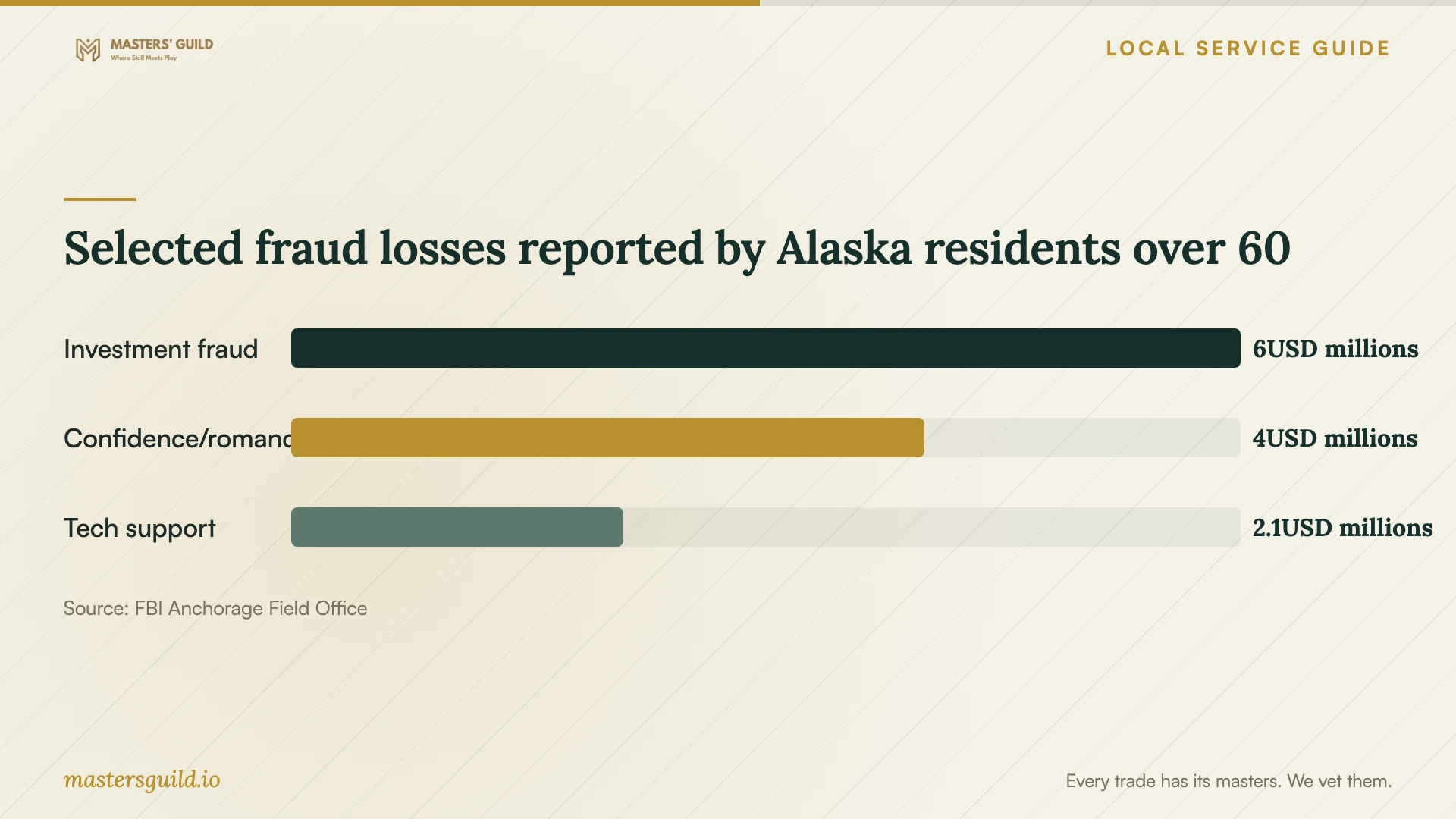
The chart compares selected fraud losses that Alaska residents over 60 reported for 2025. FBI Anchorage included tech support fraud among that group's leading loss categories. These statewide complaint figures describe reported financial harm; use your own symptoms and incident history when arranging a diagnosis. [3]
Include data handling in a replacement decision
If the technician recommends replacement, compare the repair quote with the replacement you would choose, including setup and file transfer. Ask them to explain the diagnosis behind the recommendation. Decide whether you want the old drive returned, erased or destroyed, and request a separate description and price for that work.
Anchorage Solid Waste Services lists private electronics recyclers and says fees apply. The municipality does not endorse the listed businesses. Contact your chosen destination to confirm equipment acceptance, hours and charges, then decide whether you or the technician will transport the equipment. [1]
The municipal code places its landfill electronics schedule under a provision identifying recycling of non-residential electronics waste. Do not use those listed amounts as a household disposal quote. Ask the destination to confirm household eligibility and the total charge for your equipment before delivery. [2]
Check the work at handover
Request a handover record describing the diagnosis, work performed, software added and remaining concerns. Have the technician demonstrate the tasks you need, including opening your documents and using your browser. Review the agreed files before collecting the computer.
Ask how to remove temporary remote access and what happened to any backup copy created during the job. Clarify who to contact if the original symptoms return, which follow-up work the price includes and which work would need a new quote.
Selected fraud losses reported by Alaska residents over 60
Local details that affect your job
Choose an electronics destination before transport
Anchorage Solid Waste Services lists Total Reclaim at 12050 Industry Way, Batteries & Bulbs at 910 W International Blvd and Eagle River Electronics at 12801 Old Glenn Hwy. Its electronics listing says fees apply, and its disclaimer advises confirming prices, hours and acceptable materials. Contact a destination before including recycling transport in the repair agreement; ask about drive handling as a separate service. [1]
Use FBI Anchorage's Alaska fraud-response guidance
For a fraudulent technical-support payment, follow FBI Anchorage's direction to notify involved financial institutions immediately and submit an Internet Crime Complaint Center complaint as soon as possible. Assemble contact and payment records while you arrange the repair. This Alaska guidance gives you a concrete response to a payment incident without waiting for the technician's diagnosis. [3]
Choose the next step for your situation
| Situation | Next step | Terms to settle |
|---|---|---|
| Suspicious messages without a diagnosis | Request an assessment | Diagnosis charge and proposed repair scope |
| Essential files without a known backup | Discuss file preservation before changes | Named files, copying permissions and recovery price |
| Payment to a suspected scammer | Notify involved financial institutions immediately, then submit an Internet Crime Complaint Center complaint as soon as possible | Retain contact and transaction records |
| Technician recommends replacement | Compare repair with replacement and setup | File transfer and return or disposal of the old drive |
| Equipment ready for recycling | Confirm acceptance and charges with the chosen destination | Transport, household eligibility and separate drive handling |
Your hiring checklist
- Record the device model, symptoms and events before the problem started.
- Photograph warning messages and retain contact or payment records.
- List essential files and tell the technician about existing backups.
- Compare itemized quotes, spending limits and completion estimates.
- Agree on access, copying and approval for destructive changes.
- Check the handover record, restored files and follow-up terms.
- Confirm destination acceptance and costs before transporting retired equipment.
Frequently Asked Questions
How much should I budget for cleanup?
Request an itemized quote from the technician. Ask for the diagnosis fee, proposed total and charges for software repair or file recovery. Compare providers using the same work description and specify a limit before authorizing additional work.
Should I approve an operating-system reinstall?
Ask the technician to explain why they recommend it and what alternatives they propose. Review the file-preservation plan, software setup and total price before approving the change.
What should I do after paying a suspected support scammer?
FBI Anchorage directs victims to notify involved financial institutions immediately, then submit an Internet Crime Complaint Center complaint as soon as possible. Keep names, contact history and payment details for the report while arranging repair. [3]
Can I use the landfill's published electronics amounts as my household quote?
Ask the facility to confirm household acceptance and charges. The municipal code identifies non-residential electronics recycling in the parent provision for that schedule. The listed amounts do not establish your household's payable total. [2]
Sources and scope
This guide combines the sources below with practical planning guidance. Figures apply to the stated geography and period; request a written quote for your property.