
Local service guide
Cloud Service Setup in Anchorage, AK
Arrange Cloud Service Setup in Anchorage by asking a technician to quote the accounts, devices, folders, security settings and recovery test you need. Check your internet upload speed and data allowance before booking a large migration. Keep account ownership and recovery details under your control, and agree who will check the transfer after the appointment. GCI publishes separate upload speeds and data allowances; Alaska Communications limits its residential fiber availability to select Anchorage neighborhoods. [1] [2]
Define the work before requesting quotes
Write down the result you want: shared household files, a photo archive, a backup of important documents, or a move from an existing account. List the computers and phones involved, their operating systems, the folders to include and the people who need access. Ask the technician to identify anything outside the quote before work starts.
Request separate prices for setup labor, migration, subscriptions and follow-up. Ask whether the technician charges for watching an upload, returning to check it or resolving transfer errors. Compare quotes against the same device and folder list. Set a spending limit for additional work and require your approval before the technician purchases storage or changes your internet plan.
Decide whether you want file sharing, recoverable backup copies or both. Ask the technician to demonstrate the chosen service's behavior after a deletion or an unwanted edit. CISA recommends testing backup availability and integrity, and keeping offline encrypted copies of critical data. Include a recovery test in the appointment rather than accepting a successful sign-in as completion. [4]
Check the connection before a large transfer
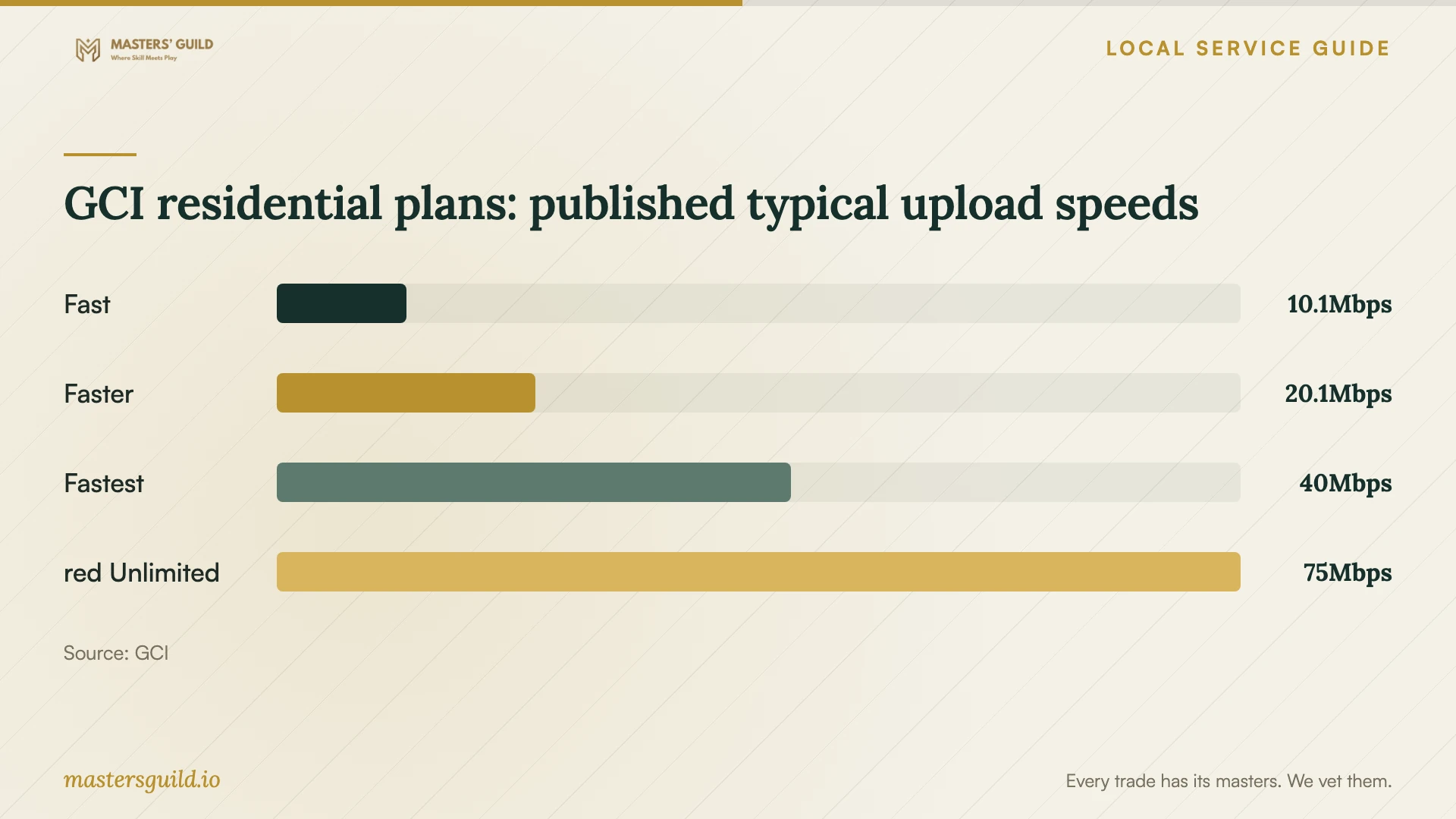
Compare upload speed when planning to send files to the cloud. GCI's broadband labels report typical upload speeds of 10.1, 20.1, 40.0 and 75.0 Mbps for Fast, Faster, Fastest and red Unlimited. GCI measures its typical speeds during peak hours between its equipment and its speed-test servers. Those measurements do not establish the speed of your chosen cloud service. [1]
Ask the technician to measure the connection you will use, check your remaining data allowance and run a small trial transfer. Have them explain how they will pause or limit transfers while you use the connection for other tasks. Agree on a completion check that includes skipped files and transfer errors, with a named person responsible for reporting the result.
If you are considering Alaska Communications fiber, check your address before booking the migration. The utility advertises symmetrical upload speeds on its top three residential fiber tiers and limits availability to select neighborhoods. It advises customers to keep their current internet service until it installs the new service. Schedule the cloud appointment after you confirm that the new connection works. [2]
Keep control of accounts and technician access
Create the account in your name and use an email address you control. Enter credentials yourself during the appointment. Ask the technician to explain any requested administrator access, remote-control software or continuing support access. Agree when they will remove temporary permissions and how you will confirm that removal.
CISA recommends phishing-resistant multifactor authentication and limiting third-party access to the responsibilities they perform. Ask the technician to explain the authentication options your chosen service supports and configure the strongest suitable option. Keep your recovery information somewhere you can reach if you lose access to the account. [4]
Alaska's Department of Law advises consumers to protect personal information and avoid obvious passwords. Before handing over a device, identify folders containing tax records, identification scans or other sensitive documents. Ask whether the technician needs to open them, whether they will create temporary copies and how they will remove those copies after the work. [3]
Require a recovery test and written handover
Ask the technician to restore a sample file to a separate folder and open it with you. Choose a document or photo that you can check without exposing private content. Have them show you where to view backup status, how to recognize a failed job and whom to contact when a recovery attempt fails.
For important records, discuss an offline encrypted backup alongside your cloud arrangement. CISA warns that ransomware can delete or encrypt accessible backups and recommends offline copies and regular recovery tests. Ask the technician to demonstrate the encryption and explain how to store the recovery key before you disconnect the backup device. [4]
Request a handover note listing the account owner, included folders, devices configured, recurring charges, recovery steps and any unfinished transfers. Keep existing copies until you have reviewed the migration and tested recovery. If the upload continues after the visit, agree on a follow-up checkpoint and what the technician will do if files fail to transfer.
GCI residential plans: published typical upload speeds
Local details that affect your job
Check GCI's data allowance before the first backup
GCI lists 250 GB for Fast, 800 GB for Faster, 1 TB for Fastest and unlimited data for red Unlimited. On its limited-data plans, customers who use the included allowance can continue at reduced speed or purchase more usage. Before an initial upload, compare the folders you plan to send with your remaining allowance and ask GCI about your account's current terms. [1]
Confirm fiber access before changing the schedule
Alaska Communications offers residential fiber in select Anchorage neighborhoods. Its installation includes exterior and interior work, and the utility asks customers to provide access to both areas and a nearby power outlet for the equipment. If you need a new connection for the migration, arrange that installation first and keep your current service until the utility installs the replacement. [2]
Choose the scope to request
| Your task | Work to request | Completion check |
|---|---|---|
| Share files across household devices | Account setup, selected folders and permissions | Open a sample file from each intended device |
| Move an existing photo or document archive | Data inventory, trial transfer and error review | Review skipped files and compare the agreed folder list |
| Protect important records | Backup configuration, offline encrypted copy and recovery instructions | Restore a sample file and open it |
| Change internet service before migration | Confirm address availability and complete the connection installation | Test the installed connection before the cloud appointment |
Your hiring checklist
- List devices, operating systems, folders and household members who need access.
- Record the amount of data you want to transfer and check your account's remaining allowance.
- Request separate setup, migration, subscription and follow-up charges.
- Choose an account owner and prepare an email address and recovery method you control.
- Agree on temporary technician permissions and their removal.
- Require a sample restore and a demonstration of backup status.
- Keep existing file copies until you have checked the migration and recovery.
- Obtain written handover notes and a follow-up plan for unfinished uploads.
Frequently Asked Questions
Can I set up the account myself?
Consider doing the account creation yourself if you are comfortable choosing folders and managing recovery details. Hire help for the parts you want checked, such as household permissions, migration errors or a recovery test. Ask for a quote limited to those tasks.
Will the technician finish the upload during the visit?
Ask for separate expectations for configuration and transfer completion. Request a trial upload using your files and connection before accepting a deadline. Agree who will check errors and confirm completion if the transfer continues after the technician leaves.
Should I upgrade my internet plan first?
Check your current upload speed, data allowance and proposed transfer size before deciding. GCI publishes distinct upload and allowance tiers, while Alaska Communications restricts fiber availability to select neighborhoods. Ask the technician whether your existing connection can handle the planned work before buying an upgrade. [1] [2]
What should I receive before paying for completion?
Agree on acceptance terms in advance: access from the intended devices, the correct folder permissions, a sample restore, handover notes and removal of temporary technician access. If uploads remain unfinished, document the remaining work and the follow-up arrangement.
Sources and scope
This guide combines the sources below with practical planning guidance. Figures apply to the stated geography and period; request a written quote for your property.