
Local service guide
Software Installation in Anaheim, CA
Arrange Software Installation in Anaheim by giving the technician your computer model, operating system, program names, and the tasks you need each program to perform. Request a written quote separating installation, licenses, backup, and troubleshooting. Before approving an operating-system change or computer replacement, agree on how you will preserve your files and test the finished setup.
Define the installation you need
Describe the outcome in ordinary language: edit documents, join video calls, use a scanner, or open files from an older computer. Include the program and version if you know them. Have the technician confirm compatibility before you buy a license or approve changes to the operating system.
Specify whether you need a new application, a reinstall, an operating-system change, or setup on another computer. For a reinstall, gather purchase receipts and identify the account that owns the license. For a migration, list the folders, email archives, settings, and applications you want the technician to address.
Choose the appointment format around the help you need. Discuss whether the technician can complete the agreed tasks remotely while you remain at the computer. Request an in-home visit if you want help connecting equipment or someone present for sign-in and testing. Confirm any travel charge before booking.
Compare written quotes for the same scope
Give each technician the same device details and task list. Confirm whether they quote a fixed fee or hourly billing, whether they impose a minimum charge, and what you owe if activation fails. Include licenses, subscriptions, data transfer, backup, and follow-up support in the comparison. Set a spending limit that requires your approval before extra work.
Request an itemized tax explanation. CDTFA says software transmitted over the internet is generally nontaxable when the sale includes no physical storage medium. A seller who includes a software backup copy on a flash drive can make the entire software sale taxable. Confirm how the seller will deliver your purchase before comparing totals. [4]
Regulation 1502 treats charges for testing a prewritten program on the purchaser's computer to ensure it operates as required as nontaxable installation charges. Have the provider identify that work on the quote rather than assuming the same treatment applies to all appointment charges. [1]
Protect files and control account access
Make a backup before the appointment and open several copied files to check it. Tell the technician which files you need to preserve. Before a reinstall or operating-system change, discuss which applications and settings you will need to restore and agree on a recovery plan if the change fails.
Enter passwords and verification codes yourself. Have the technician explain any request for administrator access or remote-control software. Agree on when remote access will end, and request removal of any access tool you do not want to keep. Retain purchase records and recovery information under your control.
During handoff, restart the computer and launch the installed program. Open a representative file, test the functions you requested, and confirm which account holds the license. Get a record of the installed version, unresolved issues, and terms for correcting an installation problem.
Pause before approving repair work
Have the technician explain any proposed repair before approving it. California's Bureau of Household Goods and Services regulates repair of electronic equipment for personal or home-office use, including personal computers. Its consumer guide requires covered service dealers to provide a written total-price estimate before repairs and quote any trip charge before the service call. [2]
Request a revised scope and total price in writing, then approve additional work before the technician proceeds. For covered repair, consult the bureau's license search when checking the provider. The guide addresses covered electronic-equipment repair; it does not establish a registration requirement for every software-only installer. [2]
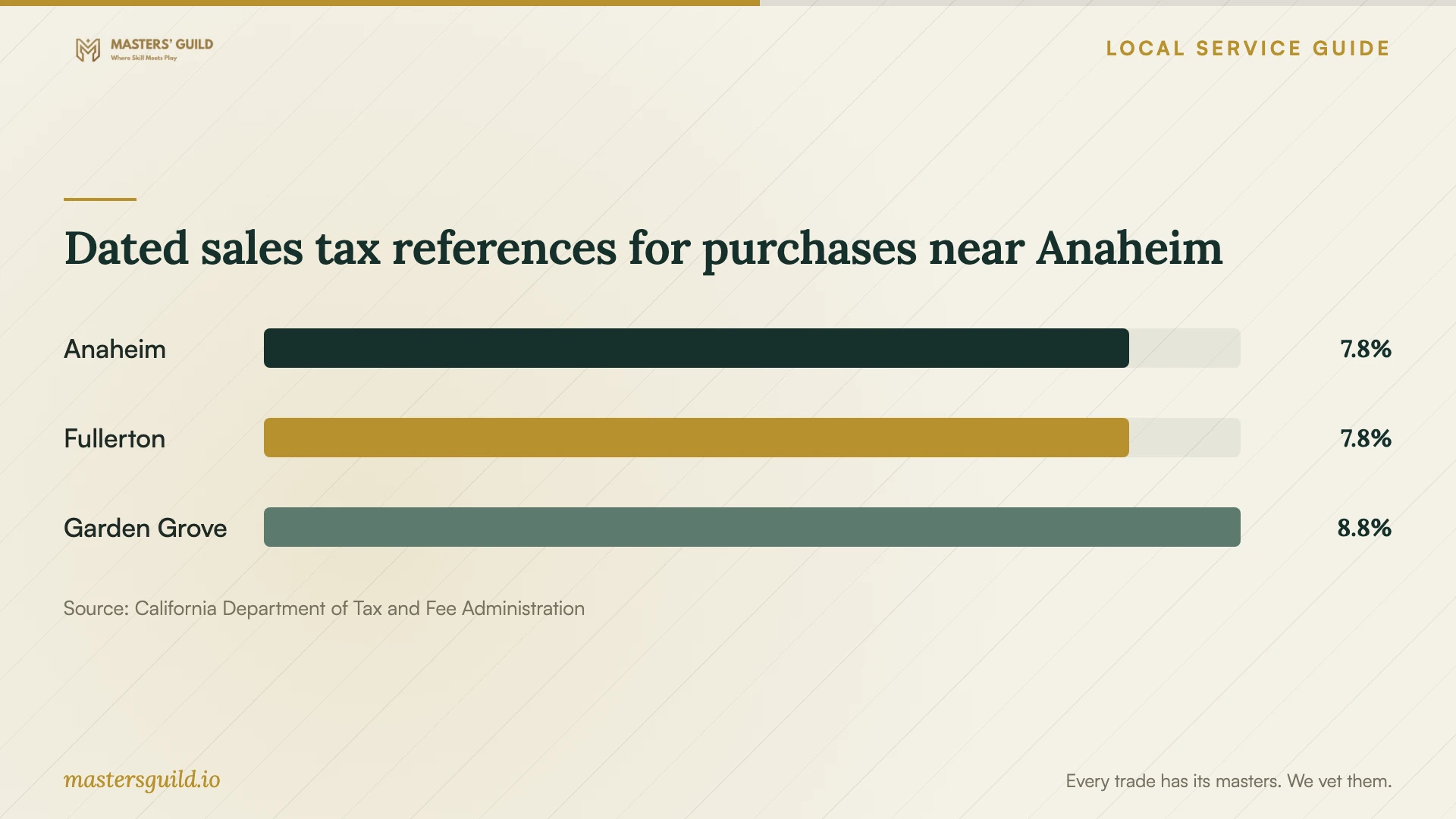
Dated sales tax references for purchases near Anaheim
Local details that affect your job
Verify the rate before a taxable purchase
CDTFA's table labeled effective October 1, 2026 lists Anaheim at 7.750%, but the same page warns that its rates may be outdated. Treat this as a dated reference and use CDTFA's address lookup before relying on a rate for a purchase. Have the seller identify the taxable portion of any accompanying hardware or physical-media software purchase. Downloaded software can receive different treatment, so do not apply the listed rate to the entire installation bill. [1] [4] [5]
Arrange household computer disposal in Anaheim
If you replace your computer, Orange County offers residents free household e-waste disposal at 1071 N. Blue Gum Street, Anaheim, 92806. The county lists hours of 9 a.m. to 3 p.m., Tuesday through Saturday, with closures on major holidays and during rainy weather. Staff may request proof of county residence. Verify your transferred files and remove sensitive information before drop-off: the county does not destroy computers or hard drives on the premises. The centers exclude business waste, so arrange a separate disposal route for business-owned equipment. [3]
Choose the scope before arranging service
| Your situation | Scope to request | Question before approval |
|---|---|---|
| One application on a working computer | Compatibility review, installation, activation, and task testing | Does the quote include a license, or will I supply it? |
| Operating-system change | Backup, compatibility review, installation, and recovery plan | Which files, programs, and settings will you preserve? |
| Moving to a replacement computer | Application setup and a named list of data to transfer | How will we verify the transferred files before erasing the old device? |
| Technician proposes covered computer repair | Written total-price estimate before repairs | What repair do you propose, and what total price am I approving? |
Your hiring checklist
- Record the computer model, operating system, program names, and error messages.
- Identify the license-owning account and gather purchase records without sending passwords.
- Back up important files and check that you can open the copies.
- Request a written scope covering installation, activation, testing, and exclusions.
- Confirm billing terms, travel charges, subscription costs, and approval for extra work.
- Arrange to enter passwords and verification codes during the appointment.
- Restart the computer and test your requested tasks before accepting completion.
- Verify transferred files and remove sensitive information before disposing of an old device.
Frequently Asked Questions
Should I buy the software before the appointment?
Have the technician confirm the required version, computer compatibility, and license type first. If you already own it, identify the account and purchase record. Confirm whether the quote includes software or covers labor alone, and approve recurring subscriptions yourself.
Does California charge sales tax on downloaded software?
CDTFA says software transmitted over the internet is generally nontaxable without physical media. Including a software backup copy on a flash drive can make the entire software sale taxable. Have the seller explain the treatment of your purchase, including any hardware or media. [4]
What should I do if the technician finds a repair problem?
Request an explanation and pause work if the scope needs to change. For covered personal-computer repair, BHGS requires a written total-price estimate before repairs. Get a revised scope and total price, then approve additional work before the technician proceeds. [2]
Can I recycle my old computer at the Anaheim center?
Orange County residents can use the household collection center for free computer disposal; the county excludes business waste. Remove sensitive information before delivery because the county does not destroy devices or drives there. Check the county's hours and weather or holiday closures before making the trip. [3]
Sources and scope
This guide combines the sources below with practical planning guidance. Figures apply to the stated geography and period; request a written quote for your property.