
Local service guide
Computer Virus Removal in Anaheim, CA
For Computer Virus Removal in Anaheim, choose a technician who will document the diagnosis, total proposed charge, file-preservation plan, and your approval before reinstalling the operating system or erasing a drive. Describe the symptoms and ask whether the appointment covers cleanup, account-security help, or recovery of files. For covered personal-computer repairs, California’s Bureau of Household Goods and Services requires a written estimate before work begins. [1]
Choose the appointment around your files
Before booking, write down what happened: the warning text, affected applications, recent downloads, and whether you gave someone remote access. Tell the technician whether the computer starts and which files you need to keep. Ask them to assess the symptoms before you authorize a cleanup package.
Request a file-preservation plan if you need family photographs, tax documents, or other records. Specify whether the technician may copy files to an external drive or cloud account. Ask them to explain the proposed treatment of the original drive and any temporary copies. Keep erasure and operating-system reinstallation as separate approval decisions.
If you suspect someone accessed your accounts, use a separate trusted device to contact the relevant account provider. Ask the technician to distinguish computer cleanup from account-security work. Include any requested password changes, remote-access software review, or account checks in the written scope rather than assuming they come with malware removal.
Get a complete quote before handing over the computer
Request an itemized quote for diagnosis, cleanup, backup, and reinstallation before approving work. Ask whether the diagnostic charge counts toward the repair and what you owe if you decline the proposed work.
BHGS lists personal computers among the electronics within its personal and home-office repair oversight. Its consumer guide requires service dealers to provide a written total-price estimate before covered repairs. The bureau also says dealers must quote any trip charge before the service call. [1]
For covered repairs, BHGS documentation guidance says the estimate should include parts, labor, the initial service-call charge, and applicable in-home transportation or travel costs. The dealer must obtain your consent for charges beyond the estimate. [2]
Ask the provider to explain whether its proposed software-only service falls within the BHGS repair framework. Request a written scope and approval limits for the work you are buying.
Arrange remote help, drop-off, or a home visit
Choose the appointment format after discussing access and file preservation. For remote help, arrange the session with the provider you selected and agree on how you will end access. For drop-off, ask who will hold the computer and where the work will occur. For a home visit, confirm the travel charge and whether the technician plans to remove the device.
When a dealer takes covered equipment from your home or accepts it at a repair location, BHGS requires a claim check or receipt. The bureau’s guidance includes the dealer’s registration number, repair-location contact information, device model and serial number, and a summary of your reported problem. Check those details before leaving. [2]
Ask the technician to explain any requested login access. Arrange a temporary login if it suits the work, and avoid including unrelated account passwords in your booking message. Confirm the expected completion date and follow-up terms. At collection, ask the technician to demonstrate the agreed checks and review the invoice with you.
Keep repair costs separate from fraud losses
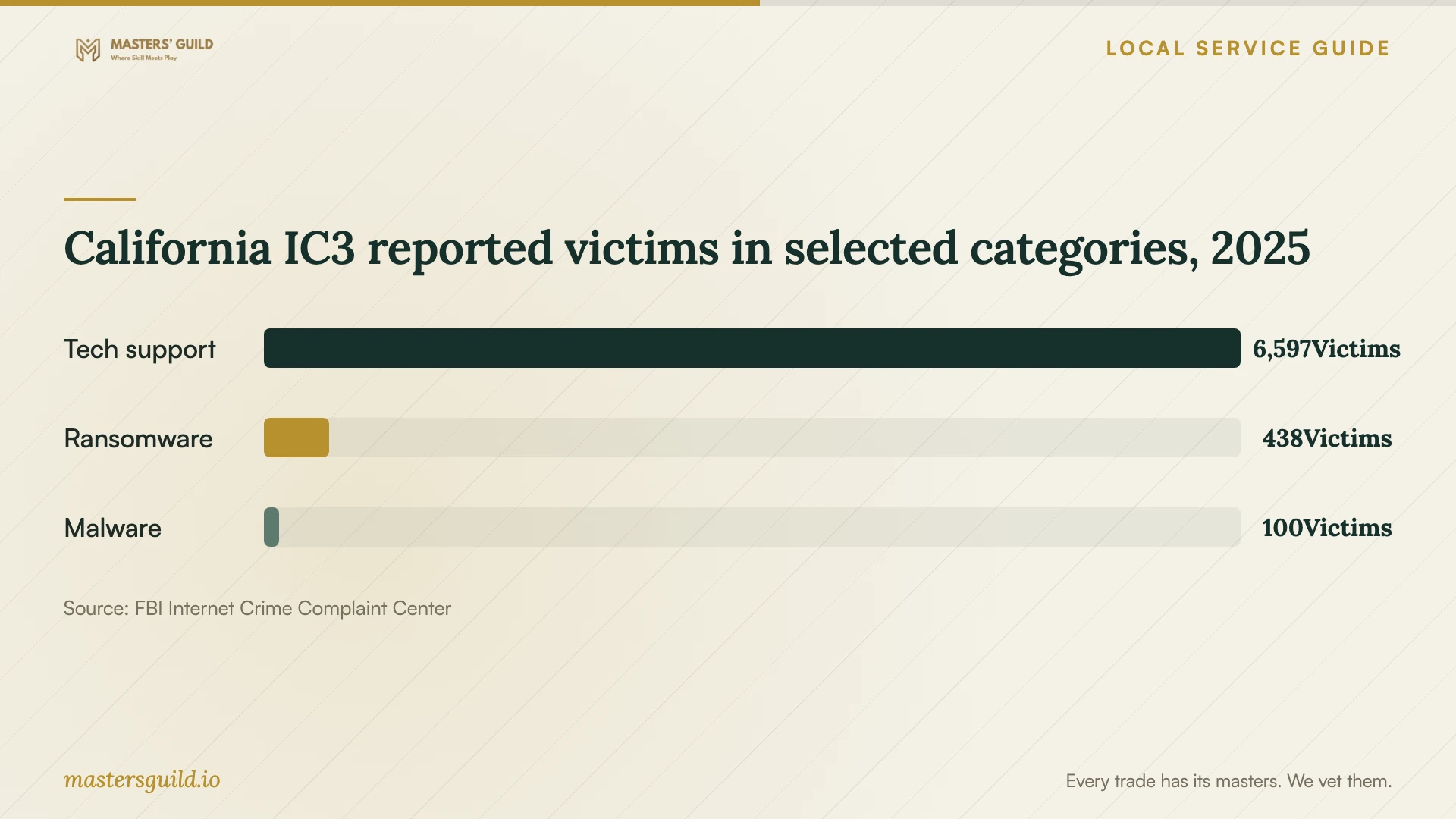
The FBI’s 2025 California IC3 report lists 6,597 victims in its tech-support category, 438 in ransomware, and 100 in malware. These statewide reported victim counts provide context for choosing help with care. They do not measure Anaheim infections, technician quality, or the price of a repair. [4]
If you contacted a provider through a warning message, pause before authorizing more work. Select a provider through contact information you obtained independently, explain any access you already granted, and ask for a written scope. Keep messages, invoices, and payment records if you need to dispute a charge or report suspected fraud.
Plan data removal before replacing the computer
Before choosing replacement, ask for separate quotes for repair, file recovery, and data sanitization. Tell the technician which files you want returned and ask how they will confirm completion. Hold disposal approval until you have decided what to do with the contents of the drive.
OC Waste & Recycling accepts household computers at its collection centers, but it states that staff do not destroy computers or hard drives on the premises. The county directs residents to remove sensitive information before dropping off electronics. Ask your technician to complete the agreed data-removal work before you use the Anaheim facility. [3]
California IC3 reported victims in selected categories, 2025
Local details that affect your job
California documentation for a personal-computer handoff
For Anaheim homeowners arranging covered computer repairs, California BHGS guidance gives you a concrete handoff checklist: obtain written diagnostic-fee disclosure before acceptance or removal, a written repair estimate, and a receipt identifying the device and dealer. If you are unhappy with covered repair work, the bureau accepts complaints. Confirm the applicability of these rules with the provider if you are buying software-only assistance. [1] [2]
Anaheim household e-waste drop-off
The Anaheim Collection Center is at 1071 N. Blue Gum Street, 92806. OC Waste & Recycling lists hours of 9 a.m. to 3 p.m., Tuesday through Saturday, with closures on major holidays and during rainy weather. Orange County residents can use the household service free; staff may request proof of residence. The centers exclude business and organizational waste. Complete sensitive-data removal beforehand because staff do not destroy drives at the facility, and check operating conditions before traveling. [3]
Match the booking to your main concern
| Your situation | Request before booking | Approval to hold back |
|---|---|---|
| Computer starts; you want symptoms assessed | Diagnosis and a written cleanup scope | Extra work beyond the agreed scope |
| Important files lack a usable backup | A file-preservation assessment and separate backup quote | Drive erasure or reinstallation |
| You gave someone remote access | Review of access software and a separate account-security discussion | Further access until you choose the provider |
| You prefer drop-off | Repair-location details and a device receipt | Expanded work without your consent |
| You plan to replace the computer | Separate file-recovery and data-sanitization quotes | Disposal before the file and data decisions |
Your hiring checklist
- Record the warning text, symptoms, and any remote access you granted.
- List essential files and tell the technician about existing backups.
- Request itemized diagnostic, repair, backup, and travel charges.
- Set written limits on file access, copying, reinstallation, and erasure.
- Confirm the repair location, device receipt, and collection arrangements.
- Ask how the provider will obtain approval for additional work.
- Review the completed work and arrange data removal before disposal.
Frequently Asked Questions
How much should I budget for virus removal?
Request an itemized quote for diagnosis, cleanup, backup, and reinstallation before approving work. Confirm the proposed total and what you owe if you decline the repair. For covered repairs, California BHGS requires a written estimate before work begins. [1]
Can the technician erase my computer?
State your authorization limits before handing it over. Ask the technician to explain the proposed steps and obtain your approval before erasure or reinstallation. Specify which files you want preserved and how you want them returned.
What should I receive when I drop off the device?
For covered equipment repairs, BHGS requires a claim check or receipt. Check the dealer and repair-location details, registration number, device model and serial number, and summary of the reported problem. [2]
Can I recycle the computer in Anaheim after cleanup?
Orange County residents can take household computers to the Anaheim Collection Center at 1071 N. Blue Gum Street. Remove sensitive information first. The county does not destroy drives there and does not accept business waste through these household centers. [3]
Sources and scope
This guide combines the sources below with practical planning guidance. Figures apply to the stated geography and period; request a written quote for your property.