
Local service guide
Network Setup and Support in Allentown, PA
Arrange Network Setup and Support in Allentown, PA by asking a technician to diagnose the connection, confirm your internet provider’s equipment requirements, and quote the work by task. Request separate prices for troubleshooting, router or mesh setup, and any Ethernet cabling. Before buying a modem, confirm your address’s network type: Astound publishes special Lehigh Valley upgrade-area requirements, while Service Electric allows customer-owned equipment but excludes its repair and configuration from its support responsibility. [1] [2]
Choose the right person for the problem
Describe the failure before booking: all devices lose internet, one room has weak Wi-Fi, a printer will not connect, or a work computer needs a wired connection. Record when the problem happens and which devices you have tested. Ask the technician to compare a wired connection through the router with Wi-Fi near the router and in the affected room. Request a diagnosis before authorizing hardware purchases.
For a Service Electric account, contact Lehigh Valley internet support at 610-865-9100 to investigate the provider connection. The company permits customers to use their own modem and router, but says it does not take responsibility for repairing or configuring customer-owned equipment. Ask both the provider and the independent technician where their work stops so you can avoid paying for overlapping visits. [2]
Confirm compatibility before ordering hardware
Give the technician your provider name, plan tier, modem model and router model. For Astound, ask the provider whether your address falls within a fiber network upgrade area or uses fiber-to-the-home or Ethernet delivery. Astound names the Lehigh Valley as a current upgrade area and specifies a Netgear Nighthawk CM3000 for customers in those upgrade areas. Its 5G download and 1G upload tier requires Astound’s modem and eero Max 7. [1]
Astound also requires its equipment for fiber-to-the-home and Ethernet-delivered internet. Customers keeping Astound Digital Phone need an Astound EMTA device even when they use their own modem. Ask the technician to preserve phone service during the change. Service Electric requires a DOCSIS 3.1 modem for gigabit service and higher; confirm approval for the exact model before purchase. [1] [2]
Separate setup costs from monthly charges
Request a written quote that separates the visit fee, labor, hardware, cables, wall plates and follow-up support. For cabling, specify the number of outlets, proposed routes, labeling, testing and responsibility for wall repairs. Ask the installer to identify any building approvals or permissions needed for the proposed route before you accept the work.
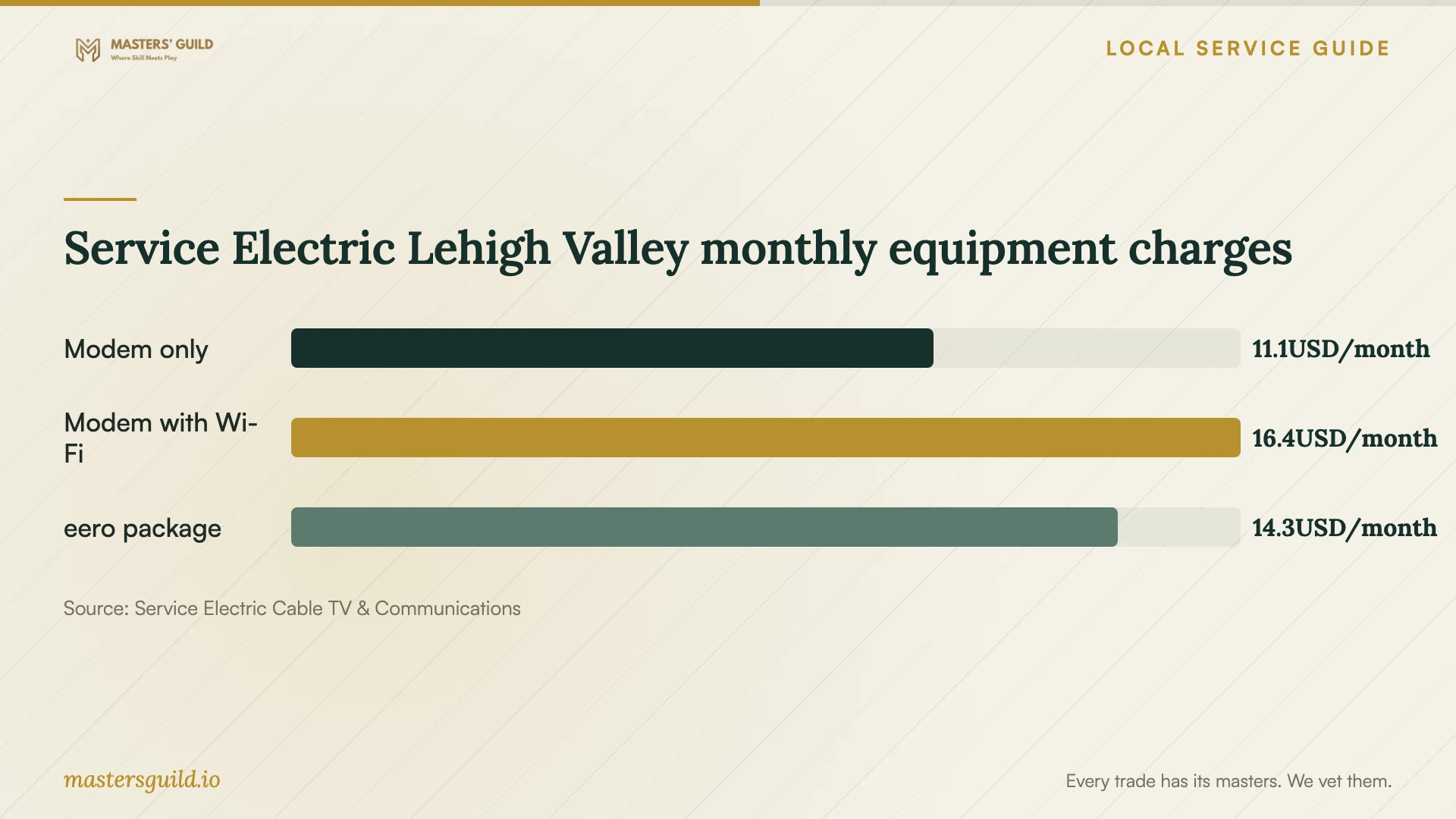
Service Electric’s Lehigh Valley residential Broadband Facts labels list estimated monthly equipment charges, including state sales tax: $11.08 for a DOCSIS 3.1 modem alone, $16.38 for a modem with Wi-Fi, and $14.26 for an eero base router and beacon. The combined modem with Wi-Fi option does not apply to modem speeds of 1 Gig or higher. Treat these as equipment line items; ask the provider which charges your chosen configuration would combine. [3]
The chart compares those published rental options. It does not establish what an independent technician should charge or how much owning equipment would save. Compare a written purchase-and-setup quote with the recurring charges on your own account, then ask who handles future faults. [3]
Agree on testing and account handover
Name the rooms and devices the technician must test before leaving. Include a video call from your work area, the household printer and any devices that need reconnection after a network-name change. For Ethernet work, request a labeled outlet list and test results for each installed run. Agree on the evidence of completion when you accept the quote.
Keep router and mesh accounts under your own email address. Enter passwords yourself when possible, and ask the technician to explain any remote access they propose. Request a brief handover covering administrator access, equipment locations, settings changed and the procedure for getting support. Agree on the follow-up period and any return-visit charge in writing.
If you are considering a provider change, use the FCC’s address-level broadband search to review provider-reported technologies and maximum advertised download and upload speeds. Confirm service with the provider before scheduling internal network work. The FCC also offers availability and location challenges if the map information does not match your address or ordering experience. [4]
Service Electric Lehigh Valley monthly equipment charges
Local details that affect your job
Lehigh Valley Astound upgrades affect modem purchases
Astound’s regional upgrade guidance changes the shopping list for affected addresses: it requires a CM3000 in fiber network upgrade areas and provider equipment for its 5G download and 1G upload tier. Ask Astound to identify your address’s delivery type and tier before a technician orders equipment. The regional notice does not establish that every Allentown address uses the same network. [1]
Service Electric support has an equipment boundary
Service Electric publishes a Lehigh Valley support number, 610-865-9100, and excludes customer-owned equipment repair and configuration from its responsibility. If you own the router or modem, ask an independent technician to quote that work and coordinate with provider support when testing the incoming connection. [2]
Choose your next step before booking
| Situation | First step | Scope to request |
|---|---|---|
| Connection fails across several devices | Ask the provider to investigate the incoming service | Approve independent troubleshooting after agreeing on the provider’s findings |
| Wi-Fi fails in a particular room | Request wired and room-by-room Wi-Fi tests | Quote placement changes, mesh setup or cabling after diagnosis |
| Buying an Astound modem | Confirm whether the address is in the Lehigh Valley upgrade area | Match hardware to the delivery type and tier before ordering |
| Configuring owned Service Electric equipment | Arrange an independent technician for configuration | Define responsibility for future equipment repair and support |
| Comparing rental with ownership | Check the equipment line items on your account | Compare recurring fees with a separate hardware and setup quote |
Your hiring checklist
- Record the affected rooms, devices, symptoms and times of failure.
- Photograph equipment model labels without sharing passwords or account credentials.
- Ask your provider to confirm the delivery type, plan tier and approved modem.
- Request separate prices for diagnosis, setup, hardware and cabling.
- For in-wall work, agree on routes, permissions, testing and wall repairs.
- Choose the rooms and devices for completion testing before the visit.
- Keep administrator accounts under your control and request a written handover.
Frequently Asked Questions
Should I buy a new router before booking support?
Ask for diagnosis first. Give the technician your equipment models and describe the affected rooms. Request a recommendation based on the agreed tests, and confirm modem compatibility with your provider before ordering equipment.
Can I use my own modem with Astound?
Eligibility depends on the connection and service tier. Astound specifies a CM3000 for its Lehigh Valley fiber network upgrade areas, requires its own equipment for fiber-to-the-home or Ethernet delivery, and requires its modem and eero Max 7 for the 5G download and 1G upload tier. Confirm your address’s requirements with Astound. [1]
Will Service Electric configure my own router?
Service Electric says it does not take responsibility for repairing or configuring customer-owned equipment. Ask an independent technician to include setup, device reconnection and account handover in the quote. [2]
What should an Ethernet installation quote include?
Ask for outlet locations, cable routes, materials, labeling, test results and wall-repair responsibility. Have the installer identify required permissions or approvals for the proposed work. Agree on completion tests and follow-up support before accepting the quote.
Sources and scope
This guide combines the sources below with practical planning guidance. Figures apply to the stated geography and period; request a written quote for your property.