
Local service guide
Cloud Service Setup in Allentown, PA
Arrange Cloud Service Setup in Allentown, PA by asking a technician to quote your accounts, devices, data transfer, permissions, and a recovery test as separate deliverables. Before agreeing to a migration date, ask them to check upload capacity at your business address. Astound distinguishes its Lehigh Valley asymmetric High Speed Internet from its symmetric Business Class Internet, so request the upload specification for your exact service. [2]
Define the work before requesting quotes
Describe the result you need: shared office files, a backup you can restore, a move from an existing account, or access across staff devices. Ask the technician to explain which tasks they will configure and demonstrate. For a small office, specify who should view, edit, and administer each shared folder. Include any staff departures or account changes you want handled during the appointment.
List the computers and phones involved, identify the source folders, and record the amount of data you want transferred. Ask whether the technician will work remotely or attend your premises, who will monitor unfinished transfers, and whether follow-up work carries another charge. Request a written scope before sharing access.
Check upload capacity before setting a migration date
Ask the technician to measure upload performance on the connection they will use and run a small trial transfer. Have them propose an upload schedule around your trading hours and agree on what you will do if the transfer remains unfinished when the appointment ends.
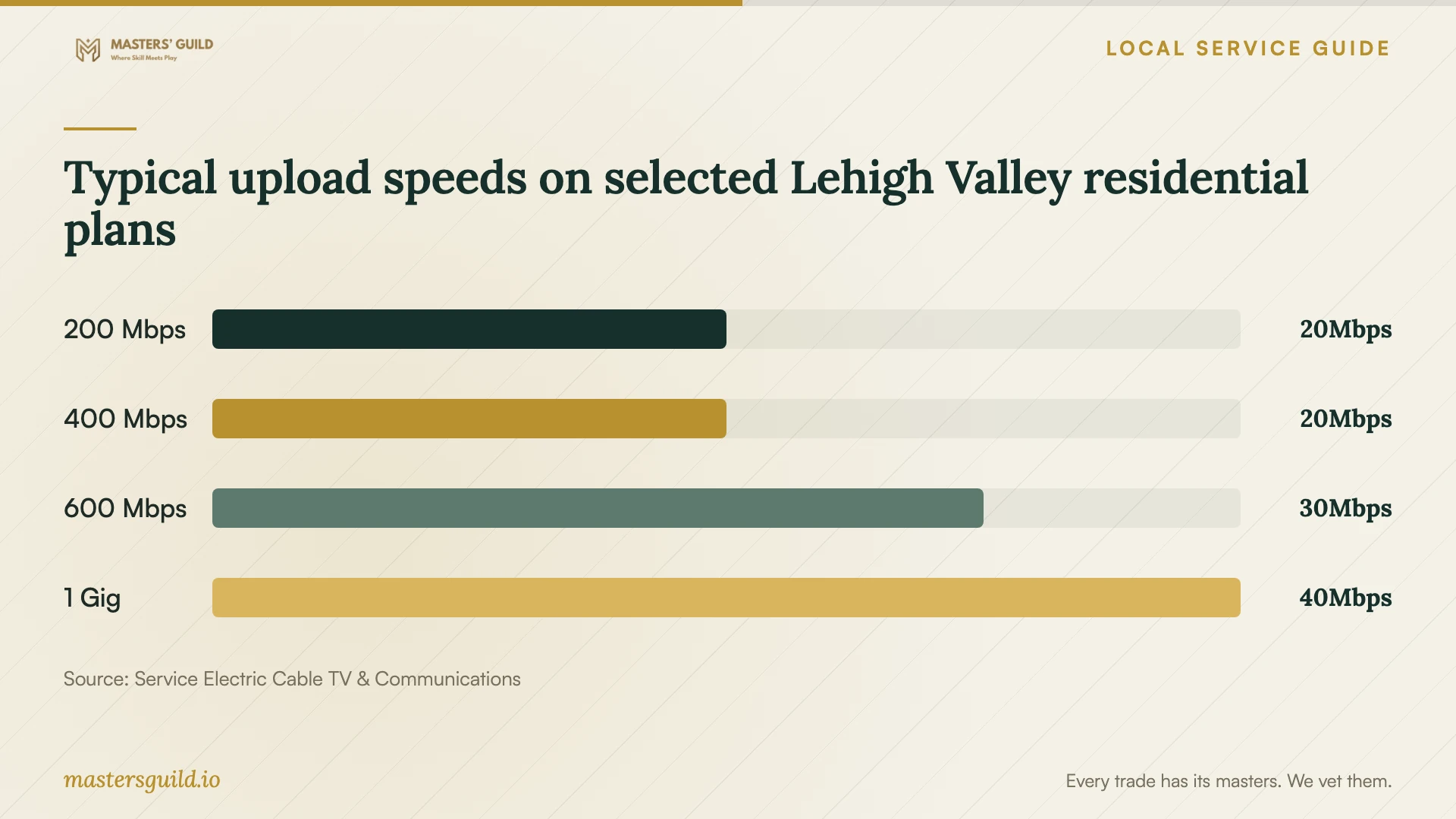
Service Electric's Lehigh Valley residential labels list typical uploads of 20 Mbps for its 200 through 400 Mbps download tiers, 30 Mbps for its 500 and 600 Mbps tiers, and 40 Mbps for its 1 Gig tier. The provider says speeds are approximate and not guaranteed. These figures give you a concrete reason to inspect upload specifications instead of choosing a plan by its download name. [1]
For business premises, obtain a commercial quote and the service's own specifications. Service Electric says its displayed prices are residential unless noted and commercial pricing may differ. Astound's regional business page distinguishes asymmetric High Speed Internet from symmetric Business Class Internet and requires an address check for available services. [1] [2]
Separate setup charges from ongoing expenses
Request separate amounts for technician labor, migration, recovery testing, subscriptions, and ongoing support. Ask the bidder to state the billing basis, included devices and accounts, any travel charge, and the approval process for extra work. The supplied sources do not establish an Allentown cloud-setup labor price, so compare written quotes for your own scope.
If you also consider a connection change, request the total recurring bill and the price after any promotion. Astound's Lehigh Valley business offer disclosure lists a Network Access and Maintenance Fee of up to $21.85 per month, excludes taxes and fees from advertised pricing, and says standard Internet pricing applies after the first 12 months of the described offer. Confirm the terms for the service you select. [2]
Agree on access and recovery before work starts
Require the technician to register the service under an account your business controls. Decide who will hold administrator access, receive billing notices, and manage recovery information. Enter your own credentials during the session rather than sending passwords in the job description. Ask the technician to document any access they receive and remove temporary access at handover.
Ask for a written explanation of the proposed backup schedule, retained versions, deletion recovery, and restore procedure for the chosen product. Require a demonstration that recovers a sample file to a separate folder. Keep your source copy until you have checked the transferred files and approved the recovery test.
Set clear conditions for accepting the job
Before signing off, open representative files, check access from the agreed devices, and test a restricted user account. Ask the technician to show you unfinished transfers, excluded folders, and any errors. Record who will resolve each outstanding item and when you should expect an update.
Request a handover note with account ownership, subscription renewal details, support contacts, and recovery instructions. Add Pennsylvania's business incident-reporting route to your contact sheet: State Police encourage voluntary reporting to PA CyberCom and provide 833-707-3843 for reporting and law-enforcement referrals. Treat that contact as an incident-reporting resource, and arrange technical support separately. [4]
Typical upload speeds on selected Lehigh Valley residential plans
Local details that affect your job
Lehigh Valley upload tiers can change your upgrade choice
If your home office uses Service Electric residential service, moving from the 200 Mbps tier to the 400 Mbps tier leaves the published typical upload at 20 Mbps. Before paying for that upgrade to support a cloud migration, ask your technician to check the actual bottleneck. The regional table does not establish service availability at your address or commercial performance. [1]
Ask Astound for the business service type at your premises
Astound's Lehigh Valley business guidance describes High Speed Internet as asymmetric and Business Class Internet as symmetric. Its availability process uses the street address and optional unit number. For an office migration, request the available product name, upload specification, and complete quote for your unit before you commit to the transfer schedule. [2]
Include a Pennsylvania incident contact in the handover
PA CyberCom accepts voluntary cyber-incident reports from Pennsylvania businesses, including ransomware and business email compromise, at 833-707-3843. Ask the technician to include that number alongside your cloud administrator and technical-support contacts so you can distinguish reporting from repair help. [4]
Choose the scope of your appointment
| Your situation | Work to request | Condition for acceptance |
|---|---|---|
| You want files available on agreed devices | Account setup, selected folders, and device access | Open sample files on each included device |
| You want recoverable business records | Backup configuration and written recovery instructions | Recover a sample file to a separate folder |
| You are moving an existing file collection | Inventory, trial transfer, migration schedule, and exception list | Check representative files and resolve transfer errors |
| Several staff members need different access | Named-user permissions and administrator handover | Test both an authorized user and a restricted user |
| You are considering an Internet upgrade | Measured upload check and address-specific service comparison | Approve the upload specification and total recurring cost before ordering |
Your hiring checklist
- Prepare a device list, source-folder list, and data-volume inventory.
- Identify the business account owner and the staff members who need access.
- Request separate setup, subscription, migration, and support charges.
- Ask for a connection check and trial upload before agreeing to a transfer schedule.
- Agree on temporary technician access and its removal at handover.
- Retain the source copy while you check transferred files.
- Witness a sample recovery and check restricted-user permissions.
- Collect written instructions, outstanding-work notes, and support contacts.
Frequently Asked Questions
What should a cloud-setup quote include?
Ask for the included accounts, devices, folders, migration work, permissions, and recovery test. Request separate subscription and support charges, plus a written process for approving extra work. Agree on who monitors transfers that continue after the appointment.
Will a faster Internet plan improve my upload?
Check the upload specification for the proposed tier. Service Electric's Lehigh Valley residential 200 through 400 Mbps plans all list 20 Mbps typical upload. Ask your technician to measure your connection before recommending an upgrade; the provider does not guarantee those speeds. [1]
How do I check options at my office address?
Use the FCC's address-search instructions to compare provider-reported technologies and maximum advertised upload and download speeds. Then confirm availability with the provider for your exact premises. Astound also requests an address check before displaying its Broadband Consumer Labels. [2] [3]
How should I approve the completed setup?
Open sample files, test the agreed device access and staff permissions, and witness a recovery test. Obtain written account and recovery instructions. Ask the technician to record unfinished uploads or errors and agree on follow-up before you accept the job.
Sources and scope
This guide combines the sources below with practical planning guidance. Figures apply to the stated geography and period; request a written quote for your property.