
Local service guide
Data recovery and backup in Albuquerque
Data recovery and backup in Albuquerque should start with a written scope: identify the files you need, establish who will handle your device, and require approval before recovery work begins. Choose a provider who can demonstrate restoration of your business files. For suspected ransomware, request incident-response expertise and isolate affected devices from the network before arranging restoration, following CISA guidance. [4]
Choose the service around the files you need
Tell prospective providers whether you need missing files recovered, a working backup restored, or a backup system installed. Name the business tasks you need to resume: opening accounting records, retrieving customer documents, or accessing shared project folders. Have the provider quote those outcomes and explain how you will check the result.
Prepare a device list, the last date you accessed the files, the symptoms you observed, and any steps you have taken since. Check whether the provider handles your device and storage arrangement, including external drives or multi-drive systems. For irreplaceable files, pause experiments and request instructions before attempting repair tools or reinstalling software.
For encrypted devices, locate your recovery key and agree on a secure handover method. CISA warns that losing recovery keys or passwords can cause permanent data loss. Avoid sending credentials with an ordinary quote request; establish which access the technician needs and how you will revoke it afterward. [5]
Get diagnostic and data-handling terms in writing
Request a written quote for your device and priority files. Include the diagnostic charge, the authorization point for further work, and the amount you owe if the provider retrieves none of your priority files. Get separate amounts for return storage, shipping, urgent service, and backup subscriptions. Use the same file list when comparing quotes.
Confirm whether you will hand over the device in person, arrange pickup, or ship it to another facility. Request a receipt identifying the device and accessories. Establish who can access the files, whether a subcontractor will receive them, how the provider protects recovered copies, and when it will delete its working copies.
For an ongoing managed backup service, put security requirements and access limits in the contract. CISA recommends formalizing these requirements for third-party providers and limiting their access to the devices and servers needed for their role. Assign someone to receive failure alerts and take action when a scheduled backup does not complete. [4]
Specify a backup you can restore
Have the installer restore selected files into a separate test location and let you open them before accepting the setup. Include files from the applications your business depends on. Record the backup date used, the steps followed, and the person responsible for future tests. CISA recommends testing backups in a disaster recovery scenario. [4]
Set an acceptable amount of lost work and an acceptable interruption to business. For example, decide whether you can re-enter a day's transactions or need more frequent copies. Have the provider explain its proposed schedule, retention period, storage capacity, and restoration process against those requirements.
Include an offline, encrypted copy of critical data in the discussion. CISA explains that ransomware can delete or encrypt accessible backups. Its device guidance also recommends disconnecting an external backup drive when you are not using it for backups. Have the provider document who rotates or disconnects that copy and where you will keep the recovery key. [4] [5]
Separate outage troubleshooting from cyber incident response
After a power interruption, check PNM's outage map and whether neighboring premises have power. PNM recommends checking the breaker box if neighbors have electricity and reporting an outage once you establish that the problem is not your breakers. Give your IT provider a timeline of the interruption and the device symptoms rather than assuming the outage caused data loss. [2]
For suspected ransomware, disconnect affected devices from Ethernet or Wi-Fi and contact your incident-response provider. CISA advises powering down only when network isolation is not possible, because shutdown loses potential evidence in volatile memory. Ask the responder to plan containment and restoration on a clean network before reconnecting backups. [4]
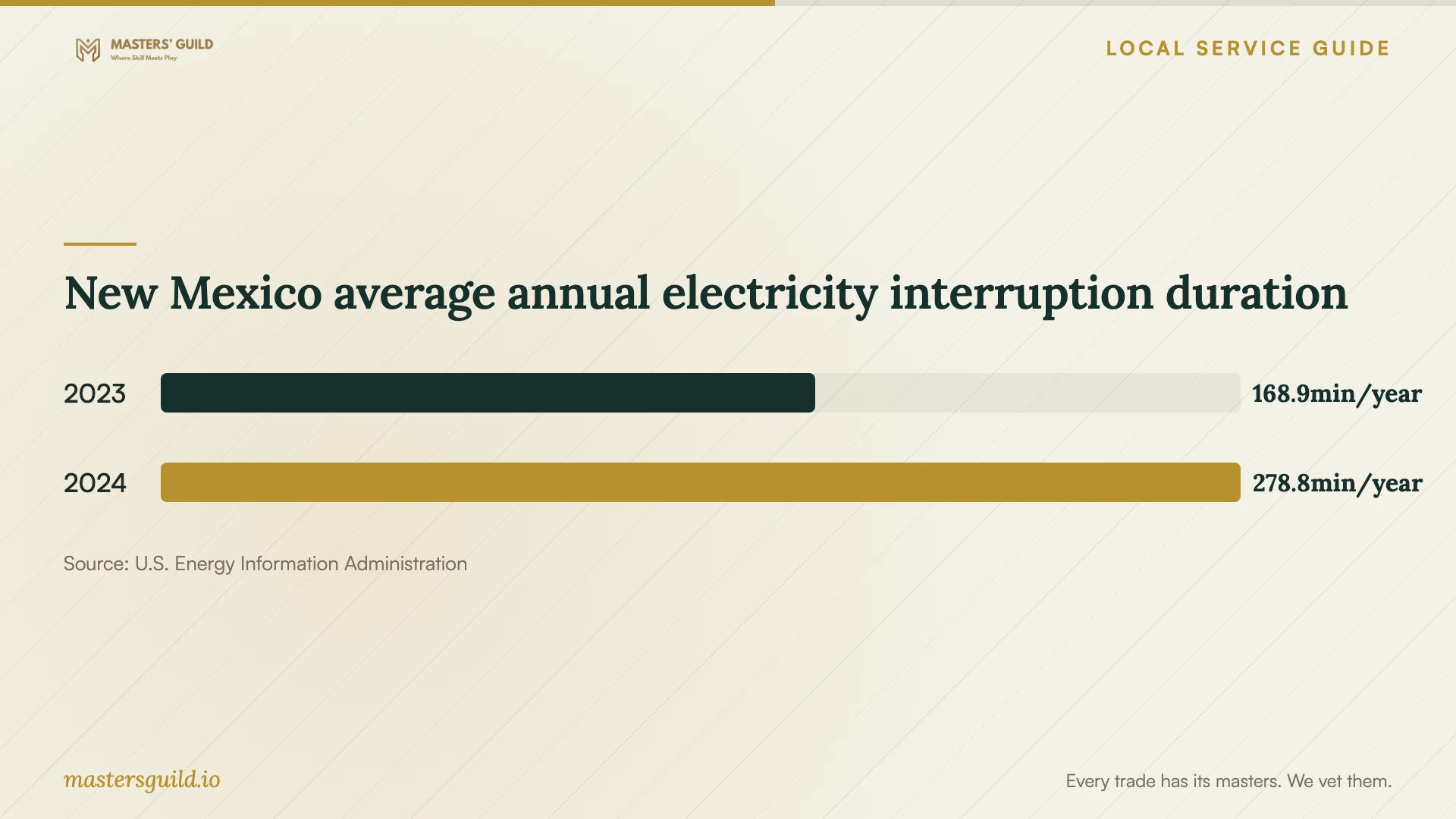
New Mexico average annual electricity interruption duration
Local details that affect your job
Use PNM's outage information to choose the next call
For premises served by PNM, check its outage map for status, estimated restoration time, and cause when known. PNM provides outage reporting online or by phone at 888-342-5766. Its text-reporting instructions require registration by texting #REG to 78766 before reporting with #OUT. Message and data rates may apply. Ask your backup installer to include a written shutdown and restart procedure for power interruptions. [2]
Plan disposal separately from recovery
Albuquerque lists Eagle Rock Convenience Center as an e-waste recycling destination and states that disposal fees apply. Accepted items include hard drives, thumb drives, laptops, and servers. The city excludes batteries of any kind from e-waste recycling. Before taking business equipment there, confirm current acceptance arrangements through 311 and have your provider document data sanitization after you verify the recovered files. The city's page does not establish a secure-erasure service. [1]
Use statewide outage data as planning context
EIA reports 278.8 minutes of average customer interruption duration for New Mexico in 2024, including major events. Reporting covered an estimated 90.1% of the state's customers. Use this statewide context to discuss power-interruption procedures with your provider; it does not measure your premises, Albuquerque neighborhoods, or the likelihood of drive failure. [3]
Match the problem to the requested scope
| Situation | Service to request | Acceptance question |
|---|---|---|
| Missing files with an existing backup | Backup assessment and restoration into a separate location | Can I open the priority files from the selected backup? |
| Unreadable device or missing files without a checked backup | Diagnosis followed by a recovery quote requiring approval | What do I owe if you cannot retrieve my priority files? |
| Suspected ransomware | Incident response, network isolation, and clean-network restoration | Who will preserve evidence and approve reconnection? |
| Working systems needing protection | Encrypted backup setup, offline-copy procedure, and restore testing | Who checks failures and demonstrates a restore? |
| Retired equipment | Verified file transfer and documented sanitization before recycling | Will I receive confirmation of sanitization before disposal? |
Your hiring checklist
- List priority files and the business tasks you need to resume.
- Record device details, symptoms, and your previous troubleshooting steps.
- Locate encryption recovery keys and agree on a secure access method.
- Get diagnostic fees, approval limits, and unsuccessful-recovery terms in writing.
- Confirm the handover location, subcontractors, and device receipt.
- Require a restore test using files you can open and check.
- Assign responsibility for backup alerts, offline copies, and future restore tests.
- Verify recovered data before authorizing sanitization or equipment disposal.
Frequently Asked Questions
How should I compare recovery quotes?
Give each provider the same device description and priority file list. Compare diagnostic fees, approval limits, return storage, shipping, and charges for unsuccessful recovery. Ask each provider to define success using the files you need, and obtain a written estimate before authorizing further work.
Should I leave an external backup drive connected?
CISA recommends disconnecting an external drive when you are not backing up, because ransomware could access and damage connected backups. Ask your provider to document a workable offline-copy routine and assign someone to carry it out. [5]
Should I turn off a computer showing a ransom message?
CISA recommends isolating affected devices from the network first. It advises shutdown only if isolation is not possible, because powering down loses potential evidence in memory. Contact an incident responder and avoid reconnecting backup media until you receive instructions. [4]
Can I recycle a drive after recovery?
Check that your recovered files open, then arrange data sanitization before disposal. Albuquerque accepts hard drives through its Eagle Rock e-waste program and charges disposal fees. Its published page does not promise secure erasure, so request sanitization as a separate service. [1]
Sources and scope
This guide combines the sources below with practical planning guidance. Figures apply to the stated geography and period; request a written quote for your property.