
Local service guide
Computer Virus Removal in Albuquerque, NM
Arrange Computer Virus Removal in Albuquerque by requesting a device-specific written estimate, a cleanup scope, and a plan to preserve your files before authorizing repairs. Describe whether the computer starts and any access you gave a support caller. Agree on remote service, drop-off, or a home visit, and require separate approval for drive erasure, operating-system reinstallation, or disposal.
Prepare a useful repair request
Give the technician a short account of what happened: the message you saw, when it appeared, whether the computer starts, and any software you installed afterward. Include whether you called a number on the screen, shared a password, or allowed someone to control the computer. Request an assessment before agreeing to a cleanup package.
Name the files you need to preserve, such as family photos or financial records. Describe your backup and when you last checked it. If you cannot open important files, request a recovery assessment before approving a reset. Put your file-preservation requirements on the intake record so the technician can quote the work you want.
Choose the service method and control access
Discuss whether remote service fits your symptoms and what access the technician would need. Agree on who starts the connection, how you will supervise the session, and how the technician will remove or disable remote access afterward. For drop-off service, obtain a receipt identifying the computer and accessories you leave. For a home visit, name the devices you want examined.
The FBI recommends contacting a company for verification when an unsolicited caller claims to represent it and requests personal information or cryptocurrency. Use that advice when choosing support: verify the contact before arranging access, and tell your chosen technician about any software or remote connection a previous caller asked you to use. [4]
Agree on the estimate and file-handling boundaries
Request separate amounts for diagnosis, cleanup, operating-system repair, and backup or recovery work. Ask whether you owe the diagnostic charge if you decline repairs. Set an approval limit and a completion window, with an update before additional work. Compare offers using the same tasks and file-preservation requirements.
New Mexico’s Taxation and Revenue Department explains that businesses can pass gross receipts tax to purchasers and must state it separately on the invoice when they do. Rates vary by location. The department describes a general delivery-location rule with exceptions, so ask the provider to identify the applicable GRT and give you the final total for your service arrangement. [1]
Put file access in writing. Agree on which folders the technician may inspect, where they would store a temporary backup, and when they would delete their copy. Give separate approval for a drive wipe or operating-system reinstall. Before approving either, ask how you will regain access to your files and applications and who will perform that work.
Handle suspicious payment requests
The FBI advises against scanning a QR code and sending payment through a cryptocurrency kiosk on instructions from someone you have never met. If a support caller makes that request, stop the payment discussion and verify the claimed company through a contact channel you find yourself. Describe the request and any access you granted when arranging your repair. [4]
If you believe you suffered a cryptocurrency-kiosk scam, the FBI recommends reports to local police and IC3. Keep receipts and transaction documentation. Include the transaction ID, destination wallet address, kiosk location, and information about the caller if available. Ask your technician for device and account follow-up instructions alongside the cleanup summary. [4]
Check completion and plan any replacement
Before accepting completion, ask the technician to explain what they found, what they changed, and what remains unresolved. Open the files and applications you identified at intake. Obtain written follow-up instructions and the terms for returning if symptoms recur. If you choose replacement, decide who keeps the old drive and who transports the equipment.
Albuquerque directs e-waste recycling to Eagle Rock Convenience Center. Its accepted list includes computers, laptops, hard drives, and several peripherals; it excludes batteries and CRT monitors from that program. Confirm the equipment category before transporting it, and finish the file-recovery and drive-handling work you authorize before disposal. [2]
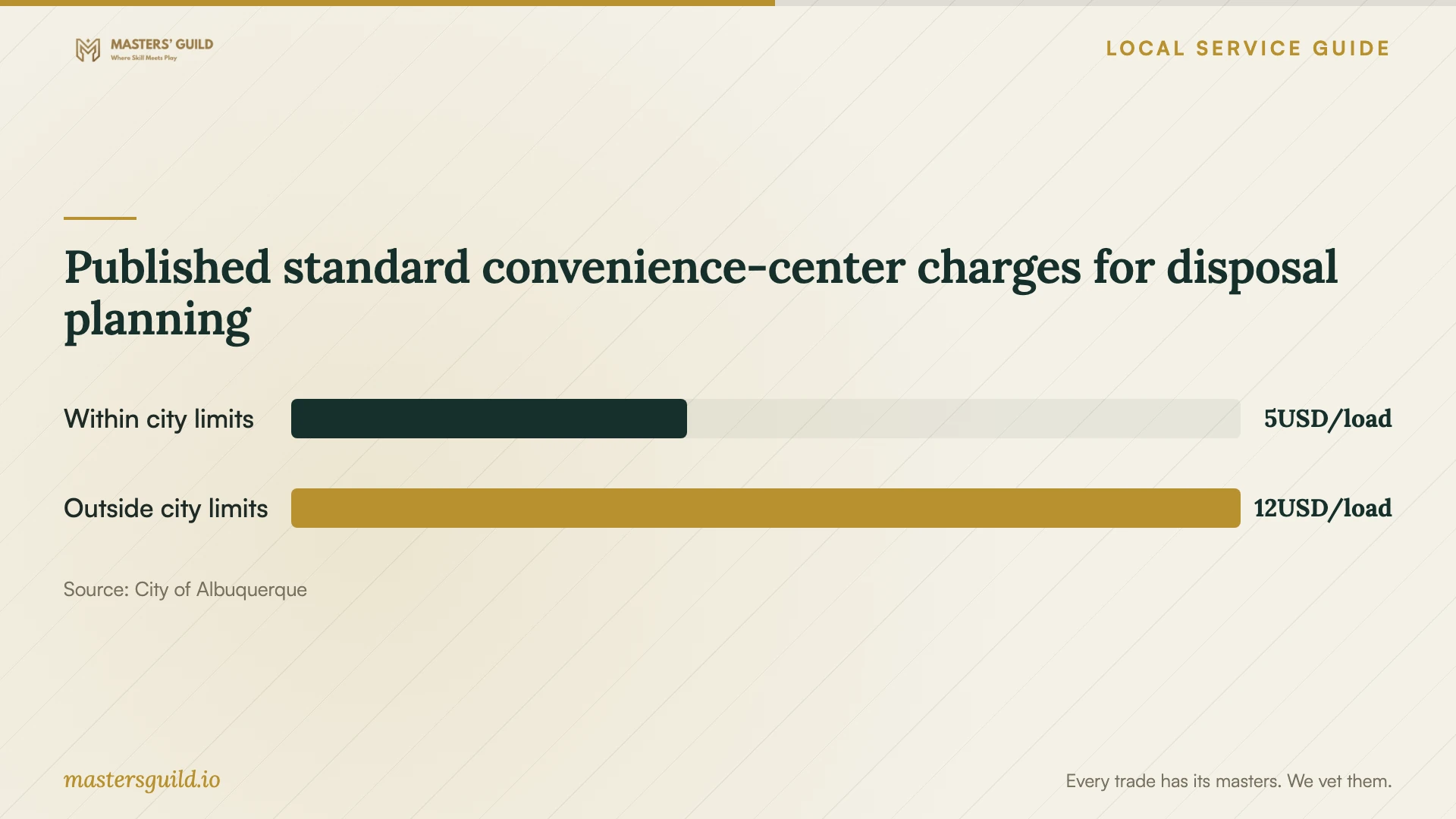
Published standard convenience-center charges for disposal planning
Local details that affect your job
Compare the total including GRT
New Mexico includes receipts from services in its gross receipts tax framework, subject to applicable exemptions and deductions. A repair business that passes GRT to you must state it separately on the invoice. Request both the service subtotal and final total before choosing remote, drop-off, or home service; ask the provider to identify the rate it applies. [1]
Confirm Eagle Rock acceptance before disposal
The city directs e-waste recycling to Eagle Rock Convenience Center and notes that disposal fees apply. Computers, laptops, and hard drives appear on its accepted list. Batteries and CRT monitors fall outside that e-waste program. Give the technician an equipment list and settle drive retention or authorized data handling before arranging transport. [2]
Decide who transports the retired computer
The city’s 2026 convenience-center schedule lists standard dumping at $5 per load plus tax for residents and businesses within city limits, and $12 per load for those outside city limits. The city accepts a utility bill, driver’s license, or valid identification card as proof of residency. Confirm the applicable disposal charge and any technician transport charge before adding disposal to your repair agreement. [3]
Choose your next step
| Your situation | Suggested next step | Confirm before authorizing |
|---|---|---|
| Computer starts and you can describe the symptoms | Discuss a supervised remote assessment | Required access, scope, and how access ends |
| Computer will not start or important files will not open | Request an intake and file-recovery assessment | File preservation and separate approval for erasure or reinstall |
| An unsolicited support caller requested personal information or cryptocurrency | Verify the claimed company, following FBI advice | Contact details you obtained yourself |
| You plan to replace the device | Agree on drive handling and check Eagle Rock acceptance | Equipment category, transport responsibility, and disposal charges |
Your hiring checklist
- Record symptoms, recent downloads, and any access you gave another person.
- List the files you want preserved and describe your existing backup.
- Confirm the service method, diagnostic charge, and completion window.
- Request a written final total and set an approval limit for additional work.
- Agree on permitted file access, temporary backup storage, and copy deletion.
- Approve drive erasure and operating-system reinstallation as separate decisions.
- Obtain an intake receipt and a written repair summary.
- Decide who keeps the old drive and who handles disposal if you replace the computer.
Frequently Asked Questions
How much should I budget for removal?
Obtain a device-specific written estimate after describing the symptoms and files you need to preserve. Ask for separate amounts for diagnosis, cleanup, recovery, and reinstall work, including what you owe if you decline repairs. Request the final total with any GRT charge; New Mexico requires businesses to state passed-on GRT separately on the invoice. [1]
Should I agree to reinstall the operating system?
Ask the technician to explain the recommendation and what happens to your files and applications. Approve the reinstall after agreeing on file preservation, the additional charge, and who will restore your applications. Request a recovery assessment first if you cannot access important files.
Can I recycle the computer after replacing it?
The city accepts computers and laptops as e-waste at Eagle Rock Convenience Center and notes disposal fees. Complete your file-recovery and drive-handling plan first. Confirm separate disposal arrangements for batteries and CRT monitors, which the city excludes from that e-waste program. [2]
What should I do about a support caller demanding cryptocurrency?
Verify the claimed company through contact details you find yourself. The FBI advises against following a stranger’s instructions to send payment through a cryptocurrency kiosk. If you believe you suffered that scam, keep transaction records and report it to local police and IC3. Tell your repair technician about any access you granted. [4]
Sources and scope
This guide combines the sources below with practical planning guidance. Figures apply to the stated geography and period; request a written quote for your property.