
Local service guide
Software Installation in Akron, OH: Plan Your Setup
Arrange Software Installation in Akron, OH by asking a technician to quote the programs, devices, account setup, and testing you need. Separate installation labor from software purchases and subscriptions, and agree on how you will protect files and enter passwords. If you need help learning a program, consider the Akron-Summit County Public Library’s computer classes or individualized Tech Helps before booking installation work. [3]
Define the installation you want
Describe the result you need before asking for a price. For example, ask for a word processor that opens your existing documents, an email application connected to your account, or a photo editor that exports a file you can print. Name the computer model, operating system, program, and version if you know them. Ask the technician to check compatibility before you buy software.
Separate new installation from troubleshooting. Tell the technician whether you can start the computer, connect to the internet, and sign in. Copy the exact error message or take a photo of it. Ask whether the quote includes removing an older version, transferring settings, or investigating a failed installation. Require your approval before the technician expands the work.
Compare quotes and appointment formats
Ask each technician to quote the same list of tasks. Request separate amounts for labor, software licenses, subscriptions, travel, and any file transfer or backup work. Confirm whether the technician charges a fixed fee or an hourly rate, how they handle an unsuccessful installation, and what follow-up help the price includes. The supplied local sources do not establish technician installation prices, so obtain a written quote for your device.
Ask whether the technician can perform your requested work remotely, at your home, or after you drop off the device. For a remote appointment, agree on the access method and stay present while the technician works. For a home visit involving a printer or scanner, include that equipment in the job description. Before a drop-off, record which charger and accessories you hand over and agree on collection arrangements.
Protect files and account ownership
Make a backup of files you want to keep and open a few copied files to check them before the appointment. Tell the technician which folders matter and which files they should leave alone. If you cannot make a backup, request that work as a separate task before authorizing removal of software or changes to the operating system.
Use your own account for purchases and subscriptions. Have your recovery email, authentication device, and purchase confirmation available, but enter passwords yourself. Ask the technician to explain any request for administrator access. Agree on whether they may retain remote access after the appointment, and request its removal when you no longer need it.
Test the setup before accepting the work
Write an acceptance test before the appointment. Open a document you use, save a copy, close the program, and reopen it. For email setup, send and receive a test message. For printer-related software, print a sample from the application you intend to use. Ask the technician to restart the computer and repeat your essential task before you accept the work.
Request a short handover note with the installed program names, account owner, purchase receipts, renewal arrangements, and unresolved issues. Ask the technician to show you how to launch the program and find your files. Agree on whom to contact if the same problem returns and whether that follow-up carries another charge.
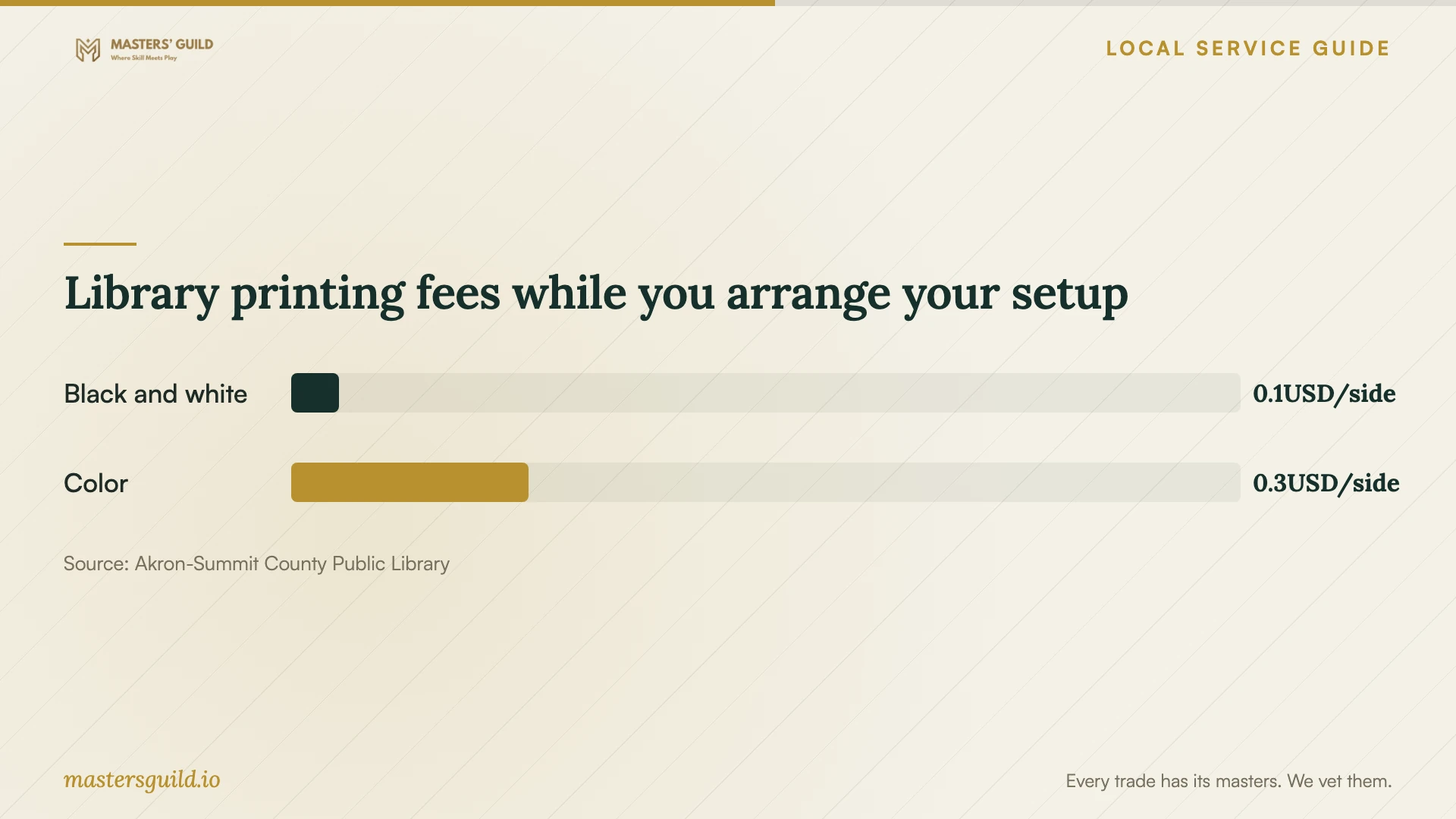
Library printing fees while you arrange your setup
Local details that affect your job
Choose library instruction for a learning problem
TechZone@Main staff answer basic questions about software and machines. The library also offers free computer classes at branches and the Main Library computer lab, plus individualized Tech Helps at branches. If you can open your program but need help using it, check the class schedule before hiring a technician. Call TechZone at 330.643.9145 to ask about suitable help. The source does not promise installation on your personal computer; confirm that request before bringing a device. [3]
Use a library computer for an urgent document
The Akron-Summit County Public Library provides public computers at all locations to users with a valid library card. Its listed software includes Word, Excel, PowerPoint, Chrome, and Adobe Reader. The standard session lasts two hours; staff may extend it to a maximum of three hours per day if no one is waiting. For a document deadline, consider this temporary option while arranging your own installation. Bring a USB drive to save your work, as the library recommends. [1]
Keep printing available during setup
The library offers black-and-white and color printing at all locations, plus mobile printing from a computer or mobile device inside or outside the library. It lists black-and-white printing at 5 cents per side and color at 25 cents per side. Copying and printing require cash; the coin-operated machines accept coins and one-dollar bills. Scanning is free, with options to save to USB or an email address. Use these services for an urgent form while you arrange application or printer setup. [2]
Choose help based on the task
| Your situation | Next step | Confirm before proceeding |
|---|---|---|
| You need programs installed on your own computer | Request a technician quote for named applications and devices. | Compatibility, license ownership, backup scope, and acceptance tests. |
| You can open the program but need instruction | Check library classes or branch Tech Helps. | The schedule and whether the session covers your program. |
| You need temporary access to document software | Consider library public computers with Word, Excel, and PowerPoint. | Your valid library card, session limit, and how you will save files. |
| You need a printed or scanned document during setup | Consider library printing, mobile printing, or free scanning. | Printing payment and the method for collecting or saving your document. |
Your hiring checklist
- List each device, program, and task you want the technician to complete.
- Record the operating system and any exact error messages.
- Ask the technician to check compatibility before you purchase software.
- Back up important files and check that you can open the copies.
- Prepare account recovery access and enter passwords yourself.
- Approve a written price and a process for authorizing extra work.
- Test your own document, email, or printing task before accepting the setup.
Frequently Asked Questions
How much should I budget for installation?
Obtain a written quote for your specific device and programs. Ask the technician to separate labor, software purchases, subscriptions, travel, and backup work. The available local evidence covers library services and document fees, so it does not support an Akron installation price range.
Can library staff install software on my computer?
The TechZone page describes basic software help, free computer classes, and branch Tech Helps. It does not establish a personal-device installation service. Call to confirm whether staff can address your request before bringing your computer. [3]
What should I do if I cannot sign in?
Tell the technician before booking. Ask them to distinguish account recovery from installation in the quote. Keep control of the recovery email and authentication device, and enter credentials yourself. Agree on a stopping point if you cannot regain access.
Can I finish a document before my home software works?
Library public computers provide Word, Excel, and PowerPoint with a valid library card. Plan around the standard two-hour session and bring a way to save your work. The library also offers mobile printing if you already have a printable file on another device. [1] [2]
Sources and scope
This guide combines the sources below with practical planning guidance. Figures apply to the stated geography and period; request a written quote for your property.