
Local service guide
Smart Appliance Setup in Akron, OH
For Smart Appliance Setup in Akron, hire someone who will confirm your appliance model, connect it to your own account, test the features you want, and explain how to reconnect it. Describe physical installation separately from app setup. If your project includes wiring or utility connections, ask Akron Plans and Permits about compliance requirements before agreeing to that work. [1]
Choose the scope before choosing a provider
Send the provider the brand and complete model number, a photo of the appliance label, and a description of its current condition. Say whether you need help with a newly delivered appliance, an installed appliance that will not connect, or a device previously linked to another household. List the features you want to use, such as cycle notifications or sharing access with another household member.
Ask the provider to confirm the model's setup instructions before the appointment. Request separate quote lines for physical installation, app setup, network changes, and any additional equipment. For a connection problem, describe the exact error and the steps you have tried. Agree on what you will pay if the provider cannot complete pairing and whether a return visit costs extra.
Route installation questions to the right office
The Summit County Engineer's permit FAQ directs all projects within the City of Akron to Akron Plans and Permits for compliance requirements. Ask that office about proposed wiring, water connections, or gas work. Describe the actual changes and your property address; ask which approvals, contractor credentials, and inspections apply to that scope. [1]
Summit County Building Standards provides residential review and inspection services for 22 jurisdictions and commercial services for 23. For an Akron property, follow the Engineer's Akron-specific direction rather than assuming the county handles your application. Ask your provider to identify who will handle any required application and inspection before installation begins. [1] [2]
Prepare your account and network information
Keep your phone available and sign into the appliance account yourself. Use an email address you control, confirm that you can receive verification messages, and review account recovery settings. Ask the provider to let you enter passwords rather than keeping copies. If someone else previously owned the appliance, resolve account ownership with the manufacturer before paying for a setup visit.
Gather the router model, network name, and appliance instructions. Ask the provider to check the manufacturer's network requirements for your exact model before recommending router changes or extra equipment. Agree that they will explain proposed changes before making them. For an intermittent connection, request a test at the appliance's installed position rather than a demonstration beside the router.
Plan around a notified meter exchange
FirstEnergy says a residential smart-meter exchange briefly interrupts electric service and may require customers to reset electronic equipment. If you have received an exchange notice, consider arranging app setup afterward. If setup comes first, ask the provider to leave recovery instructions and show you how to check the connection after power returns. [3]
FirstEnergy also says its smart meter cannot identify which specific electrical equipment uses energy. If you want appliance-level monitoring, ask the provider to demonstrate the information your appliance supplies and explain its limits. Do not accept whole-home utility readings as proof of one washer's or refrigerator's consumption. [3]
Compare efficiency before buying, then test the setup
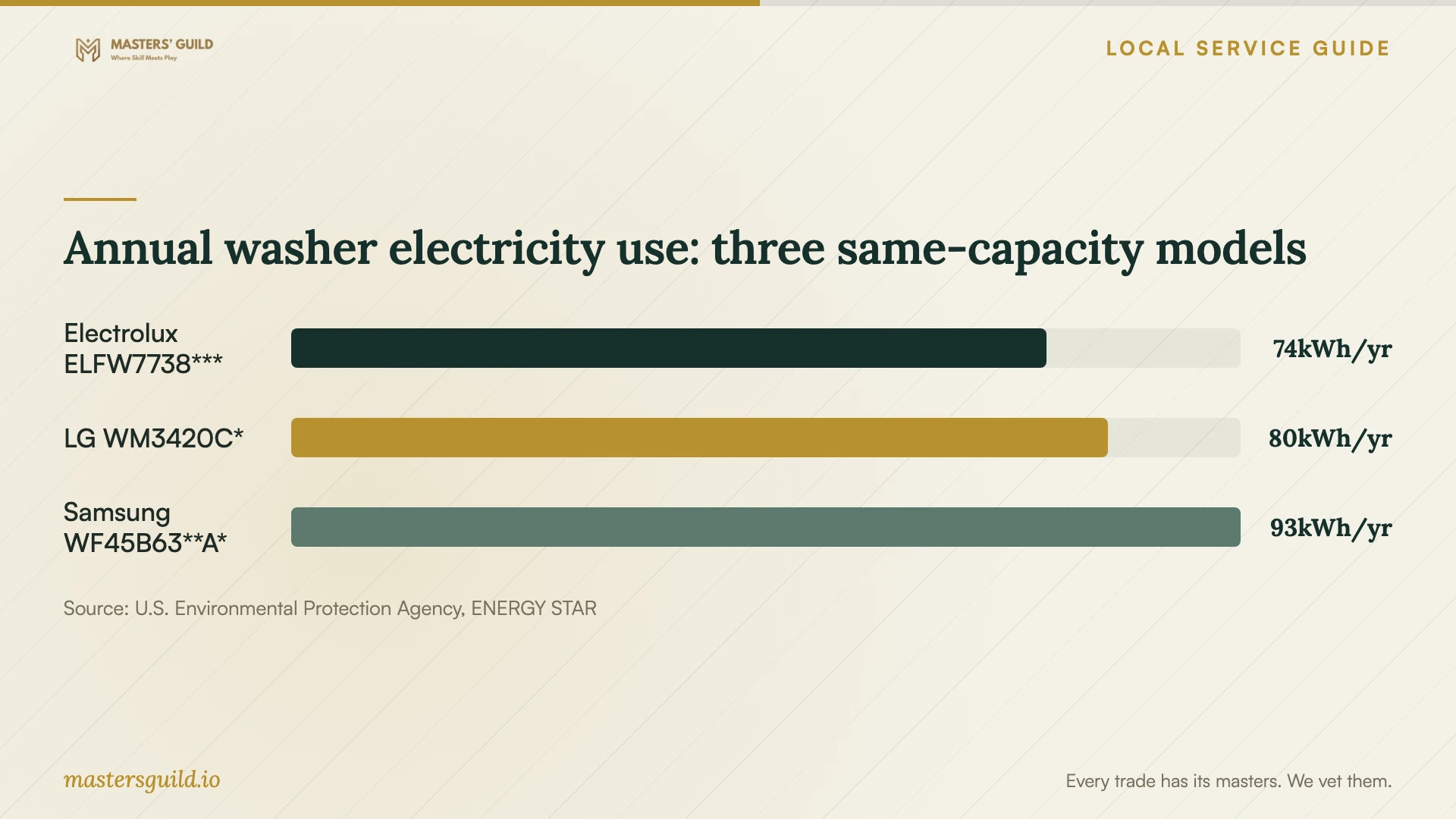
The chart compares published annual washer electricity use for three 4.5-cubic-foot front-load models in ENERGY STAR's listing. ENERGY STAR identifies its Most Efficient collection as 2025. Use these figures as a national product reference when shopping. They do not predict your household bill or measure the benefit of connecting an appliance to an app. [4]
ENERGY STAR recommends using the yellow EnergyGuide label to compare similar models and estimate annual operating costs. It also advises considering appliance size and usual load size. Before buying, check the exact model's connected features with the manufacturer; do not use inclusion in this efficiency comparison as confirmation of app compatibility. [4]
Before the provider leaves, open the app on your phone and test each agreed feature. Request a demonstration of a notification, household access if requested, and the reconnection steps. Record any unfinished work and the follow-up terms. Keep the final account under your control and remove temporary access that the provider no longer needs.
Annual washer electricity use: three same-capacity models
Local details that affect your job
Akron has an explicit compliance contact
The Summit County Engineer directs projects inside Akron to Akron Plans and Permits at (330) 630-7305 or (330) 375-2010. Before booking work that changes wiring or utility connections, describe your address and scope to that office and ask what approvals apply. Confirm the application route for your property before using the county's regional process. [1]
A utility appointment can affect setup timing
For homeowners receiving FirstEnergy service, a notified smart-meter exchange is a reason to plan a connection check afterward. FirstEnergy says the residential exchange briefly interrupts electricity and may require electronic equipment resets. Ask your setup provider for recovery instructions if the utility appointment follows their visit. [3]
Choose the next step for your appliance
| Your situation | Suggested next step | Ask before booking |
|---|---|---|
| Installed appliance needs app pairing | Request a model-specific setup visit. | Will you test the requested features using my account and phone? |
| Appliance connects only near the router | Request troubleshooting at its installed position. | Will you explain network changes and get approval before adding equipment? |
| Proposed wiring or utility connection changes | Contact Akron Plans and Permits for compliance guidance. | Who will handle any required approvals and inspections? |
| FirstEnergy meter exchange notice received | Consider setup after the exchange or arrange a recovery check. | Will you leave instructions for reconnecting after the power interruption? |
| You want appliance-level energy information | Ask for a demonstration of the appliance's available readings. | What does the appliance report? FirstEnergy says its meter cannot identify individual equipment use. |
Your hiring checklist
- Send the complete appliance model number and describe the connection error or desired features.
- Separate physical installation from app pairing and network troubleshooting in the quote.
- Resolve any previous owner's account access before the appointment.
- Prepare your phone, account recovery access, router information, and manufacturer instructions.
- Ask Akron Plans and Permits about requirements for proposed installation changes.
- Agree on troubleshooting charges, equipment approval, and return-visit terms.
- Test the agreed features on your own phone and keep written reconnection instructions.
Frequently Asked Questions
How much should I budget for setup?
Request a written, model-specific quote for the work you need. Ask providers to separate pairing, network troubleshooting, physical installation, equipment, and return visits so you can compare offers on the same basis. Agree on a spending limit for troubleshooting and require approval before the provider adds equipment or work.
Does app setup require a permit?
Ask Akron Plans and Permits about requirements for any proposed installation changes. Describe the work rather than calling it smart setup: explain whether the provider will pair an installed appliance or change wiring, water connections, or gas connections. The Summit County Engineer identifies that office as the compliance contact for projects inside Akron. [1]
Can my utility smart meter show each appliance's energy use?
FirstEnergy says its smart meter cannot identify which specific equipment uses electricity. Ask your provider to demonstrate any appliance-level information in the manufacturer's app and explain what that information measures. [3]
What should count as a completed appointment?
Agree on completion before booking: pairing on your account, testing each requested feature, explaining any network changes, and leaving recovery instructions. Test the result yourself before the provider leaves and record any remaining issue with a follow-up plan.
Sources and scope
This guide combines the sources below with practical planning guidance. Figures apply to the stated geography and period; request a written quote for your property.