
Local service guide
Data recovery and backup in Akron, OH
Data recovery and backup in Akron starts with a device-specific assessment and a written list of the files you need. Ask a provider to quote recovery, return storage and backup setup separately, explain partial-recovery charges, and agree on how you will check the results. Before recycling the old computer, confirm who will delete your personal information, as Summit County ReWorks advises residents. [1]
Describe the files and the device before booking
Tell the provider whether you need missing files retrieved, an existing backup restored, or future backups configured. Include the device model, storage type if known, error messages and the last time you accessed the files. Describe previous repair or recovery attempts. Request handling and transport instructions before handing over equipment.
Name the files that matter: family photographs, tax records, an email archive or a particular project folder. Ask the provider to assess those priorities and explain what they would deliver. Agree on a completion check that includes opening representative files and checking the requested folders. Specify whether you need the folder structure and filenames preserved.
Compare written quotes for the same work
Obtain device-specific written quotes with separate charges for assessment, recovery, return storage and backup installation. Include shipping and any amount due if you decline further work. Ask what you would owe if the provider retrieves only part of your priority list. Set a spending limit that requires your approval before additional work.
Agree on a date for the assessment update and request a completion estimate after diagnosis. State any deadline before booking. Confirm whether the receiving technician performs the recovery or sends the device elsewhere, and ask who will contact you if the scope changes.
Record the serial number on the handover receipt. Request written terms covering file access, subcontractors, temporary copies, retention and deletion. Keep passwords out of the initial job description; agree on a secure access method if the provider needs credentials. Identify who can approve work and collect the returned device.
Make restore testing part of backup installation
CISA writes its ransomware guide for organizations and IT responders. It recommends offline, encrypted backups of critical data and regular tests of backup availability and integrity because ransomware can delete or encrypt accessible backups. For a household installation, use those principles to request a protected backup copy and a demonstration that you can retrieve your files. [2]
Choose the folders to include and agree on a backup schedule. Ask how you will learn about a failed backup and who will respond. Get a written list of storage subscriptions and support charges. Confirm that you control the account and know how to retrieve your files if you change providers.
Before accepting the setup, have the provider restore selected files to a separate folder or device and open them with you. Retain instructions for repeating the test. Agree on secure storage for encryption recovery information and identify a trusted person who can help if you cannot manage the account.
Arrange incident-response help for suspected ransomware
For a household computer displaying a ransom message, adapt CISA's organizational response sequence: disconnect the affected device from Ethernet or Wi-Fi first. CISA advises powering down only if network isolation is impossible, because shutdown loses potential evidence in memory. Contact an incident-response provider before authorizing routine restoration. [2]
CISA advises responders to preserve evidence, investigate the compromise and restore data onto clean systems. Ask the provider who will handle containment and checks before reconnection. Obtain a separate scope for this work and use a phone call to discuss the incident rather than relying on the affected computer. [2]
Use drive observations as backup-planning context
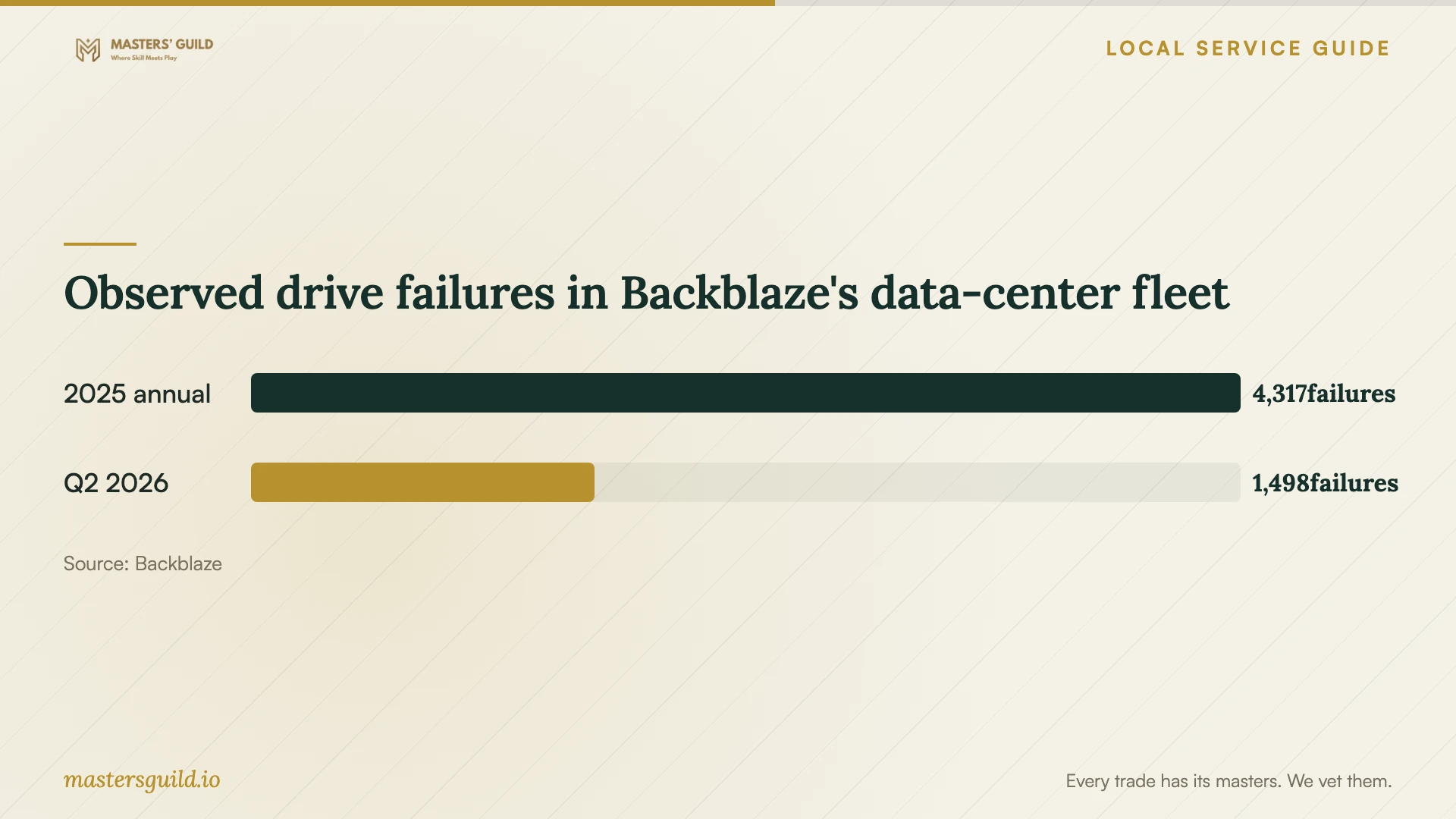
Backblaze reports 4,317 drive failures during 2025 and 1,498 during the second quarter of 2026 in its data-center fleet. The chart shows those observed counts with their reporting windows. Backblaze collects daily snapshots of operational drives; its observations do not measure household devices in Akron or the likelihood of recovering your files. [3]
Ask the provider to assess your device and priority files before proposing a recovery outcome. Discuss how you will protect the returned files as a separate part of the job. Keep that backup plan in the written scope so you can check both deliverables before completion.
Observed drive failures in Backblaze's data-center fleet
Local details that affect your job
Assign deletion responsibility before local recycling
Summit County ReWorks tells residents to ask whether the electronics vendor deletes personal information or leaves that task to the customer. For an Akron household replacing a computer after recovery, verify the returned files and test the replacement backup before authorizing deletion. Agree in writing on who will sanitize the old storage and what confirmation you will receive. Include that task in the recovery quote if you want the technician to handle it. [1]
Confirm the listed Goodwill option before drop-off
ReWorks identifies a Goodwill program accepting working and nonworking computers and accessories at retail locations. It lists these private and nonprofit options without managing or endorsing them. Call your intended destination about the exact equipment, hours and fees before arranging transport. ReWorks also advises checking recycler certification or asking how the vendor manages devices. Treat this as a disposal option after file handover; confirm any recovery or data-deletion service separately. [1]
Choose the scope to request
| Your situation | Request | Completion check |
|---|---|---|
| You have a backup and need files returned | Backup restoration and file verification | Open the priority files together. |
| Files are missing and you have no usable copy | Recovery assessment with an approval limit | Agree on requested files and partial-recovery terms. |
| You want protection after recovery | Backup setup using CISA's offline encrypted backup and testing principles | Demonstrate restoration and retain repeat-test instructions. |
| You suspect ransomware | Incident response following CISA's isolation and clean-restoration guidance | Confirm who handles evidence and reconnection checks. |
| You plan to recycle the computer | File verification followed by agreed data deletion | Confirm deletion responsibility as ReWorks advises. |
Your hiring checklist
- List priority files, device details, symptoms and previous recovery attempts.
- Request device-handling and transport instructions before handover.
- Get separate assessment, recovery, return-storage and backup-setup charges.
- Agree on partial-recovery charges and a spending limit.
- Record the serial number and obtain file-access and retention terms.
- Open representative recovered files before accepting completion.
- Complete a restore demonstration and retain account recovery instructions.
- Confirm recycling acceptance and deletion responsibility before disposal.
Frequently Asked Questions
How much should I budget for recovery?
Request a device-specific assessment quote and written recovery terms tied to your priority files. Include return storage, shipping, partial-recovery charges and any amount due if you decline further work. Compare the same deliverables across quotes and set an approval limit.
How do I check that the backup works?
Have the provider restore selected files and open them with you. CISA recommends backup availability and integrity tests for organizations; adapt that principle to your household setup. Retain instructions and agree on when you will repeat the test. [2]
Can I recycle the computer after receiving my files?
Verify the files and test your replacement backup before authorizing deletion or disposal. ReWorks advises Summit County residents to confirm vendor acceptance, hours and fees, and ask who deletes personal information. Get that answer before drop-off. [1]
Should I shut down a computer showing a ransom message?
CISA's organizational guidance recommends network isolation first, such as disconnecting Ethernet or Wi-Fi. It advises powering down if isolation is impossible and warns that shutdown loses potential evidence in memory. Contact an incident-response provider for help applying the next steps to your computer. [2]
Sources and scope
This guide combines the sources below with practical planning guidance. Figures apply to the stated geography and period; request a written quote for your property.