
Local service guide
Computer Virus Removal in Akron, OH
For Computer Virus Removal in Akron, request a device-specific quote, a written repair scope and a proposed completion date. Identify the files you want preserved and require your approval before deletion or an operating-system reinstall. Plan essential computer access during the repair: Akron-Summit County Public Library offers public computers with a valid library card, starting with a two-hour allowance. [1]
Agree on diagnosis, price and completion
Describe what you see before asking for a repair price. Include unwanted browser changes, unfamiliar messages, files you cannot open or trouble starting the computer. Note when the symptoms began and what you have tried. Ask the technician to diagnose the cause before you authorize cleanup.
Request a written quote naming your device, the diagnostic charge, approved work and total payable amount. Ask what you owe if you decline the repair or the technician cannot complete the cleanup. Give separate approval for file recovery, application installation or an operating-system reinstall, and set a spending limit for additional work.
Agree on an intake appointment and proposed completion date. Tell the technician about a bill-payment, schoolwork or document deadline. For temporary access, the library allows public-computer use for two hours with a valid card; staff may extend use to three hours per day if nobody is waiting. Fit your essential tasks into the initial allowance when planning the repair. [1]
Choose the service arrangement and protect your files
Ask the technician to explain the proposed arrangement: remote support, drop-off service or a home visit. For remote work, agree on session supervision and removal of access afterward. For drop-off service, ask which accessories to bring and request a receipt identifying the computer. For a home visit, name the devices and tasks you want included.
List the photographs, documents and folders you want preserved. Describe your backup and when you last checked its contents. Ask the technician to explain where they would copy files, who could access those copies and when they would delete them. Require your approval before drive erasure or reinstallation.
Agree on necessary device access without putting account passwords in your symptom notes. Ask whether you can enter credentials yourself. If you suspect someone accessed an account, request a separate account-security review. Before authorizing replacement or recycling, settle responsibility for deleting personal information; ReWorks advises residents to ask whether the recycler handles that task or leaves it to the owner. [2]
Keep household documents accessible during repair
Akron-Summit County Public Library offers public computers at all its locations to people with a valid library card. Use the two-hour allowance to plan a short session for essential documents or household administration. Keep a list of the tasks you need to complete, and leave room for signing out before your session ends. [1]
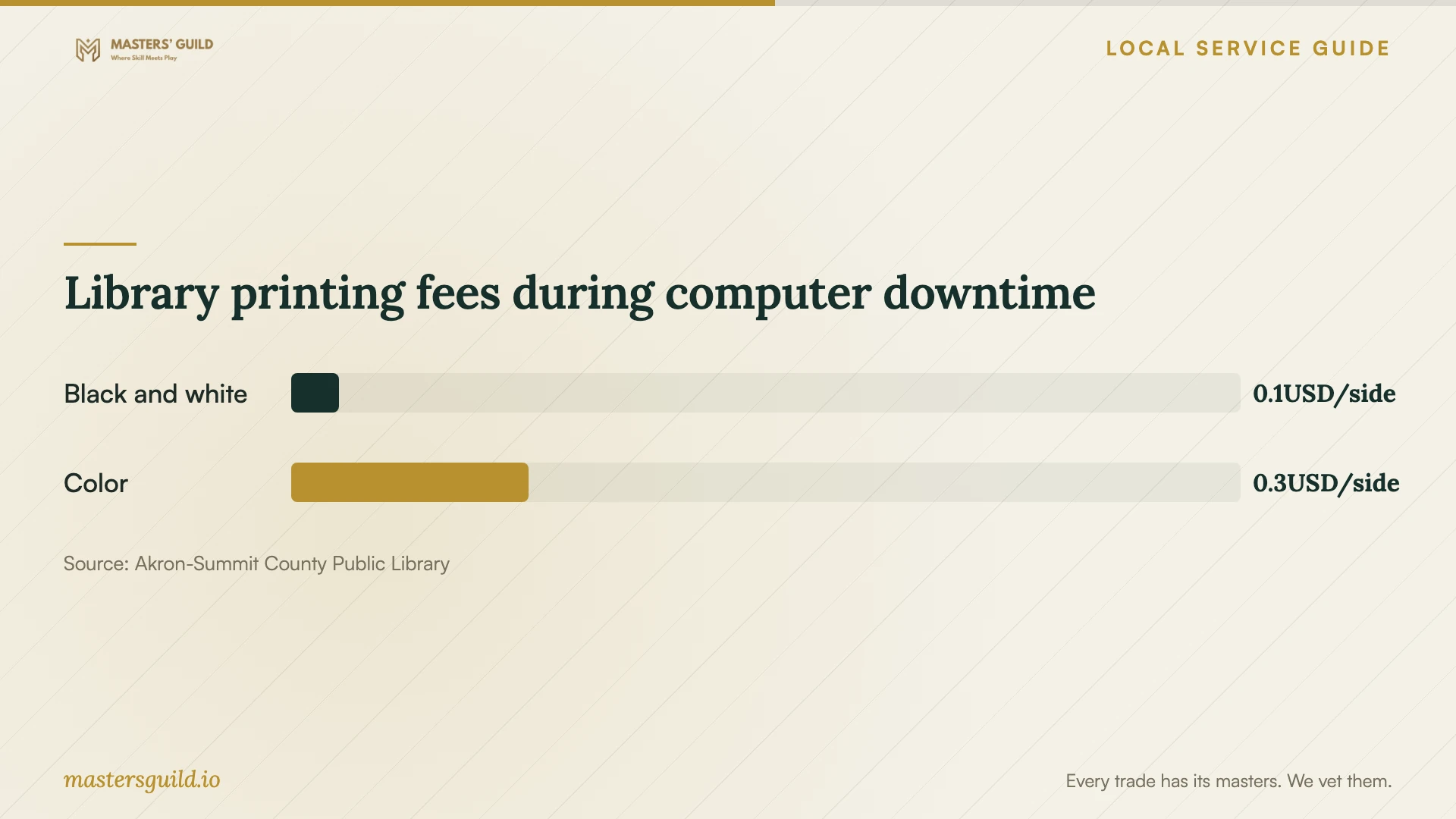
For documents you can access from another device, the library offers mobile printing from inside or outside its buildings. It lists black-and-white printing at 5 cents per side and color at 25 cents per side. Scanning and faxing are free. Choose the service that meets your immediate need before adding a printer-related task to the repair scope. [3]
Bring cash for printing. The library does not accept credit cards, and its coin-operated machines accept coins and $1 bills. The chart shows the published fee per printed side, so count sides rather than sheets when planning what to bring. [3]
Check the returned computer or arrange retirement
Agree on completion checks before work begins. Ask the technician to start the computer, check the reported symptom and open a selection of files you requested they preserve. Request a written account of what they found, what they changed and any unresolved issues. Ask for follow-up terms if the same symptom returns.
If you choose replacement, confirm file preservation and data-erasure responsibility before surrendering the old computer. Summit County ReWorks recommends contacting recyclers about accepted materials, operating hours and fees. It also advises verifying recycler certification or asking how the vendor manages devices. Request an explanation of handling and any documentation you will receive. [2]
ReWorks provides outside recycling resources that it does not manage or endorse. Treat the list as a starting point for questions. Confirm the vendor will accept your equipment and agree on personal-information deletion before making the trip. [2]
Library printing fees during computer downtime
Local details that affect your job
Plan library sessions around the initial allowance
Bring a valid Akron-Summit County Public Library card for public-computer access at any library location. You may use a computer for two hours. An extension depends on nobody waiting, with a maximum of three hours per day. Plan your repair appointment around the essential tasks you can complete within the initial allowance. [1]
Choose document services and bring the right payment
The library offers mobile printing from inside or outside its buildings, plus free scanning and faxing. Printing and copying cost 5 cents per black-and-white side or 25 cents per color side. Bring cash; the library does not accept credit cards, and coin-operated machines accept coins and $1 bills. [3]
Call before taking a computer to a recycler
Summit County ReWorks advises residents to confirm accepted equipment, hours and fees with a recycler before delivery. Ask who deletes personal information and how the vendor handles devices. ReWorks does not manage or endorse the outside recycling resources it lists, so confirm those arrangements with the vendor you choose. [2]
Match your situation to the next step
| Your situation | Next step | Detail to confirm |
|---|---|---|
| You know the symptoms but not the cause | Request diagnosis before authorizing cleanup | Diagnostic charge and approval process |
| You need photographs or documents preserved | Agree on file handling before repair | Permission before deletion or reinstallation |
| You need temporary computer access | Plan a library session with your valid card | Two hours; extension up to three hours per day if nobody waits |
| You need printed documents | Use library printing or mobile printing | Cash payment; 5 cents per black-and-white side or 25 cents per color side |
| You decide to retire the computer | Contact a recycler before delivery | Acceptance, fees, handling and personal-information deletion |
Your hiring checklist
- 1. Record symptoms, when they began and the steps you have tried.
- 2. Identify essential files and describe your existing backup.
- 3. Request a written scope, total quote and limit for additional charges.
- 4. Require approval before file deletion, drive erasure or reinstallation.
- 5. Agree on device access, custody and return arrangements.
- 6. Set a proposed completion date and arrange essential document access.
- 7. Agree on completion checks and written follow-up terms.
Frequently Asked Questions
How much should I budget for removal?
Request a device-specific quote with a total payable amount. Ask the technician to separate diagnosis, cleanup, file preservation and any reinstallation. Confirm what you owe if you decline further work, and require approval before the technician exceeds your spending limit.
Should I approve an operating-system reinstall?
Ask the technician to explain why they recommend it, which files and applications they intend to preserve, and which restoration tasks the quote includes. Approve the process after you understand the proposed changes and completion checks.
Can I print documents while my computer is away?
Akron-Summit County Public Library offers mobile printing from computers and mobile devices, inside or outside the library. Black-and-white printing costs 5 cents per side and color costs 25 cents per side, with cash payment. Scanning and faxing are free. [3]
Who should erase a computer I plan to recycle?
Agree on responsibility before handing it over. Summit County ReWorks advises asking whether the vendor deletes personal information or leaves that task to you. Request an explanation of the process and any documentation you will receive. [2]
Sources and scope
This guide combines the sources below with practical planning guidance. Figures apply to the stated geography and period; request a written quote for your property.