
Local service guide
Cloud service setup in Akron: Plan and Hire
Cloud service setup in Akron starts with choosing the files and devices you want connected, then asking a technician to quote the work, account handover, and recovery test. For basic computer guidance, consider the Akron-Summit County Public Library’s free classes or request a one-hour technology-trainer appointment. For a paid migration, write down the folders to move and require a demonstration before accepting the job. [1]
Choose the help that fits your task
Describe the result you want before asking for a price. You might want to open household documents on a laptop and phone, move a photo collection from an old computer, or arrange a backup you can restore. Ask the technician to explain the proposed setup in those terms and identify which tasks the quote includes.
For help learning software or using an account, start by asking the library about its training options. Its computer-training page describes free hands-on classes, online learning tutorials, and a request process for a one-hour appointment with a technology trainer. Confirm the subject before booking; the page does not promise a household cloud migration or backup installation. [1]
For paid help, ask candidates which platform they will configure and how they will demonstrate completion. Request an itemized quote with the devices, selected folders, account work, and follow-up included. If a technician proposes remote help, ask how you will approve access and end the session. Choose an in-home visit if you want someone beside you while checking devices and practicing the steps.
Check your connection before scheduling the upload
Measure upload performance on the device you intend to use, and give the technician your file total before agreeing to a completion time. Ask them to distinguish time spent configuring accounts from time spent waiting for transfers. Agree on who will check progress, handle errors, and confirm the upload after the appointment.
Summit County describes Summit Connects as a planned public-safety and critical local-government fiber network and states that it will not provide residential or business service at present. Confirm household connectivity with a provider available at your address before scheduling a migration. [2]
FairlawnGig describes service in Fairlawn and the JEDD, with expansion beyond those boundaries. Its FAQ also contains references to Akron’s Hickory Road and Vesper Drive, alongside older material. Treat those street references as a reason to ask about your exact address, rather than confirmation of current coverage or an installation date. The utility lists its office number as 330-668-3300. [3]
If you plan to switch to FairlawnGig, the utility recommends completing its installation before cancelling your existing internet service to avoid an interruption. Its FAQ also advises transitioning an email account tied to the previous provider before discontinuing that provider’s service. Include that email transition in your cloud-setup scope if you use the address for account recovery. [3]
Separate setup costs from ongoing charges
Request separate amounts for technician labor, cloud storage or backup subscriptions, and any internet change. Ask about travel charges, additional devices, return visits, and payment for upload monitoring. Obtain a written approval step for work outside the original scope. Compare quotes for the same tasks; the sources here do not establish an Akron technician price range.
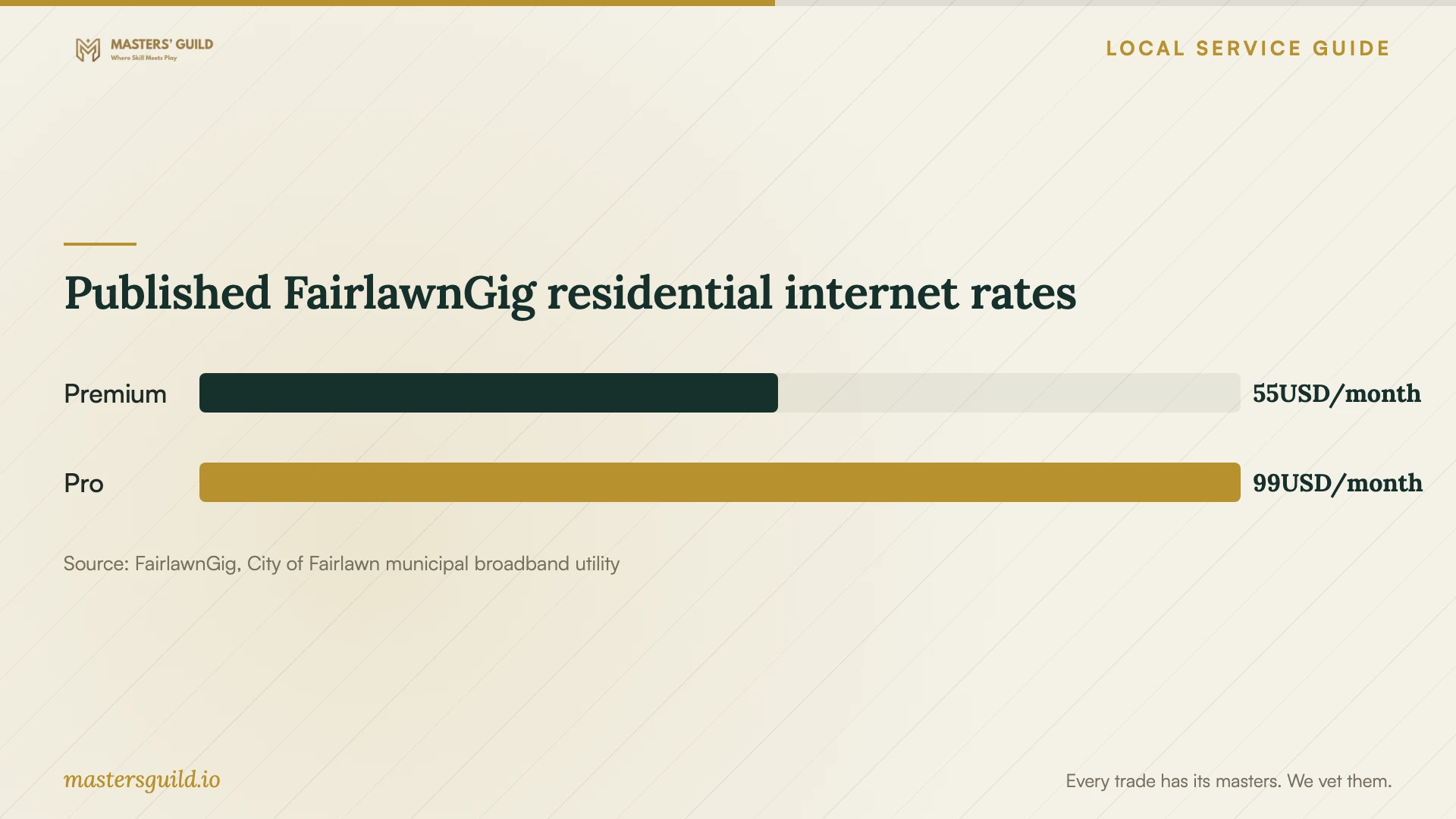
FairlawnGig’s welcome page lists Premium residential service at $55 per month for 1,000 Mbps upload and download, and Pro at $99 per month for 5,000 Mbps upload and download. It labels these rates for Fairlawn residents, notes possible service fees, and requires a customer-supplied router for Pro. Confirm address eligibility and the complete bill before budgeting for either plan. [4]
Use the chart as a nearby residential internet-cost reference. Before choosing a plan, ask the technician to assess your present connection and explain whether an upgrade serves your intended use. Keep the cloud provider’s charges and the technician’s quote beside the internet bill when comparing your ongoing costs.
Agree on account ownership and completion
Create the account under an email address you control, and enter passwords yourself. Ask the technician to help you set recovery details and an additional sign-in verification method, then practice signing in without their assistance. Agree on any temporary access they need and remove it at handover.
Keep the original files until you have checked the agreed transfer. Ask the technician to open representative photos and documents from the destination account on each agreed device. For a backup job, require a demonstration that restores a chosen file to a separate folder. Ask them to explain the steps for recovering an older version or a deleted file in your selected service.
Request a short handover note naming the account owner, folders included, devices configured, subscription charges, and unfinished transfers. Have the technician show you how to inspect progress and report a problem. Set a follow-up date if the upload continues after they leave, and agree on whether that check costs extra.
Published FairlawnGig residential internet rates
Local details that affect your job
Use library training before paying for basic guidance
Akron-Summit County Public Library offers free computer classes and a request process for a one-hour individual technology-trainer appointment. Call Electronic Services at 330.643.9145 to discuss training or registration. Ask whether your cloud-account question fits before hiring someone for a larger job. [1]
Separate the county fiber project from household service
Summit County describes Summit Connects as a planned public-safety and critical local-government fiber network and states that it will not provide residential or business service at present. For a home upload, confirm household connectivity with a provider available at your address before arranging the technician visit. [2]
Confirm utility coverage at the address
FairlawnGig describes coverage in Fairlawn and the JEDD and expansion into surrounding areas. Its FAQ mentions specific Akron streets but includes older entries, so those mentions do not confirm current availability. Contact the utility for your exact address and installation status before coordinating a technician visit or cancelling existing service. [3]
Choose your next step
| Your situation | First step | What to confirm |
|---|---|---|
| You need basic computer or account guidance | Ask the local library about training | Whether your topic fits a class or requested one-hour appointment |
| You want files available on several devices | Request a written setup quote | Folders, devices, sharing permissions, and a completion demonstration |
| You want a recoverable backup | Ask for setup plus a restore test | Who checks completion and how you recover a chosen file |
| You expect household access through Summit Connects | Check a provider available at your address | The county states that the planned project will not provide residential service at present |
| You are considering FairlawnGig | Confirm the exact address with the utility | Eligibility, installation status, fees, and equipment requirements |
Your hiring checklist
- List each device and the folders, photos, or documents you want included.
- Record your file total and measure upload performance on the intended device.
- Ask the library whether basic account or software guidance fits its training options.
- Request an itemized quote separating labor, subscriptions, travel, and follow-up.
- Specify who owns the account and who controls recovery details.
- Keep original files while checking the destination copies.
- Require a file-opening check and, for backup work, a restore demonstration.
- Arrange a follow-up check for unfinished transfers and remove temporary technician access.
Frequently Asked Questions
Can I get local help before hiring a technician?
Ask Akron-Summit County Public Library about its free computer classes or request a one-hour technology-trainer appointment. Explain your question first. Confirm whether the trainer can cover it; the training page does not promise an in-home migration service. [1]
How much should I budget for the setup?
Get written quotes for the same folders, devices, and completion tests. Keep labor separate from cloud subscriptions and internet service. These sources do not establish local technician rates, and the nearby utility prices in the chart cover residential internet service. [4]
Should I cancel my old internet service before the visit?
If you are switching to FairlawnGig, the utility recommends completing its installation before cancelling existing internet service. Check whether your old provider also supplies an email account you use for cloud-account recovery, and arrange that transition before cancellation. [3]
How do I know the technician has finished?
Use acceptance steps agreed in the quote: sign in yourself, open selected files on the agreed devices, check sharing access, and restore a test file for backup work. Request written details of any transfers still running and a date for the final check.
Sources and scope
This guide combines the sources below with practical planning guidance. Figures apply to the stated geography and period; request a written quote for your property.